Good cable management can make or break your standing desk setup by keeping your workspace tidy, safe, and functional. When you organize cables with clips, sleeves, and proper routing, you prevent tripping hazards, reduce clutter, and protect your devices from damage. An organized environment not only looks professional but also boosts your focus and productivity. To create an efficient workspace, learn how integrating ergonomic accessories and maintenance tips can elevate your setup even further.
Key Takeaways
- Effective cable management prevents clutter, enhances safety, and maintains a professional-looking workspace.
- Proper routing reduces strain on cables, prolonging device lifespan and preventing damage.
- Organized cables support ergonomic positioning, ensuring easy access and reducing distractions.
- Using tools like clips, sleeves, and routing channels simplifies troubleshooting and maintenance.
- A tidy setup improves overall workspace ambiance, boosting focus and productivity.

Setting up a standing desk can boost your productivity and improve your posture, but without proper cable management, your workspace quickly becomes cluttered and unsafe. The mess of tangled cords not only looks unprofessional but also poses tripping hazards and makes it harder to focus on your work. To keep things tidy, you need a solid plan for organizing your cables, especially as you incorporate wireless accessories and ergonomic accessories into your setup. Wireless devices, such as keyboards, mice, and chargers, can reduce cable clutter significantly, but they don’t eliminate all cords. You’ll still have power cords, monitor cables, and charging wires to manage.
One effective way to keep cables out of sight is to use cable clips and sleeves. Cable clips attach easily to your desk or monitor stand, guiding cables along designated paths. Sleeves can bundle multiple cords together, giving your workspace a cleaner, more streamlined look. When combined with wireless accessories, these tools help reduce the number of cords running across your desk, making your setup neater and safer. You’ll find that less clutter translates to fewer distractions and a more ergonomic workspace, where everything is within easy reach and properly aligned. Proper cable routing also improves the overall organization of your workspace, making it easier to troubleshoot any connectivity issues.
Cable clips and sleeves keep your workspace tidy, safer, and more ergonomic by guiding and bundling cords out of sight.
Investing in cable management solutions that complement ergonomic accessories is a smart move. For instance, monitor arms and adjustable desks often come with built-in cable management channels. These features help route your cables behind the desk, keeping them out of sight and preventing accidental yanks that could disrupt your setup. When you’re using ergonomic accessories such as footrests or monitor risers, ensure the cables are neatly tucked away to avoid interference and maintain comfort. Proper cable routing also prevents cables from pulling or straining, which can lead to damage over time. Additionally, cable management is an essential aspect of creating a safe and functional workspace, reducing the risk of damage and accidents. Applying organized cable systems can also streamline the process of troubleshooting and maintenance. Implementing natural landscape principles, such as incorporating greenery and natural textures, can also contribute to a calming environment that encourages focus and well-being. Maintaining a clean cable setup can also help extend the lifespan of your electronic devices by minimizing wear and tear.
Another tip is to set up a designated spot for charging and power strips. Using a surge protector with a long cord allows you to place it underneath or behind your desk, minimizing visible clutter. Labeling cables makes it easier to identify and unplug devices without disturbing other connections. Regularly review and untangle your cables to prevent knots and unnecessary wear. Remember, a well-managed cable system isn’t just about aesthetics; it’s about safety and efficiency. When your cables are organized, you can adjust and move your standing desk freely without worrying about pulling out a plug or tripping over cords.

XHF 120 PCS Adhesive Cable Wire Clips Black, Outdoor Christmas Light Clips, Cable Management Wire Organizer Cord Holder for Under Desk, Car, Wall, TV PC Ethernet Cable
- High-Quality Material: Strong adhesive and PA66 nylon construction
- Versatile Usage: Suitable for USB, Ethernet, lights, and more
- Size Details: Base 5/8" x 5/8", buckle 1/4" x 2/5"
As an affiliate, we earn on qualifying purchases.
As an affiliate, we earn on qualifying purchases.
Frequently Asked Questions
What Are the Best Cable Management Tools for Standing Desks?
You should use cable clips and cable sleeves for effective cable routing, keeping cords organized and out of the way. Velcro straps are great for bundling cables securely, while cable labels help you easily identify each wire. Under-desk cable trays also prevent clutter and improve airflow. These tools work together to maintain a tidy, safe workspace, making your standing desk setup look professional and ensuring smooth cable management.
How Often Should I Check and Update My Cable Organization?
Think of your cables like a garden—you need to check on them regularly to keep everything tidy. You should inspect and update your cable organization every few months, ensuring cable safety and maintaining aesthetic appeal. Over time, cords can shift or loosen, risking damage or accidents. By staying proactive, you prevent clutter and hazards, keeping your workspace safe, sleek, and efficient. Regular upkeep makes all the difference.
Can Cable Management Improve My Standing Desk Ergonomics?
Yes, cable management can improve your standing desk ergonomics. Well-organized cables enhance cable aesthetics, making your workspace look cleaner and less cluttered. It also promotes airflow optimization, preventing overheating of devices and reducing dust buildup. By keeping cables neatly secured and out of your way, you minimize distractions and awkward movements, helping you maintain better posture and comfort throughout your workday.
Are There Specific Cable Types Better Suited for Standing Desks?
Silicone-coated or flat cables are superb choices because they’re sturdy, slim, and reduce clutter. When choosing cable types, compatibility considerations matter—ensure they fit your devices and setup. Flexible, lightweight cables prevent tangles and maintain tidy, top-tier ergonomics. Prioritize cable types that are durable, compatible, and designed forstanding desks, helping you stay streamlined, secure, and stress-free during long work sessions.
How Do I Prevent Cables From Tangling Over Time?
To prevent cables from tangling over time, focus on cable aesthetics and flexibility. Use cable organizers like clips or sleeves to keep cords neat and in place. Opt for flexible cables that bend easily without damage, reducing knotting. Regularly check and adjust cable arrangements, avoiding tight bends. This proactive approach keeps your setup tidy, enhances cable longevity, and maintains a clean, professional look for your standing desk.

AGPTEK White Cable Sleeve, 2 Pack 5ft – 1.2 Inch Cable Management Cord Hide
- Universal Cable Compatibility: Fits various cable sizes and lengths
- Easy to Cut and Customize: Simple to cut with scissors for perfect fit
- Pet and Child Safe: Non-toxic, chew-proof protection for pets and kids
As an affiliate, we earn on qualifying purchases.
As an affiliate, we earn on qualifying purchases.
Conclusion
Think of cable management like tending a garden; neat, organized cables foster a thriving, stress-free workspace. When you take the time to keep your cables tidy, your standing desk becomes a smooth-running machine, free of clutter and distractions. A well-managed setup isn’t just about aesthetics—it’s about creating an environment where productivity can grow effortlessly. So, invest in cable management, and watch your workspace flourish like a well-tended garden, blossoming with clarity and focus.
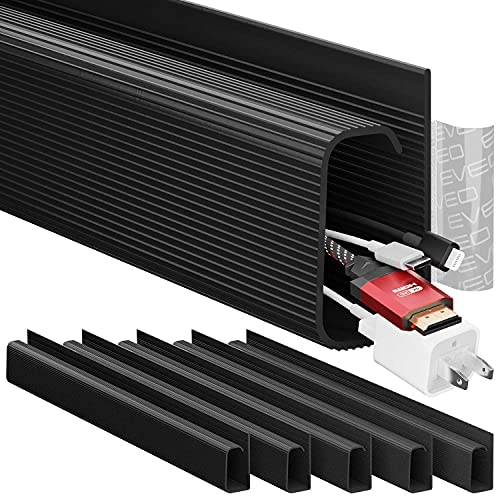
EVEO Cable Management Under Desk Kit (6 Units) – Under Desk Cable Management Cord Hider, Cable Hider Cord Management, Cable Organizer, Cable Raceway | Self-Adhesive 96'' J Channel 6X16 – Black
- Workspace Transformation: Creates a clutter-free, professional look
- Tool-Free Installation: Easy setup with strong adhesive
- High Capacity: Organizes up to 10 power cords or 16 Ethernet cables
As an affiliate, we earn on qualifying purchases.
As an affiliate, we earn on qualifying purchases.

N NOROCME 192 PCS Cable Management Kit 4 Wire Organizer Sleeve
- Complete Cable Management Kit: Includes sleeves, ties, clips, and mounts
- Various Cable Clips: 6 types, eco-friendly, strong, multi-surface use
- Durable Materials: Sturdy, high-quality components for long-lasting organization
As an affiliate, we earn on qualifying purchases.
As an affiliate, we earn on qualifying purchases.