To minimize strain when reaching at your desk, keep frequently used items within arm’s reach on organized, accessible storage solutions like trays or drawer dividers. Use vertical storage like wall shelves to free up desk space, and position your monitor at eye level to avoid neck strain. Adjust your keyboard and mouse placement to promote natural posture. Staying organized reduces unnecessary reaching and twisting; uncover more tips to make your workspace even more ergonomic.
Key Takeaways
- Use labeled storage bins and drawer dividers for easy item retrieval and quick access.
- Keep frequently used items within arm’s reach to reduce stretching and awkward reaching.
- Incorporate vertical storage solutions like wall-mounted shelves to maximize space and minimize clutter.
- Regularly declutter your workspace to prevent unnecessary reaching for unnecessary items.
- Position monitors at eye level and accessories close to promote proper posture and reduce physical strain.
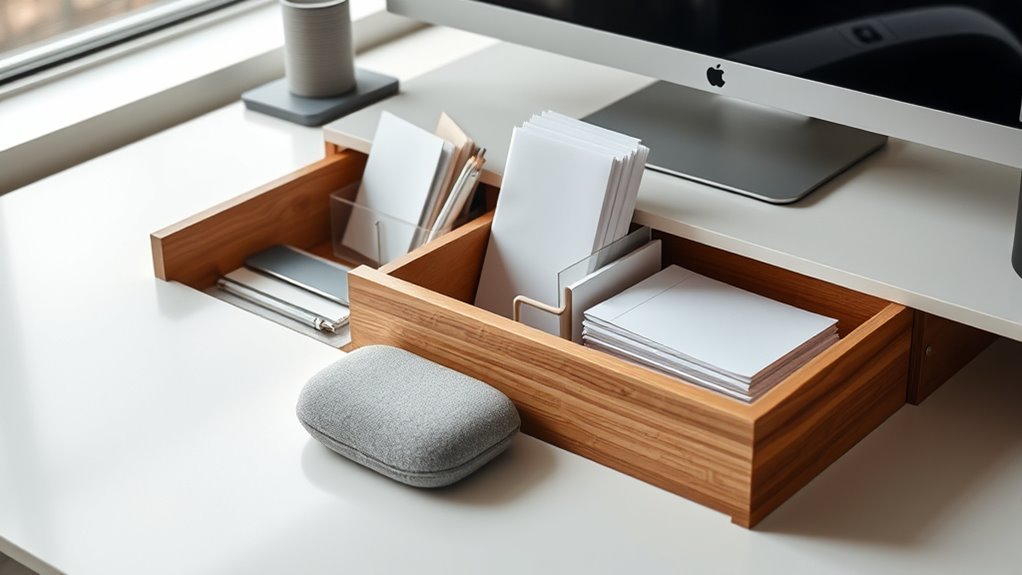
A cluttered desk can hinder your productivity and increase stress, but with the right storage solutions, you can create a more organized workspace. When your workspace is tidy, reaching for supplies becomes effortless, reducing unnecessary strain on your body. Incorporating ergonomic accessories plays a key role in this process. These accessories, such as adjustable monitor stands, keyboard trays, and supportive wrist rests, help position your equipment at ideal heights and angles. This not only minimizes reaching distances but also promotes better posture, reducing muscle fatigue and discomfort over long periods.
To start, adopt clutter reduction techniques that keep your desk surface clear and accessible. For example, use stackable trays or drawer organizers to separate documents, stationery, and gadgets. Keep commonly used items within arm’s reach in designated compartments, so you don’t have to stretch or twist awkwardly to retrieve them. This simple step saves time and prevents unnecessary movements that might strain your shoulders, neck, or back. Additionally, consider vertical storage options like wall-mounted shelves or pegboards to free up desk space and keep essentials within easy reach without crowding your workspace.
Next, focus on the placement of your ergonomic accessories. Position your monitor directly in front of you at eye level to avoid neck strain. Your keyboard and mouse should be close enough to prevent reaching forward or upward, which can cause shoulder tension. An adjustable keyboard tray can help you maintain a neutral wrist position, reducing the risk of repetitive strain injuries. Wrist rests, when used correctly, support your wrists during typing and mouse use, alleviating pressure and promoting comfort. By setting up your workspace with these ergonomic accessories, you’ll reach for items with minimal effort and maintain better body alignment. Additionally, choosing the right dog names can add a touch of personalization and cheerfulness to your workspace, making it a more inviting environment.
Clutter reduction techniques also involve regularly decluttering your desk. Set aside a few minutes at the end of each day to organize papers, discard unnecessary items, and tidy your storage solutions. This habit prevents accumulation of clutter that can cause you to stretch or reach awkwardly for misplaced objects. Using labeled storage bins or drawer dividers makes it easier to locate items quickly, further reducing reaching distances and unnecessary movements.
Ultimately, creating a workspace that minimizes strain when reaching involves a combination of smart storage and ergonomic accessories. Keep your essentials organized and within easy reach, and adjust your setup to support your natural movements. This approach not only boosts your productivity but also safeguards your physical well-being, making your workday more comfortable and efficient.

HUANUO FlowLift™ Dual Monitor Stand, Fully Adjustable Gaming Monitor Desk Mount for 13–32″ Computer Screens, Full Motion VESA 75×75/100×100 with C-Clamp & Grommet Base, Each Arm Holds 4.4 to 19.8 lbs
Compatible with Wide Screens – To ensure compatibility with the dual monitor mount, your each monitor must meet…
As an affiliate, we earn on qualifying purchases.
As an affiliate, we earn on qualifying purchases.
Frequently Asked Questions
How Can I Prevent Neck Strain From Reaching for Items?
To prevent neck strain when reaching for items, you should adjust your ergonomic chair to promote good posture and keep frequently used items within easy reach. Use alternative storage methods like shelves or drawer organizers to reduce the need to stretch or twist your neck. Keep your workspace organized, so everything you need is close, and avoid overextending your neck, preventing unnecessary strain and discomfort throughout your workday.
What Are Ergonomic Solutions for Small Desk Spaces?
Think outside the box to maximize your small desk space. You can use adjustable monitor stands to keep your screen at eye level, reducing neck strain. Incorporate cable management solutions to keep cords tidy and free up space. Vertical storage options like wall-mounted shelves or stackable trays also help. These solutions make your workspace more efficient and comfortable, proving that a little ingenuity can go a long way in tiny areas.
How Often Should I Reorganize My Desk Storage?
You should reorganize your desk storage every few months to keep things accessible and reduce strain. When doing so, review your desk accessories and storage containers, and remove items you no longer use. Adjust the placement of frequently used items to within easy reach, minimizing stretching or reaching. Regular reorganization helps maintain an ergonomic workspace, keeps everything tidy, and guarantees your setup supports your comfort and productivity.
What Tools Help Reduce Repetitive Reaching Motions?
Tools like adjustable shelves and drawer organizers help reduce repetitive reaching motions. Adjustable shelves let you customize your storage height, so frequently used items are within easy reach. Drawer organizers keep smaller items neatly sorted, preventing you from stretching or bending too much. By arranging your supplies efficiently with these tools, you minimize strain and make your workspace more ergonomic, keeping you comfortable and productive throughout the day.
Are There Specific Materials That Minimize Strain During Storage?
Think of your storage as a gentle stream, flowing smoothly with minimal effort. Opt for storage bins made from lightweight materials like plastic or fabric, which are easy to lift and move. These materials reduce strain and prevent fatigue, making reaching for items effortless. Keep your essentials within arm’s reach in organized bins, so your daily tasks flow seamlessly without unnecessary tension or discomfort.

WOWBOX 25 PCS Clear Plastic Drawer Organizer Set, 4 Sizes Desk Drawer Divider Organizers and Storage Bins for Makeup, Jewelry, Gadgets for Kitchen, Bedroom, Bathroom, Office
Premium Material:The drawer organizer is made of non-toxic plastic which may be safely used. The transparent design makes…
As an affiliate, we earn on qualifying purchases.
As an affiliate, we earn on qualifying purchases.
Conclusion
Think of your desk as a well-tended garden—each item carefully placed to nurture your focus and ease your reach. When you organize thoughtfully, you’re tending to your workspace’s health, preventing strain like weeds choking growth. A tidy desk isn’t just order; it’s a symbol of clarity and balance, helping your mind flourish. Keep your tools within reach, and watch your productivity blossom, turning your workspace into a sanctuary of comfort and efficiency.

Rustic Floating Shelves Wall Mounted Set of 3, 17 Inch Natural Wood Wall Shelves, Decor Storage Shelf for Bedroom Bathroom Living Room Office Pictures Plants Books Cats TV (Rustic Brown)
【Perfect solution for your walls】Our stylish shelves look rustic yet modern, are a great addition if you need…
As an affiliate, we earn on qualifying purchases.
As an affiliate, we earn on qualifying purchases.

HUANUO Keyboard Tray Under Desk, 360 Adjustable Ergonomic Sliding Keyboard & Mouse Tray, Under Desk Keyboard Tray Slide Out, Keyboard Holder Under Desk for Typing in Home, Office Work, 25"W x 9.84"D
Large & Perfect Size – Full size keyboard drawer with a 25” x 9.84” , please kindly confirm…
As an affiliate, we earn on qualifying purchases.
As an affiliate, we earn on qualifying purchases.