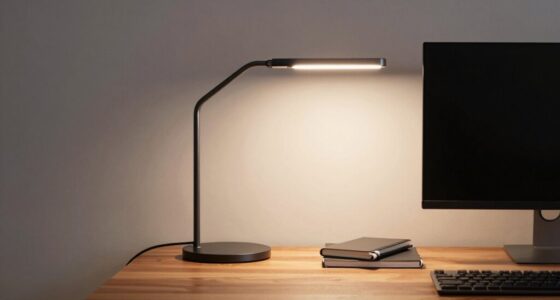
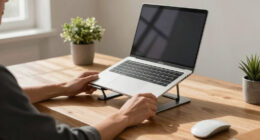
To make back-to-back meetings less draining, set up your workspace with ergonomic accessories like an adjustable chair for proper back support, a keyboard stand to keep your wrists neutral, and monitor arms to position screens at eye level. Incorporate soft, adjustable lighting to reduce eye strain and boost energy. Creating a comfortable environment helps you stay focused and minimizes fatigue throughout the day. Keep exploring for simple tips to optimize your workspace even further.
Key Takeaways
- An ergonomic chair and monitor arms reduce neck and back strain during long meetings.
- Adjustable lighting minimizes eye fatigue and headaches, keeping you alert throughout the day.
- Keyboard stands promote proper wrist posture, preventing discomfort during extended work sessions.
- Creating a well-lit, comfortable environment boosts focus and energy levels during back-to-back meetings.
- Incorporating relaxing breaks with immersive lighting or visuals helps recharge and maintain productivity.

When your schedule is packed with back-to-back meetings, having an efficient desk setup becomes essential. You need a workspace that minimizes discomfort and helps you stay focused. One of the best ways to achieve this is by investing in ergonomic accessories. These include adjustable chairs that support your lower back, keyboard stands that keep your wrists neutral, and monitor arms that position your screen at eye level. By properly aligning your body, you reduce strain and fatigue, making it easier to stay alert through long hours of meetings. An ergonomic setup isn’t just about comfort; it boosts productivity by preventing common aches that can distract you during critical discussions.
Alongside ergonomic accessories, ambient lighting plays a crucial role in creating a workspace that energizes rather than drains you. Harsh fluorescent lights can cause eye strain and headaches, especially when you’re staring at screens for extended periods. Instead, opt for soft, adjustable lighting that mimics natural daylight. Desk lamps with dimming options allow you to customize your lighting based on the time of day or the task at hand. Proper ambient lighting reduces glare on your screens, making it easier to read documents or follow along with presentations. When your environment feels comfortable and well-lit, you’re less likely to experience fatigue, which is especially important when you’re juggling multiple meetings. Proper lighting also contributes to maintaining your overall well-being during long work hours. Incorporating knowledge about home theater projectors can help you create a more immersive environment for work or entertainment during breaks. Additionally, choosing the right ergonomic accessories can significantly enhance your comfort and focus throughout the day, especially if you integrate adjustable lighting options to optimize your workspace environment. Using ergonomic principles in your setup can further prevent strain and promote better posture.
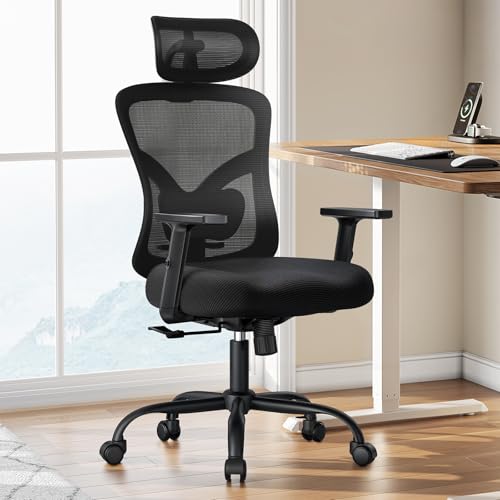
Marsail Ergonomic Office Chair Ergonomic Gaming Chair with Lumbar Support, 2D Headrest, Adjustable Armrests, Contoured Seat Cushion, Computer Desk Chair with Wheels for Home and Office
Adjustable Lumbar Support: This ergonomic office chair is designed to align with the natural curve of your spine….
As an affiliate, we earn on qualifying purchases.
As an affiliate, we earn on qualifying purchases.
Frequently Asked Questions
How Can I Reduce Eye Strain During Long Meetings?
To reduce eye strain during long meetings, you should limit blue light exposure by using blue light filters or glasses. Take regular eye breaks and do eye exercises like blinking frequently or focusing on distant objects to relax your eye muscles. Adjust your screen brightness to match the room, and maintain proper distance from your monitor. These steps help prevent fatigue and keep your eyes comfortable throughout lengthy meetings.
What Ergonomic Adjustments Improve Comfort in a Packed Schedule?
Remember, a stitch in time saves nine. To improve comfort during a packed schedule, you should use an adjustable chair that supports your posture and reduces strain. Incorporate an ergonomic keyboard to prevent wrist discomfort during long typing sessions. Take quick breaks to stretch and reset your position. These adjustments help you stay comfortable and focused, making even the busiest days more manageable and less draining.
How Do I Stay Focused With Back-To-Back Meetings?
To stay focused during back-to-back meetings, prioritize effective time management by scheduling short, intentional mental breaks between sessions. Use these breaks to stretch, hydrate, or breathe deeply, helping reset your focus. Avoid multitasking and stay present in each meeting, taking notes to keep engaged. Setting clear boundaries and sticking to a structured schedule enhances concentration, reduces fatigue, and keeps you energized throughout a demanding day.
What Are Quick Stretches to Do Between Meetings?
Think of your body as a finely-tuned instrument needing quick tuning between tasks. During movement breaks, do simple stretches like shoulder rolls, neck tilts, or seated spinal twists. These quick desk stretches improve desk ergonomics and keep your muscles from tightening. Stand up, stretch your arms overhead, and gently bend side to side. These brief movement breaks re-energize you and make your workday more manageable, preventing stiffness and fatigue.
How Can I Organize My Desk for Better Productivity?
You can boost productivity by organizing your desk with clear decor organization, so everything’s easy to find. Use storage solutions to reduce clutter and keep your workspace tidy. Improve lighting by adding a desk lamp or adjusting natural light, which helps reduce eye strain and keeps you alert. Keep essential items within reach and personalize your space with inspiring decor to make your work environment more inviting and efficient.

ErGear Single Monitor Arm, Fully Adjustable Monitor Mount for 13–34 Inch Screens, Fast Install Computer Monitor Stand with Tool-Free VESA Mount, Cable Management, Holds 19.8 lbs, Max VESA 100x100mm
Ultrawide Compatibility: The ErGear heavy-duty monitor arm is compatible with most 13″–34″ flat or curved monitors up to…
As an affiliate, we earn on qualifying purchases.
As an affiliate, we earn on qualifying purchases.
Conclusion
With this desk setup, you’ll breeze through back-to-back meetings like a productivity superhero on a mission. No more feeling drained or overwhelmed—you’ll stay energized and focused from start to finish. Think of it as your secret weapon against the chaos of a busy day, transforming what used to be a marathon into a smooth, enjoyable sprint. Get ready to conquer your schedule with ease and make every meeting feel like a breeze!

Vaydeer Wrist Rest with Keyboard Stand, Computer Wrist Support Pad, Ergonomic Keyboard Riser Holder Lifter Tray with Wrist Pad, Soft Memory Foam Desk Cushion, Palm Hand Typing for Office Home School
【2-in-1 Keyboard Stand with Wrist Rest】Tired of constantly adjusting a misaligned wrist rest that slides out of place?…
As an affiliate, we earn on qualifying purchases.
As an affiliate, we earn on qualifying purchases.

shinelife LED Desk Lamp for Office Home, Bright Desk Light with USB Charging Port, Adjustable Dimmable Desk Lamps 5 Modes 5 Brightness, Touch Study Lamp for Nail, Craft, Puzzle, Sewing, Study, Black
Superior Brightness Enjoy crisp, natural lighting with our office lamp, designed to enhance focus and reduce eye fatigue….
As an affiliate, we earn on qualifying purchases.
As an affiliate, we earn on qualifying purchases.