To create a truly accessible workspace for wheelchair users, you should incorporate adjustable furniture, such as sit-stand desks, and guarantee pathways are wide enough—at least 36 inches—and free of obstructions. Position equipment within 48 inches to minimize stretching and strain. Use adaptive tools and technology, like voice controls and accessible switches, to enhance independence. Prioritize good lighting and clear navigation flows. For more practical tips, explore ways to make your workspace more inclusive and functional.
Key Takeaways
- Ensure doorways are at least 36 inches wide with unobstructed, smooth pathways for easy wheelchair navigation.
- Use adjustable desks and furniture within a 48-inch reach zone to prevent strain and promote comfort.
- Incorporate height-adjustable work surfaces and sit-stand desks for flexible ergonomic positioning.
- Install accessible controls, such as lever handles and push-button switches, for effortless interaction.
- Design workspace layout with logical flow and appropriate turning radius (around 60 inches) for seamless wheelchair movement.
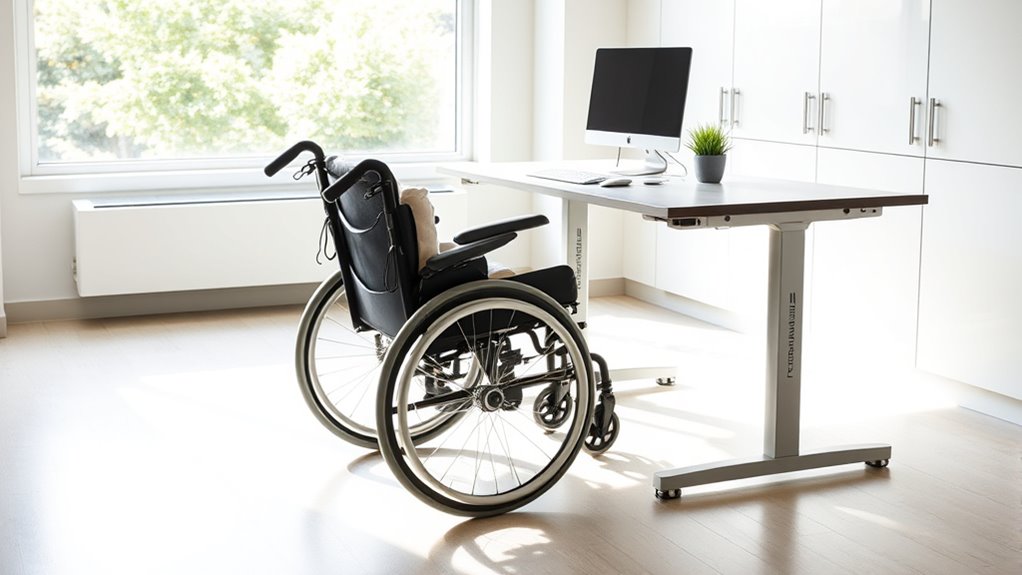
Creating an accessible workspace isn’t just about compliance; it’s about guaranteeing everyone can perform at their best. When designing for wheelchair users, you need to focus on adaptive technology and inclusive design principles that promote independence and comfort. Adaptive technology plays an essential role in making your workspace more functional. Think about sit-stand desks that can be adjusted effortlessly, allowing users to shift positions easily. Incorporating tools like voice-activated controls or large, accessible switches can help eliminate barriers, giving users more autonomy over their environment. These technologies aren’t just helpful—they’re vital in fostering an inclusive atmosphere where everyone can contribute fully.
Inclusive design means considering the needs of all users from the start. It’s about creating a space that naturally accommodates wheelchair users without requiring major modifications later. You should guarantee doorways are wide enough—at least 36 inches—to allow smooth wheelchair access. Pathways should be clear of obstructions, with enough turning radius (typically 60 inches) for easy navigation. When planning your workspace, consider the placement of desks, storage, and equipment. Items should be within easy reach, ideally no higher than 48 inches from the floor, so users don’t need to stretch or strain. Incorporating adjustable furniture is another smart move; it allows for personalized comfort and helps prevent musculoskeletal issues.
Design spaces with wide doorways, clear pathways, and reachable, adjustable furniture to ensure seamless wheelchair access and comfort.
Lighting and controls also matter. Use lever-style door handles, push-button light switches, and touchless faucets to make interactions easier. Bright, even lighting reduces shadows and glare, which can cause discomfort or difficulties for some users. When designing with inclusive design principles, it’s important to think beyond just physical accessibility. Consider the layout’s overall flow, ensuring that pathways are logical and intuitive. This helps everyone move comfortably through the space, reducing confusion and frustration.
Additionally, training staff on accessibility features and adaptive technology can make a big difference. When everyone understands how to use and support these tools, the environment becomes more welcoming and efficient. Remember, creating an accessible workspace isn’t a one-time task; it’s an ongoing process of evaluation and improvement. By prioritizing adaptive technology and inclusive design, you’re not just meeting standards—you’re fostering a culture of respect, equality, and productivity. With these principles in mind, you’ll build a workspace where wheelchair users feel empowered, valued, and able to perform at their best every day. Recognizing the importance of projector contrast ratio in visual displays can also enhance the clarity of presentations in shared spaces.
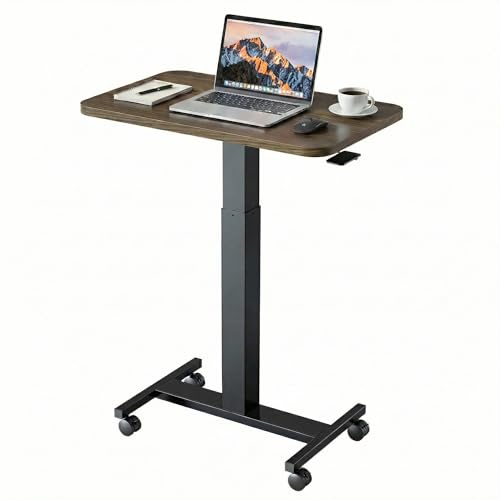
HUANUO Small Rolling Laptop Standing Desk, Height Adjustable Mobile T-Base Desk with Lockable Casters, Portable Sit-Stand Workstation for Bedside & Sofa, Walnut
- Sit Stand Desk: The height of this small…
- Lockable Mobile Desk: 4 smooth-rolling wheels enable you…
- Ergonomic & Versatile Design: Sitting Mode: The compact top…
As an affiliate, we earn on qualifying purchases.
As an affiliate, we earn on qualifying purchases.
Frequently Asked Questions
How Can I Customize My Workspace for Different Wheelchair Sizes?
To customize your workspace for different wheelchair sizes, you should use customizable furniture and adjustable shelving. These options allow you to modify desk height, workspace clearance, and storage access easily. You can adjust the height of your desk or workstation to match your wheelchair’s size, ensuring comfort and accessibility. Incorporate adjustable shelving to optimize storage and reach, making your workspace adaptable for various wheelchair dimensions and enhancing overall ergonomics.
What Specific Ergonomic Tools Aid Wheelchair Users?
You can benefit from ergonomic tools like an ergonomic keyboard and an adjustable desk to improve comfort. An ergonomic keyboard reduces strain on your wrists, while an adjustable desk allows you to set the height for ideal posture. These tools help prevent fatigue and musculoskeletal issues, making your workspace more comfortable and efficient. By customizing your setup, you ensure better support and maintain productivity throughout your day.
How Do I Ensure Safety Alongside Accessibility Features?
Think of your workspace as a fortress, blending safety and accessibility seamlessly. To guarantee this, you should incorporate emergency preparedness plans and fire safety measures, like clear escape routes and accessible alarms. Regularly inspect equipment and pathways to prevent hazards, and train yourself on emergency procedures. This way, your environment becomes a symbol of security—a safe haven where accessibility and safety stand united, empowering you confidently to work and thrive.
What Are Cost-Effective Modifications for an Accessible Workspace?
You can make your workspace cost-effective by investing in ergonomic furniture like adjustable desks and supportive chairs, which improve comfort and efficiency. Add assistive technology such as voice-activated tools or keyboard shortcuts to enhance accessibility without high costs. Repurpose existing furniture with simple modifications, like lower work surfaces or portable ramps, to meet accessibility needs. These affordable changes create an inclusive, ergonomic environment that benefits everyone.
How Can I Maintain Workspace Accessibility Over Time?
You keep workspace accessibility shining like a steady beacon by regularly checking your workspace lighting and ergonomic seating. Think of these elements as the heartbeat of your environment; when they’re in sync, your space remains welcoming. Schedule routine adjustments, like tightening screws or replacing worn-out lighting, ensuring your workspace stays safe and comfortable. By consistently nurturing these details, you uphold a barrier-free zone where productivity and comfort flourish hand in hand.

SURAIELEC Wireless Light Switch Kit with Receiver, 15A RF Remote Control
- Wireless Installation: Add or relocate switches without wiring
- Easy Setup: Requires neutral wire, fits standard boxes
- Interference-Free Use: Multiple sets operate independently without interference
As an affiliate, we earn on qualifying purchases.
As an affiliate, we earn on qualifying purchases.
Conclusion
Designing a dynamic, disability-friendly domain demands dedication, detail, and a desire to deliver. By prioritizing practical placements, proper pathways, and thoughtful touches, you create a workspace that welcomes everyone. Your efforts empower, enhance, and elevate accessibility, ensuring ease and equality for all users. Remember, small shifts in setup considerably shape a supportive, sustainable environment. So, stay committed, stay considerate, and craft a workspace where wheelchair users can work with confidence, comfort, and clarity.

Romig Marque Curved ADA Compliant Reception Station Standalone or Add-On- Driftwood Grey
- ADA Compliant Reception Unit: Supports more clients
- Easy Assembly: No tools needed, locks together
- Spacious Work Surface: 21.5-inch deep workspace
As an affiliate, we earn on qualifying purchases.
As an affiliate, we earn on qualifying purchases.

Amazon Basics Easy Installation Straight Door Lever, Passage, Satin Nickel, 1-Pack
- Easy to install: Uses standard Phillips screwdriver
- Reversible design: Fits both right and left-handed doors
- Universal fit: Suitable for doors 1-3/8" to 1-3/4" thick
As an affiliate, we earn on qualifying purchases.
As an affiliate, we earn on qualifying purchases.