To optimize your workspace lighting, combine natural and artificial sources thoughtfully. Position your desk near a window to use daylight effectively, while using diffused blinds or curtains to prevent glare. Incorporate adjustable desk lamps or dimmable overhead lights to control brightness and direction. Layering ambient, task, and accent lighting helps reduce eye strain and creates a balanced environment. Mastering these adjustments can boost comfort and focus—keep exploring for more tips to perfect your ergonomic lighting setup.

Get comfort and recovery gear delivered free with Prime
- Fast, free delivery on millions of items
- Prime Video, Amazon Music and more included
- Member-only deals all year
Key Takeaways
- Position light sources to minimize glare and reflections on screens using adjustable fixtures or shades.
- Maximize natural light by placing desks near windows and diffusing sunlight with blinds or curtains.
- Use adjustable, layered artificial lighting with suitable color temperatures (5000K-6500K) for flexibility and comfort.
- Properly align lights to avoid harsh shadows and create even, diffuse illumination across the workspace.
- Balance natural and artificial light to reduce eye strain, improve focus, and promote overall ergonomic comfort.
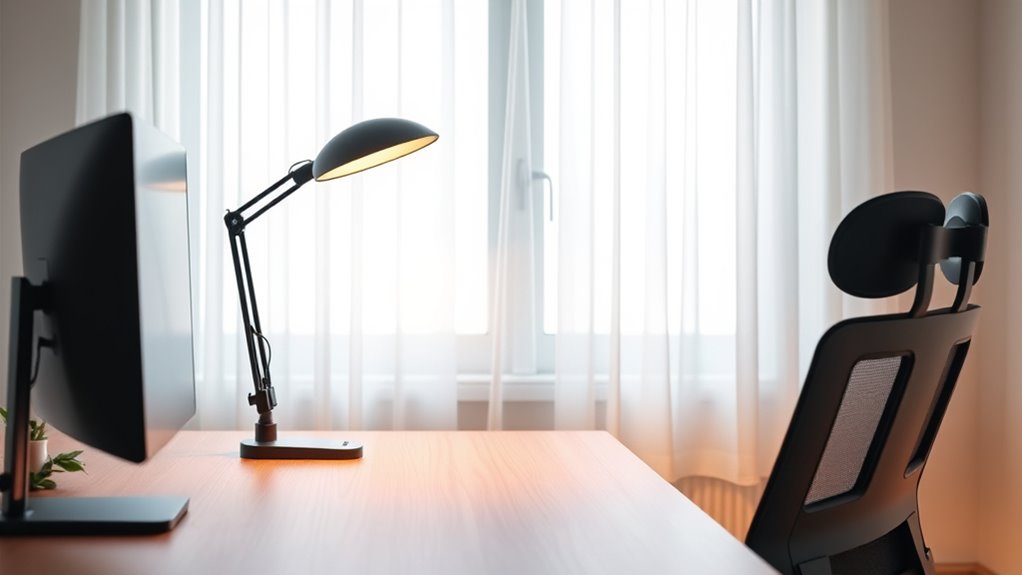
Creating an ergonomic lighting setup is essential for maintaining comfort and productivity in your workspace. Proper lighting reduces eye strain, enhances focus, and boosts your overall efficiency. A key aspect of achieving this is managing glare and integrating natural light effectively. Glare can be distracting and uncomfortable, forcing your eyes to work harder than necessary, which can lead to headaches and fatigue. To combat this, you should position your light sources thoughtfully. Use adjustable fixtures or shades to direct light away from reflective surfaces like computer screens or glossy desks. Soft, diffused light is preferable because it minimizes harsh reflections and creates a more even illumination across your workspace. Additionally, selecting appropriate lighting fixtures designed for ergonomic setups can further improve comfort and reduce strain. Natural light integration plays a crucial role in creating an ergonomic environment. When possible, position your desk near windows to capitalize on daylight, but be mindful of glare. Use blinds, curtains, or window films to diffuse sunlight and prevent it from creating hotspots or reflections on your screen. This not only improves your visual comfort but also helps regulate your circadian rhythm, keeping you alert during the day and promoting better sleep at night. If natural light is limited, supplement it with well-placed artificial lighting that mimics daylight. Opt for bulbs with a color temperature of around 5000K to 6500K, which closely resembles natural light and helps maintain your alertness and mood. Adjustability is vital for an ergonomic lighting setup. Your eyes are constantly adjusting to different levels of brightness, so having the ability to modify your lighting helps tailor the environment to your needs. Desk lamps with adjustable arms or dimmable overhead lights give you control over the intensity and direction of light, reducing eye strain and preventing fatigue. Additionally, ensure that your workspace lighting is layered—combine ambient, task, and accent lighting to create a balanced environment. This layering prevents overly bright or dim areas, which can cause your eyes to constantly adapt, leading to discomfort. Ultimately, an ergonomic lighting setup isn’t just about brightness; it’s about creating a flexible, glare-free environment that seamlessly incorporates natural light. When you pay attention to these details, you’ll notice less eye fatigue, improved concentration, and a more comfortable workspace. Taking the time to fine-tune your lighting can make a significant difference in your daily comfort and productivity.
adjustable desk lamp with dimmer
As an affiliate, we earn on qualifying purchases.
As an affiliate, we earn on qualifying purchases.
Frequently Asked Questions
How Does Lighting Impact Long-Term Eye Health?
Lighting substantially impacts your long-term eye health by reducing eye strain and protecting your vision. Poor lighting can cause fatigue, headaches, and worsen vision over time. By ensuring proper, well-balanced light, you help maintain your eye health, prevent strain, and keep your vision sharp. Good lighting practices encourage better focus and comfort during work, ultimately supporting your long-term eye health and overall well-being.
What Are the Best Color Temperatures for Productivity?
Did you know that 75% of employees report increased focus with proper lighting? For productivity lighting, aim for a color temperature around 4000K to 5000K, which mimics natural daylight and boosts alertness. Cooler temperatures can help you stay energized, while warmer tones promote relaxation. Adjust your workspace lighting based on tasks, ensuring your environment supports sustained concentration and reduces eye strain over time.
How Can Smart Lighting Improve Ergonomic Setups?
Smart lighting improves your ergonomic setup by using smart controls that adjust brightness and color temperature automatically. This helps you maintain ideal lighting, reducing eye strain and fatigue. It also supports your circadian rhythms by mimicking natural daylight patterns, boosting alertness and mood throughout the day. With smart lighting, you create a healthier, more comfortable workspace that adapts to your needs, enhancing productivity and well-being effortlessly.
Are There Specific Lighting Tips for Different Work Environments?
Yes, different work environments need tailored lighting tips. For a computer desk, position your desk to minimize glare from windows and overhead lights, and make certain your monitor is at eye level to prevent strain. Use task lighting to focus light where needed, and avoid harsh, direct light that causes discomfort. Adjust your desk placement to maximize natural light, while reducing glare, creating a comfortable, ergonomic setup that boosts productivity.
How Often Should Lighting Be Adjusted for Optimal Ergonomics?
You should adjust your lighting at least once every few months to maintain ideal ergonomics. Regular lighting frequency checks help you spot any glare, dimness, or shadows that could cause eye strain. Make ergonomic adjustments as needed, especially when changing work tasks or environments. Keep an eye on natural light levels too, and tweak your setup to ensure consistent, comfortable illumination that supports your productivity and reduces fatigue.
As an affiliate, we earn on qualifying purchases.
Conclusion
By choosing the right lighting, reducing glare, and adjusting your environment, you create a workspace that supports your focus, reduces strain, and boosts productivity. You build a space that’s easy on your eyes, comfortable for your body, and conducive to your work. You set yourself up for success by prioritizing your well-being, enhancing your comfort, and illuminating your tasks. Ultimately, an ergonomic lighting setup empowers you to work smarter, healthier, and more efficiently every day.
diffused window blinds for glare reduction
As an affiliate, we earn on qualifying purchases.
As an affiliate, we earn on qualifying purchases.
As an affiliate, we earn on qualifying purchases.
Fall Picks
fall essentials
As an affiliate, we earn on qualifying purchases.