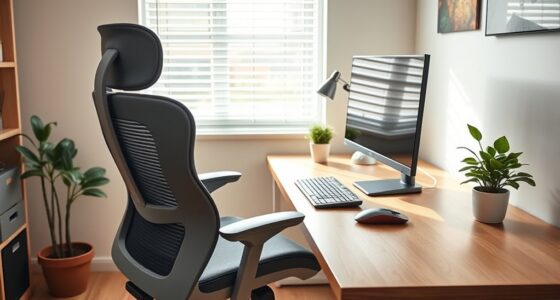
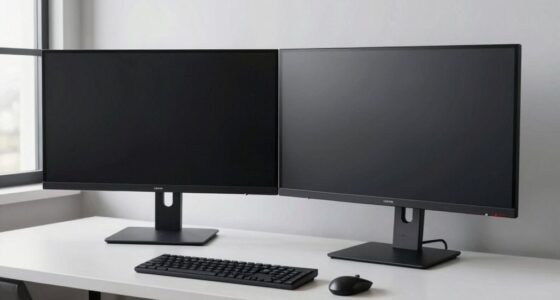
To set up your workspace for left-handed use, start by positioning your mouse and input devices on your left side for easy access. Adjust your chair so your feet rest flat, knees are bent at 90 degrees, and hips are slightly higher than your knees. Place the monitor directly in front of you at eye level to reduce neck strain. Keep frequently used items within reach on your dominant side. Continue exploring to discover more tips for a comfortable, ergonomic setup.
Key Takeaways
- Place frequently used items, like mouse and tools, on the left side for easy access.
- Use an ergonomic mouse designed for left-handed users to reduce wrist strain.
- Arrange the keyboard slightly angled or split to favor left-hand typing comfort.
- Adjust monitor placement directly in front at eye level to minimize neck movement.
- Organize workspace so that essential documents and accessories are within easy reach on the left.

If you’re left-handed, setting up your workspace correctly can considerably boost your comfort and productivity. The key lies in ergonomic chair positioning and how you arrange your mouse and keyboard. When you sit down, make sure your chair height allows your feet to rest flat on the floor, with your knees at a 90-degree angle. Your hips should be slightly higher than your knees to promote good posture. Adjust the chair’s backrest so your lower back is supported, helping to prevent strain during long work sessions. Keep your shoulders relaxed and avoid hunching forward, which can cause discomfort over time.
Positioning your ergonomic chair properly is the first step toward a comfortable setup. Once seated, align your monitor directly in front of you, about an arm’s length away, with the top of the screen at or slightly below eye level. This reduces neck strain and encourages a neutral head position. When it comes to mouse and keyboard placement, left-handed users should place these input devices within easy reach on their dominant side. Your mouse should be close enough that you don’t have to stretch your arm, keeping your wrist straight and relaxed. If your workspace allows, a vertical or ergonomic mouse can reduce wrist strain and improve control, especially for prolonged use.
Your keyboard setup should accommodate your natural typing position. Keep it centered in front of your body, slightly angled to match your natural hand movement. For left-handed users, a split or ergonomic keyboard that can be adjusted to favor the left side can make a significant difference. When typing, your wrists should remain straight, not bent upward or downward. Consider using a wrist rest to support your hands and reduce pressure on your joints. The goal is to minimize strain on your wrists, shoulders, and neck by ensuring your input devices are positioned so your arms and hands move naturally. Additionally, proper workspace ergonomics can help prevent repetitive strain injuries and improve overall comfort during long work periods.
Also, consider the overall layout—keep frequently used items within easy reach, on your dominant side, to avoid unnecessary stretching or twisting. This includes not only your mouse and keyboard but also documents, phones, or other accessories. By thoughtfully arranging your workspace with ergonomic principles in mind, you’ll find your left-handed orientation becomes less of an obstacle and more of an advantage. Creating a setup tailored to your needs helps prevent discomfort and fatigue, allowing you to focus more on your work and less on physical strain.
As an affiliate, we earn on qualifying purchases.
Frequently Asked Questions
What Are the Best Ergonomic Tools for Left-Handed Users?
You should consider ergonomic tools designed for your needs. An ergonomic mouse tailored for left-handed users helps reduce strain and improve comfort during long hours. Also, a left-handed keyboard ensures proper wrist alignment and minimizes fatigue. These tools support your natural hand position, making daily tasks easier and more comfortable. Investing in these ergonomic options can boost productivity and prevent discomfort, helping you work more efficiently and comfortably throughout the day.
How Can I Customize My Computer Setup for Left-Handed Use?
Did you know that nearly 10% of the population is left-handed? To customize your computer setup, start by adjusting your mouse placement to the left side of your desk for easier access. Also, switch your keyboard orientation if possible, so the keys are more comfortable to reach. These small changes make your workspace more efficient and comfortable, allowing you to work smoothly and naturally as a left-handed user.
Are There Specific Office Furniture Options for Left-Handed Workers?
You should look for left-handed desks designed with the keyboard and mouse placement on the left side. These desks often feature adjustable surfaces to suit your comfort. Pair a left-handed desk with an ergonomic mouse, which fits your hand better and reduces strain. This setup enhances your productivity and comfort, making your workspace more efficient. Investing in specialized office furniture helps you work comfortably and efficiently as a left-handed user.
How Do I Adjust Lighting to Suit Left-Handed Workspace Arrangements?
To optimize your lighting for a left-handed workspace, focus on ambient control by positioning lights to avoid shadows that may interfere with your tasks. Use adjustable desk lamps or task lighting on your left side to provide direct illumination. Ensuring even lighting reduces eye strain and enhances productivity. Experiment with different angles and brightness settings until you find the perfect balance, creating a comfortable environment tailored to your needs.
What Are Common Challenges Left-Handed Users Face in Shared Workspaces?
In shared workspaces, you might face challenges like mirror placement and utensil organization that don’t suit your left-handed needs. You could struggle with positioning mirrors to see yourself comfortably or find utensils arranged for right-handed use. These issues can cause inconvenience and slow your workflow. To improve, communicate your preferences, and suggest rearranging items or mirror placements to better accommodate your left-handed tasks.
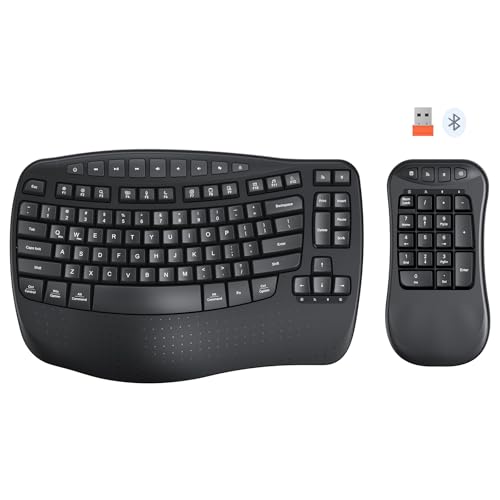
MEETION Wave Ergonomic Keyboard, 2.4GHz Wireless/Bluetooth Split Keyboard with Wrist Rest, Separate Mini Numeric Keypad, Flexible 2-in-1 Setup for Left-Handed/Accountants/Data Entry
- Flexible Split Layout: Rearrange main keyboard and numeric keypad
- Ergonomic Wave Design: Reduces arm movement and typing fatigue
- Separate Numeric Keypad: Position on right or center as needed
As an affiliate, we earn on qualifying purchases.
As an affiliate, we earn on qualifying purchases.
Conclusion
So, there you have it—your ultimate guide to transforming your workspace into a left-handed paradise. Now, with everything perfectly positioned, you’ll finally enjoy the luxury of not knocking over your coffee or wrestling with tools meant for righties. Who knew that rearranging a few things could turn your daily chaos into a smooth, left-handed utopia? Happy lefting, and may your workspace always be as unconventional as your sense of humor!

MROCO Ergonomic Mouse Pad with Gel Wrist Rest, 9.4 x 8.1 in, Black
- Gel Cushioning for Comfort: Soft gel supports reducing wrist strain
- Smooth Lycra Surface: Provides silky feel and precise cursor control
- Non-Slip PU Base: Ensures stable placement during use
As an affiliate, we earn on qualifying purchases.
As an affiliate, we earn on qualifying purchases.
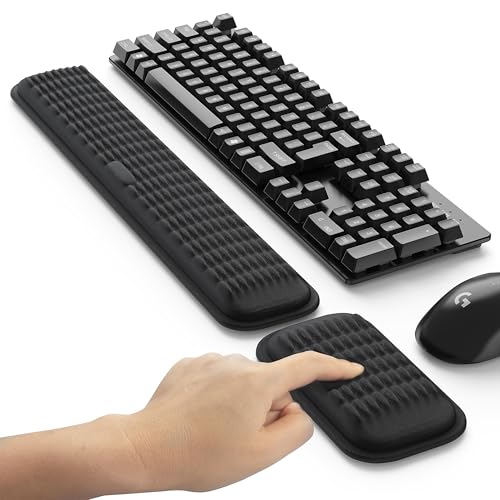
MEKASS Ergonomic Wrist Rest for Keyboard and Mouse, Soft Memory Foam Keyboard Wrist Rest Set with Non-Slip Silicone Base, Easy Typing, Pain Relief, Comfort for Office, Work, Gaming (Classic Black)
- Massage Pattern Design: Relaxes hands and promotes blood flow
- Soft Memory Foam: Provides comfort and support during use
- Perfectly Sized: Fits most keyboards and mice comfortably
As an affiliate, we earn on qualifying purchases.
As an affiliate, we earn on qualifying purchases.