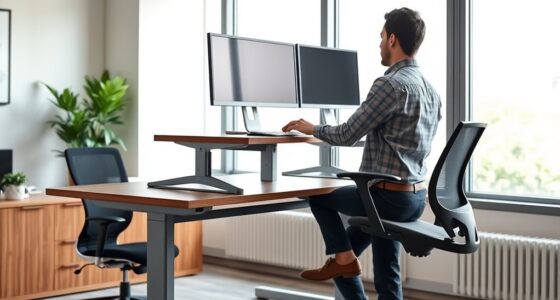

Choosing the wrong desk depth can cause constant discomfort, affect your posture, and lead to long-term dissatisfaction. Too shallow, and you’ll struggle to organize your workspace and reach objects comfortably. Too deep, and you may reach too far, straining your neck and shoulders. Correctly sizing your desk helps you stay ergonomic, organized, and comfortable. If you’re unsure about what works best, understanding key factors can help you avoid future regret.
Key Takeaways
- Inadequate desk depth leads to constant stretching, poor posture, and long-term discomfort.
- Shallow desks cause clutter, reducing workspace efficiency and increasing frustration.
- Excessively deep desks make reaching difficult, promoting awkward postures and strain.
- Improper depth compromises ergonomic setup, resulting in eye, wrist, and neck strain.
- Choosing the wrong desk depth can cause ongoing discomfort and workspace dissatisfaction.

Many people overlook the importance of desk depth, only to realize later that it can greatly impact comfort and productivity. The depth of your desk isn’t just about fitting everything on top; it influences your posture, reach, and overall workspace efficiency. If your desk isn’t deep enough, you may find yourself constantly stretching or leaning forward, which can lead to discomfort and long-term strain. On the other hand, too much depth can make your workspace feel distant and create unnecessary clutter, making it harder to stay organized.
Getting the right desk depth is essential for ergonomic adjustments. When your desk is appropriately deep, you can position your monitor at an ideal distance—about an arm’s length away—reducing eye strain and neck tension. It also allows you to place your keyboard and mouse at a comfortable height, minimizing wrist strain. Proper ergonomic setup depends heavily on your desk depth because it determines how easily you can achieve these adjustments without compromising comfort. If your desk is too shallow, you might have to compromise on ergonomics, leading to awkward postures. Conversely, if it’s excessively deep, reaching for items can become a chore, causing you to adopt poor postures over time.
Proper desk depth ensures ergonomic comfort by allowing ideal monitor, keyboard, and mouse positioning for reduced strain.
Clutter management is another factor where desk depth plays a significant role. A desk that’s too shallow can quickly become cluttered, as there isn’t enough space for all your essentials, forcing you to pile things up or leave items off to the side. This clutter hampers productivity and increases stress, as a chaotic workspace distracts your focus. Conversely, a desk with adequate depth offers ample room to organize your supplies, documents, and tech devices neatly, creating a clean and efficient environment. This organization can boost your focus and reduce time wasted searching for materials. Workspace organization is closely tied to choosing the right desk depth because it directly impacts how well you can keep your workspace tidy. Additionally, selecting a desk with suitable depth can contribute to long-term comfort by reducing repetitive strain injuries and promoting better posture habits. Furthermore, understanding the importance of ergonomic principles can help ensure your workspace setup supports your health and productivity over time.
Many people regret choosing a desk with the wrong depth because they realize it hampers their workflow and causes discomfort. When selecting a desk, consider your specific needs: how much surface area you require for work tools, the ergonomic adjustments necessary for comfort, and how much clutter you tend to accumulate. Balance is key. The ergonomic benefits of proper desk depth help maintain good posture, keep essentials within arm’s reach, and organize your space effectively. Failing to think about the right depth can lead to ongoing discomfort and frustration, making you wish you’d paid more attention during your initial setup. Ultimately, investing time in choosing the proper desk depth pays off in comfort, efficiency, and overall satisfaction.

ErGear 48 X 24 Inch Height Adjustable Electric Standing Desk, Black
- Electric Height Adjustable Standing Desk for Comfortable Work…
- Powerful Motor with Memory Presets – Equipped with…
- Exceptional Stability Steel Frame – Built with a…
As an affiliate, we earn on qualifying purchases.
As an affiliate, we earn on qualifying purchases.
Frequently Asked Questions
How Do I Measure the Perfect Desk Depth for My Workspace?
To measure the perfect desk depth, start by considering your material selection and aesthetic preferences. You should sit comfortably at your current workspace, then extend your arms; the depth should allow your elbows to rest naturally without feeling cramped. Make certain there’s enough room for your monitor, keyboard, and other essentials, while maintaining a balanced look. Adjust the depth until it feels both functional and visually appealing for your workspace.
Can Adjustable Desks Help Reduce Depth-Related Regrets?
Yes, adjustable desks can help reduce depth-related regrets by allowing you to customize your workspace for ideal ergonomic adjustments and personal comfort. You can easily change the height and depth to suit your needs, reducing strain and improving posture. This flexibility guarantees your workspace feels right for you, preventing regrets tied to an uncomfortable or improperly sized desk. With adjustable desks, you create a more ergonomic and comfortable environment tailored to your preferences.
What Are the Ergonomic Benefits of Optimal Desk Depth?
Ideal desk depth promotes ergonomic posture and enhances workspace comfort. When your desk isn’t too deep or shallow, you can easily reach essential items without straining, reducing neck and shoulder tension. This setup encourages proper alignment, minimizes fatigue, and prevents repetitive strain injuries. By choosing the right desk depth, you support better focus and productivity, making your workspace healthier and more comfortable for long-term use.
How Does Desk Depth Impact Overall Productivity?
Think of your desk as the stage for your productivity performance. When the depth is just right, you have enough space to organize your workspace aesthetics and storage solutions without feeling cramped. This balance allows you to work efficiently, reducing distractions and fatigue. An ideal desk depth keeps your tools within reach, helping you stay focused and engaged, ultimately boosting your overall productivity and making your workday smoother and more enjoyable.
Are There Industry Standards for Ideal Desk Depth?
Industry standards for perfect desk depth typically range between 24 to 30 inches, ensuring ergonomic comfort and functionality. You should consider desk depth trends that prioritize space for ergonomic accessories like monitors, keyboards, and mice. With the right depth, you can reduce strain and boost productivity. Keep in mind, adjustable desks are increasingly popular as they allow you to customize your workspace for ideal comfort and efficiency.

6" / 150 MM DEPTH GAUGE METRIC & IMPERIAL STANDARDS – ENGINEERING
- Measurement Range: 6 inches / 150 mm depth gauge
- Measurement Standards: Metric and imperial standards
- Material: Steel rule with gun metal finish base
As an affiliate, we earn on qualifying purchases.
As an affiliate, we earn on qualifying purchases.
Conclusion
So, as you stand at your desk, remember the story of Goldilocks—finding what’s just right is key. Don’t let your workspace become a tale of regret, where the depth is either too shallow or too deep. Instead, carve out a spot that feels perfect, like a cozy nook in a forest. When your desk fits just right, you’ll work with ease and comfort, avoiding the pitfalls of regret and embracing the harmony of a well-chosen space.

ErGear Single Monitor Arm, Fully Adjustable Monitor Mount for 13–34 Inch Screens, Fast Install Computer Monitor Stand with Tool-Free VESA Mount, Cable Management, Holds 19.8 lbs, Max VESA 100x100mm
- Compatibility: Fits 13–34 inch monitors up to 19.8 lbs
- VESA Compatibility: Supports 75x75mm and 100x100mm patterns
- Durable Construction: Tested over 20,000 cycles for longevity
As an affiliate, we earn on qualifying purchases.
As an affiliate, we earn on qualifying purchases.

OPNICE Desk Organizer and Accessories, 2-Tier Computer Monitor Stand Riser with Drawer and 2 Pen Holders, Laptop Stand, Office Desk Accessories for Office Supplies, Black
- Ergonomic Design: Elevates monitor for comfortable viewing
- Space Saving: Includes drawer and pen holders for organization
- Durable and Stable: Made of sturdy metal for long-lasting support
As an affiliate, we earn on qualifying purchases.
As an affiliate, we earn on qualifying purchases.