To create a better workstation, start by pairing your office chair and monitor arm carefully. Choose a chair with adjustable height and good support to promote proper posture, and match it with a monitor arm that aligns the screen at eye level for comfort. A coordinated setup improves focus, reduces strain, and enhances your workspace’s aesthetic harmony. Keep in mind that proper ergonomic adjustments made together with stylish coordination can boost your productivity—stay with us to learn how to perfect your setup.
Key Takeaways
- Choose an office chair with adjustable height and support for optimal ergonomic alignment.
- Select a monitor arm that allows height, tilt, and swivel adjustments for proper eye-level positioning.
- Match the chair and monitor arm finishes for aesthetic harmony, enhancing workspace appeal.
- Ensure the monitor arm provides sufficient flexibility to maintain a comfortable viewing angle.
- Proper pairing promotes ergonomic comfort, reduces strain, and creates a cohesive, motivating workspace.

Aesthetic coordination also plays a key role in creating a workspace that is both functional and visually appealing. When your office chair and monitor arm complement each other in style and color, your entire setup looks more cohesive and inviting. This aesthetic harmony can boost your mood and motivation, making you more inclined to work comfortably and efficiently. Choose a monitor arm that matches your chair’s design or color scheme, or opt for neutral finishes that blend seamlessly with your other office furniture. A coordinated setup doesn’t just look good — it helps create a sense of order, which can improve your focus and reduce distractions.
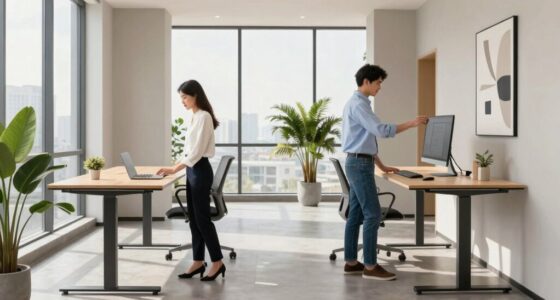
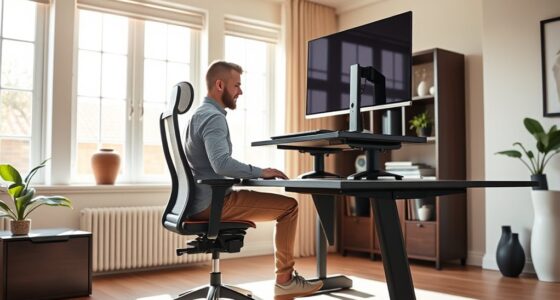
As you fine-tune your workstation, pay close attention to ergonomic adjustments. Proper alignment of your chair and monitor ensures you maintain good posture, preventing strain and long-term health issues. Keep your feet flat on the ground, knees at a 90-degree angle, and your hips aligned with your knees. Your monitor should be positioned so that the top of the screen is roughly at eye level, about an arm’s length away. With an adjustable monitor arm, you can make these tweaks easily, ensuring your setup promotes healthy habits. Incorporating ergonomic principles can also guide you in creating a more comfortable and health-conscious workspace. Additionally, understanding ergonomic guidelines can help you identify key features to look for in your office furniture choices. Being aware of outdoor influences such as lighting and noise levels can also enhance your comfort and focus in your workspace. Combining ergonomic adjustments with aesthetic coordination results in a workspace that’s not only supportive but also inspiring. Regularly taking breaks and stretching during your workday can further enhance your comfort and overall well-being.
Ultimately, your workstation’s success hinges on the pairing of your office chair and monitor arm. These choices influence your posture, comfort, and the overall look of your space. By prioritizing ergonomic adjustments and aesthetic coordination, you create an environment that encourages productivity, reduces discomfort, and reflects your personal style. When your setup is thoughtfully designed, working becomes less of a chore and more of an enjoyable experience.

HOLLUDLE Ergonomic Mesh Office Chair – 3D Adjustable Lumbar Support & 3D Armrests, V-Shaped Back, Adjustable Desk Chair for Office & Home, White
[Advanced 3D Lumbar Support] Customize your comfort with Holludle's unique 3D lumbar support. Adjust it up, down, forward,…
As an affiliate, we earn on qualifying purchases.
As an affiliate, we earn on qualifying purchases.
Frequently Asked Questions
How Do I Choose the Right Monitor Arm for My Desk Size?
To choose the right monitor arm for your desk size, first consider its weight capacity to guarantee it supports your monitor securely. Measure your desk’s available space to find an arm that fits comfortably. Opt for one with cable management features to keep cords organized and avoid clutter. Make sure the arm’s extension and swivel range match your viewing preferences, creating a comfortable, clutter-free workspace.
What Are the Best Ergonomic Features to Look for in an Office Chair?
Did you know that poor posture can increase back pain by up to 54%? When choosing an ergonomic office chair, prioritize lumbar support to keep your lower back aligned and comfortable. Look for adjustable height to guarantee your feet rest flat on the floor, reducing strain. These features help maintain proper posture, boost comfort, and prevent long-term injuries, making your workspace healthier and more productive.
Can I Adjust Both the Chair and Monitor Arm Easily for Different Users?
Yes, you can easily adjust both the chair and monitor arm for different users. You simply change the chair height to fit each person’s leg length and guarantee the arm flexibility allows you to position the monitor at eye level. These adjustments help you maintain comfort and good posture, making switching between users quick and effortless. Just remember to check the adjustment mechanisms are smooth and intuitive for easy customization.
How Does Monitor Height Impact Long-Term Eye Strain?
Imagine your eyes as delicate cameras, capturing every detail, yet suffering from blue light and visual fatigue if misaligned. If your monitor’s too high or low, long-term eye strain worsens, causing headaches and blurred vision. Proper monitor height keeps your eyes level with the top of the screen, reducing strain. This simple adjustment helps prevent eye fatigue, ensuring comfort and focus during extended work sessions.
Are There Compatibility Concerns Between Specific Monitor Arms and Office Chairs?
Yes, there can be compatibility concerns between specific monitor arms and office chairs. When choosing a monitor mount, you need to make certain it fits your desk and can support your monitor’s weight. Additionally, chair compatibility matters because some arms require adjustable height or clearance that your chair’s design might restrict. Always check the specifications for both the monitor mount and your office chair to guarantee they work well together, preventing stability issues or limited movement.

HUANUO FlowLift™ Pro Monitor Arm for 13–32" Screens, MechaSpring Monitor Mount, Fully-Adjustable Monitor Stand with Tilt/Swivel/Rotation, Tool-Free VESA Mount, C-Clamp/Grommet Base, Max Load 19.8 lbs
Check Desk & Monitor Compatibility: To ensure a proper fit, your monitor must meet the following 3 conditions…
As an affiliate, we earn on qualifying purchases.
As an affiliate, we earn on qualifying purchases.
Conclusion
By choosing the right office chair and monitor arm, you’re building a workstation that supports your comfort and productivity. Think of your setup like a well-tuned orchestra, where each piece plays an essential role in harmony. When your chair and monitor are perfectly paired, you’ll feel more focused, less strained, and ready to tackle any task. Invest in these essentials, and watch your workday become smoother and more enjoyable.
HOLLUDLE Ergonomic Mesh Office Chair – 3D Adjustable Lumbar Support & 3D Armrests, V-Shaped Back, Adjustable Desk Chair for Office & Home, White
[Advanced 3D Lumbar Support] Customize your comfort with Holludle's unique 3D lumbar support. Adjust it up, down, forward,…
As an affiliate, we earn on qualifying purchases.
As an affiliate, we earn on qualifying purchases.

NEO CHAIR Office Desk Gaming Ergonomic Computer Chair with Lumbar Back Support Adjustable Height Swivel Rolling Wheels Flip-up Arms Mesh Chair for Home Vanity (Ivory)
Breathable Mesh & Back Support – Elastic mesh keeps air flowing and offers gentle support, while the contoured…
As an affiliate, we earn on qualifying purchases.
As an affiliate, we earn on qualifying purchases.