If your chair lacks proper ergonomic features like adjustable height, lumbar support, or armrests, it could be causing your back pain. Notice if you’re slouching, feeling persistent discomfort, or experiencing tension in your neck and shoulders—these signs point to poor support and improper posture. A good ergonomic chair encourages healthy seating habits and reduces strain over time. To prevent ongoing issues, understanding what makes a chair supportive is key—learn more to protect your back long-term.
Key Takeaways
- Persistent back discomfort after sitting may indicate poor ergonomic support or improper posture in your chair.
- Lack of adjustable features like lumbar support, seat height, or armrests can cause misalignment and strain.
- Slouching, leaning forward, or frequent shifting suggest your chair doesn’t promote active, healthy sitting habits.
- Feeling pressure or numbness in your lower back or legs might be due to inadequate seat depth or improper positioning.
- Long-term use of an unergonomic chair increases the risk of developing chronic back pain and spinal issues.

If you spend long hours sitting at a desk, your chair could be secretly contributing to your back pain. Many people overlook how important the right chair truly is, assuming that discomfort is just part of working long hours. But the truth is, a chair with proper ergonomic features can make a huge difference in your comfort and spinal health. Ergonomic design aims to support your body’s natural posture, reducing strain on your back, neck, and shoulders. When your chair includes features like adjustable height, lumbar support, and seat depth, you’re better positioned to maintain posture correction throughout the day. This isn’t just about comfort—it’s about preventing long-term back issues that can develop from poor seating habits.
An ergonomic chair supports your posture, reducing back pain and preventing long-term issues.
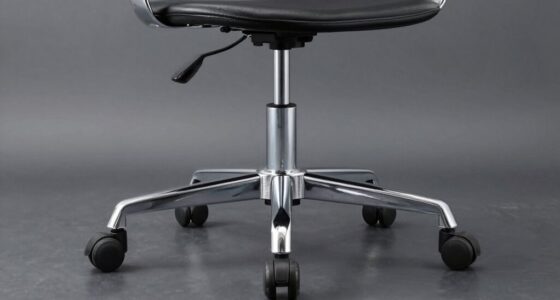
A chair with good ergonomic features encourages you to sit correctly, keeping your spine aligned and reducing unnecessary pressure on your discs and muscles. For example, adjustable lumbar support is essential because it fills the natural curve of your lower back, encouraging proper posture correction and preventing slouching. If your chair lacks this, you might find yourself leaning forward or hunching over, which puts extra stress on your back and neck. An adjustable seat height ensures your feet are flat on the ground, your knees are at a 90-degree angle, and your hips are level with your knees. This positioning helps distribute your weight evenly and minimizes strain. Some chairs also come with adjustable armrests that support your shoulders and arms, preventing tension from creeping into your neck and upper back.
You should also pay attention to how your chair supports your movements. A chair with a flexible, breathable backrest allows you to shift positions easily and stay comfortable during long periods of sitting. The goal is to promote active sitting, where you make small adjustments rather than remaining static in one position. This dynamic approach helps keep your muscles engaged and reduces the risk of stiffness or pain. Proper ergonomic seating can also help reduce the risk of developing back pain over time, especially when combined with good posture habits. If your current chair doesn’t have these ergonomic features, it might be time to consider an upgrade. Investing in a chair designed for posture correction not only alleviates existing discomfort but also helps prevent future problems.
In essence, your chair plays an essential role in your overall back health. Recognizing whether it has the right ergonomic features can be a game-changer. Guarantee it supports your natural posture, allows for adjustments, and promotes movement. When you choose wisely, you’re taking a proactive step toward minimizing back pain and creating a healthier, more comfortable work environment.
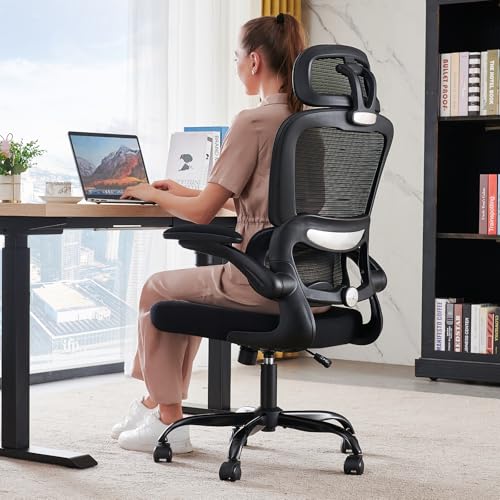
TRALT Office Chair Ergonomic Desk Chair, 330 LBS Home Mesh Office Desk Chairs with Wheels, Comfortable Gaming Chairs (Black)
Ergonomic Office Chair: Experience unparalleled support with our ergonomic office chair, designed to provide comprehensive assistance for your...
As an affiliate, we earn on qualifying purchases.
Frequently Asked Questions
How Often Should I Replace My Office Chair?
You should replace your office chair every 5 to 8 years, depending on its chair lifespan and how well you maintain it. Regularly check for signs of wear, such as wobbly wheels or torn upholstery, which indicate it’s time for a replacement. Following a consistent replacement schedule guarantees your chair supports good posture and reduces back pain. Don’t wait until it’s visibly damaged—early replacement keeps you comfortable and healthy.
Can Standing Desks Reduce Back Pain Caused by Chairs?
Switching to a standing desk can help ease back discomfort caused by your chair, offering a invigorating change. Ergonomic accessories like anti-fatigue mats and adjustable platforms boost comfort and support. Standing desk benefits include improved posture and increased movement, which can lessen strain on your back. Incorporating standing periods into your routine encourages flexibility and reduces the risks associated with prolonged sitting, making your workspace healthier overall.
What Are Signs My Chair Is Causing Nerve Issues?
You may notice nerve issues if you feel persistent numbness, tingling, or weakness in your legs or arms, especially after long sitting periods. If your chair lacks proper lumbar support, it can lead to cushion discomfort and poor posture, putting pressure on nerves. These signs suggest your chair isn’t supporting your spine correctly, and addressing these issues with better lumbar support and cushioning can help prevent nerve-related problems.
Do Ergonomic Chairs Prevent All Types of Back Pain?
Ergonomic chairs with proper lumbar support can critically reduce many types of back pain, but they can’t prevent all. Imagine sitting in a chair designed to follow your spine’s natural curve—yet if you neglect other factors like posture and movement, pain might still sneak in. While ergonomic design helps, staying aware of your posture and taking breaks remains essential for long-term back health.
How Does Chair Height Impact Spinal Alignment?
Your chair height directly impacts your spinal alignment by ensuring your lumbar support is properly positioned and your seat depth allows enough thigh support. When your chair is too high, your lumbar curve isn’t supported, straining your back. If it’s too low, your hips might slide forward, affecting spinal posture. Adjust your chair so your feet are flat, knees at a 90-degree angle, and your lumbar support aligns with your lower back for ideal comfort.

Office Chair Ergonomic Desk Chair, 330LBS Capacity, High Back Computer Chair for Long Hours Comfortable, Rolling Swivel Executive Task Chair for Home Office with Flip-up Armrests, Black
Office Chairs for Long Working: Ergonomic tall office chairs adopts with scientific S-shaped spine fitting design to provides...
As an affiliate, we earn on qualifying purchases.
Conclusion
If your chair feels like a villain lurking in your workspace, it’s time to take action. Don’t let it be the silent thief stealing your comfort and health. By choosing the right chair and sitting properly, you’re planting seeds for a healthier back. Remember, a good chair isn’t just furniture—it’s your loyal ally in the battle against back pain. Make the switch today, and let your back breathe a sigh of relief.

Fizzin Ergonomic Office Chair, 400 LBS Computer Chairs with Adjustable Lumbar Support, Breathable Mesh Desk Chair Ergonomic with Thickened Cushion, Comfy Home Office Desk Chair (Black)
Ergonomic Office Chair: Our ergonomic office chair provides total comfort and support for your head, back, hips and...
As an affiliate, we earn on qualifying purchases.

SIHOO M18 Ergonomic Office Chair, High Back Mesh Desk Chair with Adjustable Headrest & Lumbar Support, 330lbs Capacity Computer Chair with 2D Armrests & Wide Cushion, Tilt Lock, for Home Office-Black
【ERGONOMICE OFFICE CHAIR】- The ergonomic chair provides 4 support points (head/back/hip/hands) and proper lumbar support. SIHOO designs ergonomic...
As an affiliate, we earn on qualifying purchases.