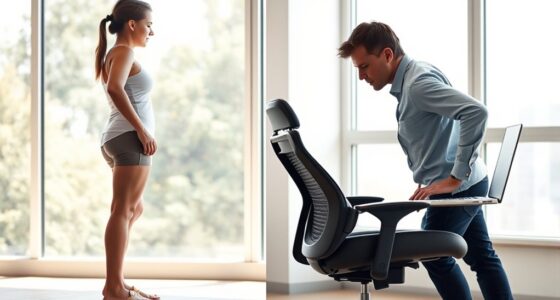
To make Zoom calls more comfortable using ergonomics, start by adjusting your chair to support your lower back and position your feet flat on the floor. Keep your monitor at eye level and about an arm’s length away to reduce neck strain, and guarantee your desk height allows elbows to stay at a 90-degree angle. Proper lighting and taking regular breaks can further ease eye and muscle fatigue. Continue exploring these tips for a healthier, more comfortable workspace.
Key Takeaways
- Adjust your chair and desk to support proper posture, with feet flat and elbows at a 90-degree angle.
- Position your monitor at eye level and about an arm’s length away to reduce neck and eye strain.
- Ensure your workspace is well-lit with minimal glare to maintain visual comfort during calls.
- Take regular breaks to stretch and move, preventing stiffness and fatigue during long Zoom meetings.
- Organize your workspace ergonomically, adding lumbar support and using adjustable equipment for maximum comfort.
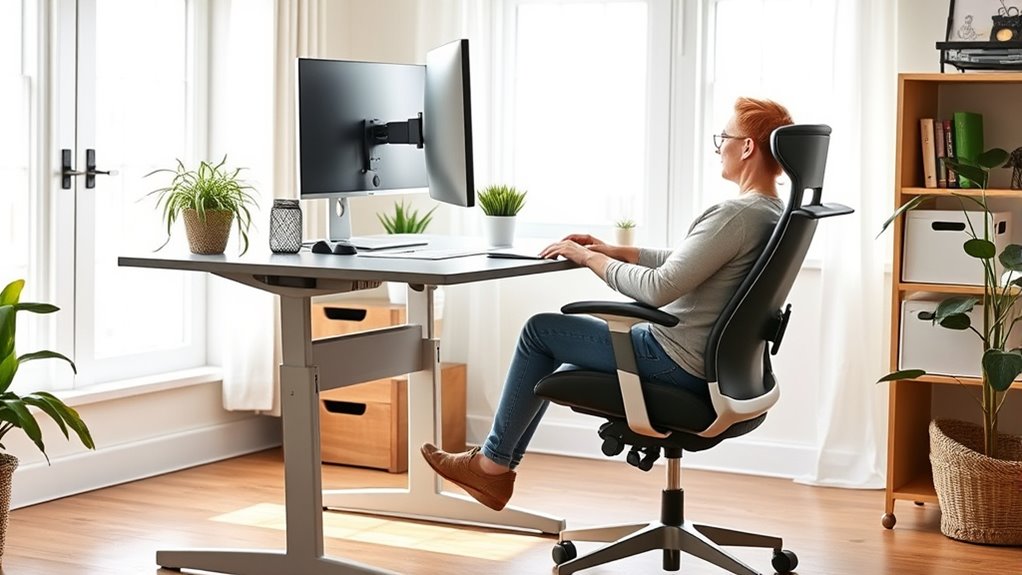
Zoom calls have become a staple of remote work and virtual communication, but they can often feel uncomfortable or draining. One of the main reasons is that many people neglect proper ergonomics during their virtual meetings. To make your Zoom experience more comfortable, start by setting up an ergonomic desk. An ergonomic desk is designed to promote good posture and reduce strain, so you want to make sure your workspace supports your body correctly. Adjust the height of your desk so that your elbows rest at a 90-degree angle when typing or using your mouse. This helps prevent shoulder and neck tension that often comes from poor desk height.
An ergonomic desk supports good posture and reduces strain during long Zoom calls.
Equally important is your chair. An adjustable chair allows you to customize your seating position to fit your body perfectly. You should be able to sit with your feet flat on the floor and your knees at a roughly 90-degree angle. The chair’s backrest should support the natural curve of your spine, especially your lower back, to prevent slouching and back pain. If your chair has lumbar support, make sure it’s positioned to support the small of your back. If it doesn’t, consider adding a lumbar pillow or cushion for extra support. Adjust the height of your chair so that your hips are level with or slightly higher than your knees, which encourages better posture and reduces pressure on your thighs.
Lighting also plays a fundamental role in comfort during Zoom calls. Position your desk so that natural light or a lamp illuminates your face evenly, reducing glare on your screen. This minimizes eye strain and makes it easier to see your colleagues clearly. Keep your monitor at eye level, about an arm’s length away, to avoid tilting your head up or down. Using an adjustable monitor stand can help you achieve this setup easily. Additionally, staying aware of AI-driven ergonomic research can provide insights on optimizing your workspace for better health.
Finally, take regular breaks, stretch, and change your position to avoid stiffness and fatigue. A well-organized, ergonomic workspace might require an initial investment, but it pays off by reducing discomfort and increasing your focus during meetings. By paying attention to your desk setup and chair adjustments, you’ll create a more comfortable environment that supports your health and keeps you engaged throughout long Zoom calls. Remember, small ergonomic tweaks can make a significant difference in how you feel during and after your virtual meetings.

HOLLUDLE Ergonomic Mesh Office Chair – 3D Adjustable Lumbar Support & 3D Armrests, V-Shaped Back, Adjustable Desk Chair for Office & Home, White
[Advanced 3D Lumbar Support] Customize your comfort with Holludle's unique 3D lumbar support. Adjust it up, down, forward,…
As an affiliate, we earn on qualifying purchases.
As an affiliate, we earn on qualifying purchases.
Frequently Asked Questions
How Can I Reduce Eye Strain During Prolonged Zoom Calls?
To reduce eye strain during long Zoom calls, you should take regular breaks and adjust your screen settings. Wearing blue light glasses helps filter harmful light, easing eye fatigue. Keep your screen at a comfortable distance—about an arm’s length—and slightly below eye level. This setup minimizes strain and keeps your eyes more comfortable over extended periods, making your Zoom calls less tiring and more productive.
What Are the Best Desk Setups for Ergonomic Comfort?
A well-designed desk setup is like a sturdy foundation for comfort. You should set your desk height so your elbows are at a 90-degree angle, reducing strain. Choose a chair with proper support—lumbar support keeps your back happy. Keep your monitor at eye level, and make sure your keyboard and mouse are within easy reach. This setup helps you stay comfortable and focused during long Zoom calls.
How Often Should I Take Breaks During Virtual Meetings?
During virtual meetings, you should aim for a break frequency of every 30 to 45 minutes, especially if the meeting lasts longer than 30 minutes. Short breaks help you stretch, relax your eyes, and improve focus. For longer sessions, consider quick 5-minute breaks every half hour. This keeps you comfortable, reduces strain, and boosts productivity throughout the meeting duration.
Are There Ergonomic Accessories That Improve Posture During Calls?
Think of ergonomic accessories as your personal posture superheroes during calls. You can use a supportive lumbar pillow, adjustable monitor stands, or an ergonomic chair to improve posture during calls. These accessories help reduce strain and fatigue, making your workspace more comfortable. Investing in ergonomic accessories is like giving your body a gentle shield, ensuring you stay alert and comfortable throughout long virtual meetings.
How Do I Adjust Lighting to Minimize Glare on My Screen?
To reduce glare on your screen during Zoom calls, you should focus on lighting adjustment. Position your light source behind your camera or off to the side, avoiding direct light hitting your screen. Use soft, diffused lighting to minimize harsh shadows and glare. Adjust the brightness and contrast settings on your monitor if needed. These steps help with glare reduction, making your calls clearer and easier on your eyes.

BONTEC Dual Monitor Stand Riser with Smartphone Holder, Adjustable Length & Swivel Angle, Ergonomic Wooden Desktop Organizer for PC Monitor, Laptop, Printer, Large Storage, White
DUAL MONITOR STAND WITH ADJUSTABLE LENGTH & ANGLE – Elevate two monitors to an ergonomic height for better…
As an affiliate, we earn on qualifying purchases.
As an affiliate, we earn on qualifying purchases.
Conclusion
By applying simple ergonomic tips, you’ll transform your Zoom calls from a strain to a breeze. Imagine your workspace as a sanctuary where comfort reigns—because when you prioritize your posture, you’re not just preventing discomfort; you’re investing in your well-being. So, why settle for discomfort when a few adjustments can make all the difference? Take control now, and let your workspace be the stage for confident, comfortable conversations. Your body will thank you for it.

Lumbar Support Pillow for Office Chair, Office Home Essentials,Gifts for Mom,Dad, Back Support Pillow for Car, Chair Cushions,Back Pain Relief Improve Posture,Mesh Cover Double Adjustable Straps
For convenience and durability, we upgraded and lengthened the straps to fit more chairs instead of adding extra…
As an affiliate, we earn on qualifying purchases.
As an affiliate, we earn on qualifying purchases.

DUMOS 63 Inch Electric Standing Desk Height Adjustable, Sit to Stand Computer Workstations Large Work PC Table Home Office Writing Gaming Desks with Memory Presets for Walking Pad, Bedroom, Rustic
Spacious 63-Inch Electric Standing Desk: Maximize your workspace with an expansive 63-inch electric standing desk. This wide, sturdy…
As an affiliate, we earn on qualifying purchases.
As an affiliate, we earn on qualifying purchases.