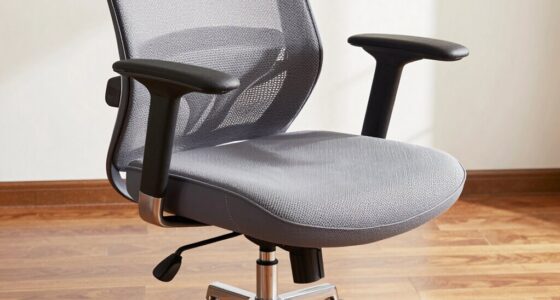
To adjust your chair’s tilt and recline correctly, start by loosening the tilt lock and sitting upright with your feet flat on the floor. Lean back to find a comfortable angle, usually between 100-110 degrees, ensuring your hips stay level. Tighten the lock to secure your preferred position. Adjust the tension so movement is smooth without feeling too loose or stiff. Keep exploring to learn more tips for maintaining ergonomic support throughout your day.

Get comfort and recovery gear delivered free with Prime
- Fast, free delivery on millions of items
- Prime Video, Amazon Music and more included
- Member-only deals all year
Key Takeaways
- Sit upright with feet flat, then loosen the tilt lock before adjusting the seat’s tilt angle.
- Lean back to find a comfortable tilt, ideally between 100-110°, and avoid extreme positions.
- Tighten the tilt lock securely to hold the desired angle, ensuring hips remain level and supported.
- Adjust the recline backrest to support natural spinal curves and maintain head and neck alignment.
- Regularly review and fine-tune your tilt and recline settings for ongoing ergonomic comfort.

Have you ever struggled to find a comfortable sitting position in your chair? If so, adjusting your chair’s tilt and recline properly can make a significant difference. When you take the time to set these features correctly, you unlock the ergonomic benefits that reduce strain and boost comfort throughout your workday. Many people overlook the importance of proper adjustment, often making common mistakes that can lead to discomfort or even long-term health issues. Understanding how to fine-tune your chair’s tilt and recline can help you avoid these pitfalls and create a more supportive seating experience.
First, start by understanding the purpose of your chair’s tilt and recline mechanisms. The tilt function allows you to adjust the angle of the seat and backrest, promoting better posture and weight distribution. The recline feature, on the other hand, gives you the ability to lean back slightly, relieving pressure on your lower back and hips. When used correctly, these adjustments provide ergonomic benefits by supporting natural spinal curves and encouraging movement, which reduces fatigue and discomfort. However, a common mistake is setting the chair’s tilt too far back or forward. If the tilt is too extreme, it can tilt your pelvis out of alignment, causing strain and limiting your mobility. Conversely, not adjusting the tilt enough might leave you in a rigid position that doesn’t support your lower back adequately.
Understanding your chair’s tilt and recline functions helps promote better posture and comfort throughout your workday.
Next, to adjust your chair’s tilt properly, start by sitting upright with your feet flat on the floor. Loosen the tilt lock if your chair has one, then gently lean back to find a comfortable angle—usually between 100 and 110 degrees. This slight recline helps distribute your weight evenly across the seat and backrest, reducing pressure points. Once you’ve found a comfortable angle, tighten the tilt lock to secure the position. It’s vital to keep your hips level and avoid slouching or leaning too far forward, as these habits can negate the ergonomic benefits of proper adjustment. Additionally, incorporating yoga principles like mindful posture and gentle movement can support your ergonomic setup and improve overall comfort.
When adjusting the recline, aim for a position that allows your back to rest naturally against the backrest while maintaining a slight tilt. This position helps decompress your spine and encourages good posture. Make sure your head and neck are aligned with your spine to prevent strain. If your chair has a tension control knob, adjust it so that leaning back feels effortless but not too loose. A common mistake is setting this tension too high, making it difficult to recline, or too low, causing the chair to tilt backward uncontrollably.
Regularly reviewing and adjusting your chair’s tilt and recline ensures continuous ergonomic benefits. Keep in mind that proper setup isn’t a one-time task; your comfort needs may change over time, so make small tweaks as necessary. By avoiding common mistakes and fine-tuning your chair, you’ll create a healthier, more comfortable workspace that supports your posture and overall well-being.
ergonomic office chair with adjustable tilt
As an affiliate, we earn on qualifying purchases.
As an affiliate, we earn on qualifying purchases.
Frequently Asked Questions
How Often Should I Readjust My Chair’s Tilt and Recline Settings?
You should readjust your chair’s tilt and recline settings whenever you notice discomfort or your ergonomic posture feels off, typically every few weeks. Regular chair maintenance helps guarantee your adjustments support proper alignment, reducing strain. Make small tweaks as needed throughout the day to stay comfortable and maintain good posture, especially if your tasks change or you spend long hours seated. Consistent adjustments promote long-term comfort and prevent musculoskeletal issues.
Can Incorrect Recline Settings Cause Long-Term Back Problems?
Incorrect recline settings can be like a slow leak in your comfort, leading to long-term back problems. When you neglect proper ergonomic posture and don’t support your lumbar properly, your spine endures unnecessary strain. Over time, this can cause chronic pain and misalignment. Always verify your chair’s recline is adjusted to support your lower back, keeping your lumbar support in the right position, so your back stays healthy and pain-free.
Are There Specific Recline Angles Recommended for Different Tasks?
Yes, specific recline angles support ergonomic posture for different tasks. For typing or focused work, keep the recline angle between 90° and 110°, maintaining lumbar support to reduce strain. When taking breaks or reading, a slight recline up to 135° can help relax your back muscles. Always verify your lumbar support stays aligned with your lower back, promoting comfort and preventing long-term discomfort during varied activities.
How Do I Know if My Chair’s Tilt Tension Is Properly Set?
Imagine leaning back comfortably as if supported by a gentle breeze—that’s how you’ll know your tilt tension is set right. If your chair resists leaning but still moves smoothly, the tension provides ideal ergonomic benefits. Use your adjustment tools to tighten or loosen the tension until you find that perfect balance. Properly set, your chair supports your movements without strain, ensuring comfort and reducing fatigue throughout your workday.
Does Frequent Reclining Affect the Chair’s Lifespan?
Frequent reclining doesn’t necessarily harm your chair’s lifespan if you maintain an ergonomic posture and proper lumbar support. Regularly shifting your position can actually help distribute wear evenly, preventing certain parts from wearing out prematurely. Just make certain your chair’s tilt tension is set correctly, so it supports your movements comfortably. Maintaining good posture while reclining reduces strain and prolongs your chair’s durability, making it a healthy choice for your back and your furniture.
As an affiliate, we earn on qualifying purchases.
Conclusion
Remember, properly adjusting your chair’s tilt and recline can boost comfort and reduce strain. Did you know that ergonomically optimized chairs can increase productivity by up to 17%? Taking a few moments to fine-tune your chair might just make a big difference in your day. So, experiment with your settings until you find what feels best—your back and neck will thank you for it. Comfort isn’t just a luxury; it’s a productivity booster.
ergonomic mesh chair for back support
As an affiliate, we earn on qualifying purchases.
As an affiliate, we earn on qualifying purchases.
office chair tilt lock mechanism
As an affiliate, we earn on qualifying purchases.
As an affiliate, we earn on qualifying purchases.
Halloween Picks
halloween
As an affiliate, we earn on qualifying purchases.