To stay focused during virtual meetings, set clear goals and prepare questions beforehand. Find a distraction-free space, turn off notifications, and keep your environment tidy. Participate actively by using chat, asking questions, and taking notes to boost engagement. Manage your time by sticking to agenda items and gently steering conversations back on track. Keep your energy up with water and good posture. Continue exploring these strategies to master your focus every time.
Key Takeaways
- Create a distraction-free environment by turning off notifications and closing unrelated tabs.
- Participate actively through chat, reactions, and note-taking to stay engaged.
- Allocate specific time blocks for agenda items to manage focus and prevent drifting.
- Use video to enhance connection and maintain alertness during meetings.
- Schedule short breaks for long meetings to refresh your attention and reduce fatigue.

Virtual meetings have become a staple of modern work, but they often challenge your ability to stay focused. With so many distractions vying for your attention—emails, notifications, multitasking—it’s easy to zone out or lose track of what’s being discussed. To maintain your focus, you need effective strategies that help you stay present and engaged throughout the meeting. One key aspect is mastering your time management. Before each meeting, set clear goals for what you want to achieve. Know which topics are most relevant to you and prepare any questions or notes in advance. This way, you avoid wasting time on tangential discussions and stay aligned with the meeting’s purpose. During the session, allocate specific time blocks for different agenda items, and gently steer conversations back on track if they drift. Managing your time effectively ensures you’re not overwhelmed or bored, which can lead to distraction.
Engagement strategies are equally important for maintaining focus. Actively participating in the discussion keeps your mind engaged and prevents it from wandering. Use features like chat or reactions to contribute, ask questions, or share your insights. This active involvement signals to your brain that you’re invested, making it easier to stay attentive. Additionally, practicing good video habits can boost your engagement—sit upright, maintain eye contact with the camera, and minimize multitasking. Avoid the temptation to check your phone or switch windows, as these actions fragment your attention and diminish your focus. During the meeting, take notes—not just to record information but also to stay mentally present. Writing down key points helps you process information more deeply and keeps you alert. Being aware of distraction management techniques can further help you stay on course and avoid common interruptions.
Another effective engagement strategy is to position yourself in a distraction-free environment. Turn off notifications, close unnecessary tabs, and let others know you’re in a focused session. If possible, keep a water bottle nearby to stay refreshed, as dehydration can sap your concentration. Break up long meetings by requesting short breaks or suggesting brief check-ins if you notice your focus waning. Remember, your ability to stay engaged hinges on your proactive approach—anticipate potential distractions and create a conducive environment for concentration. By managing your time wisely and employing engagement strategies, you’ll find it easier to stay attentive, contribute meaningfully, and make virtual meetings more productive for everyone involved.

Lumbar Support Pillow for Office Chair,Mothers Day Gifts for Mom, Back Support Pillow for Car, Office Supplies, Chair Cushions, Back Pain Relief Improve Posture, Mesh Cover Double Adjustable Straps
- Extended Adjustable Straps: Fits more chairs securely
- Ergonomic Back Support: Relieves back pain and improves posture
- High-Density Memory Foam: Maintains shape and provides firm support
As an affiliate, we earn on qualifying purchases.
Frequently Asked Questions
How Can I Handle Technical Issues During Meetings?
When technical issues arise during virtual meetings, stay calm and troubleshoot quickly. For audio troubleshooting, check your microphone and speaker connections or restart the device if needed. Confirm your camera setup is correct by testing your camera before the meeting and adjusting the position if necessary. Keep a backup plan, like dial-in options, handy. Staying proactive and prepared helps you handle technical glitches smoothly, keeping your focus on the discussion.
What Should I Do if I Get Distracted Easily?
Oh, the irony of fighting distraction triggers when they’re everywhere, right? When you get distracted easily, try focus techniques like pausing to breathe or jotting down key points. Minimize temptations—turn off notifications and close unrelated tabs. These small steps help you stay present, even amid chaos. Recognize what pulls your attention and actively counter it; that’s how you regain control and keep your mind sharp during virtual meetings.
How Can I Stay Engaged When Meetings Are Lengthy?
When meetings get lengthy, you can stay engaged by practicing mindful breathing to stay calm and centered. Take a few deep breaths if your focus drifts. Actively participate by asking questions or sharing ideas, which keeps you involved. Break the monotony by taking brief notes or jotting down key points. These strategies help you maintain your focus and make certain you’re contributing meaningfully throughout the meeting.
What Are Some Etiquette Tips for Virtual Meetings?
Think of virtual meetings as your digital stage—dress professionally and show up on time, like a seasoned actor ready for their cue. Use a tidy background, mute when not speaking, and stay attentive. Keep eye contact by looking at the camera, and avoid multitasking. These etiquette tips help you appear polished and respectful, ensuring your virtual presence is as effective and engaging as a face-to-face interaction.
How Do I Manage Multiple Meetings in One Day?
To manage multiple meetings in one day, prioritize your schedule with effective time management. Set clear agendas for each meeting to stay organized and focused. Block specific time slots for preparation and breaks to avoid burnout. Use calendar reminders to stay on track, and don’t hesitate to decline non-essential meetings. This approach helps you stay productive, guarantees you’re prepared, and maintains your focus throughout a busy day.

Samsonite Lumbar Support Pillow for Office Chair, Lower Back Support for Car, Back Pillow Desk Chair Cushion with Memory Foam, Improved Posture Backrest
- Contoured Memory Foam: Provides all-day lumbar support
- Adjustable Straps: Ensures secure fit on chair and car seats
- Ventilated Mesh Cover: Promotes airflow for cooler sitting
As an affiliate, we earn on qualifying purchases.
Conclusion
By staying present and applying these tips, you’ll find it easier to maintain focus during virtual meetings. Ironically, the very tools meant to distract us—our phones and notifications—can become allies in keeping us engaged if used wisely. It’s no coincidence that with a little intentional effort, you’ll notice your participation and productivity soar. So, next time, remember: your focus is within reach, just like that unexpected moment of clarity that can change everything.

Everlasting Comfort The Original Lumbar Support Pillow for Office Chair - Improves Posture, Promotes Back Pain Relief - Superior Back Support for Gaming and Desk Chairs - Lumbar Pillow for Car, Couch
- High-Density Memory Foam: Provides firm, long-lasting support
- Supports Natural Spine Curve: Encourages better posture and reduces slouching
- Versatile Use: Suitable for office, car, couch, and gaming chairs
As an affiliate, we earn on qualifying purchases.
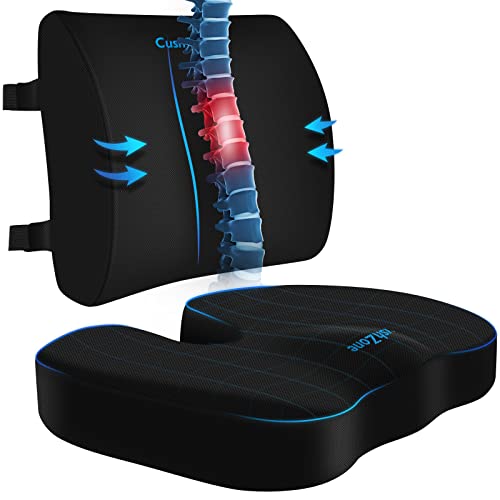
CushZone Seat Cushion and Lumbar Support Pillow for Office Chair, Black
- Ergonomic Dimensions for Comfort: Sized for most users with ergonomic design
- High-Quality Materials: Made of durable fabric with quality zippers
- Non-Slip and Adjustable Fit: Non-slip bottom and adjustable straps for stability
As an affiliate, we earn on qualifying purchases.