Even in a high-quality ergonomic office chair, sitting continuously for over two hours can pose health risks like muscle fatigue, poor circulation, and discomfort. To stay comfortable and healthy, it’s best to take breaks every 30 to 60 minutes, stand up, stretch, or move around. Proper adjustments and posture help, but long periods of static sitting aren’t ideal. If you want tips on optimizing your sitting habits and avoiding issues, there’s more to discover ahead.
Key Takeaways
- Experts recommend limiting continuous sitting to about two hours to prevent health risks.
- Even supportive chairs cannot fully eliminate risks of prolonged sitting; regular breaks are essential.
- Incorporate movement or stretching every 30 to 60 minutes to reduce muscle fatigue and improve circulation.
- Ergonomic adjustments should be made frequently to maintain proper posture during extended periods.
- The quality of sitting time matters more than total hours; prioritize movement and proper posture.
Spending hours in a good office chair can boost productivity and comfort, but even the best seat has its limits. No matter how supportive or adjustable your chair is, sitting for extended periods can lead to discomfort or even health issues if you’re not mindful. That’s why understanding how many hours is too many in a good office chair is crucial. The key lies in making regular ergonomic adjustments and focusing on posture maintenance.
When you sit for long stretches, your body naturally shifts into a static position, which can cause strain on your neck, back, and shoulders. To combat this, you should frequently adjust your chair’s features—like height, lumbar support, and armrest positions—to ensure your body remains aligned. Proper ergonomic adjustments help keep your spine in a neutral position, reducing the risk of developing chronic pain or repetitive strain injuries. It’s not just about comfort; it’s about preventing long-term health problems.
Posture maintenance is equally important. Sitting in the same position for hours can cause muscle fatigue and stiffness. Every 30 to 60 minutes, take a brief break to stand, stretch, or walk around. Even small movements can improve circulation and relieve tension. When you do sit back down, check your posture: your feet should be flat on the ground, your knees at a 90-degree angle, and your back properly supported by the chair’s lumbar support. Keep your shoulders relaxed and your monitor at eye level to avoid straining your neck. These small adjustments reinforce good posture habits and help you stay comfortable longer.
While a high-quality office chair offers excellent features for extended use, it doesn’t mean you should spend endless hours seated without interruption. Experts recommend limiting continuous sitting to about two hours, followed by a short break. If your work involves long periods of desk work, consider using a sit-stand desk or incorporating movement breaks into your routine. The goal is to prevent the negative effects of prolonged sitting, such as decreased circulation, back pain, and fatigue.
In addition, incorporating movement and variation into your routine can significantly reduce the strain caused by static sitting. The goal is to prevent the negative effects of prolonged sitting, such as decreased circulation, back pain, and fatigue. In the end, it’s not just about how many hours you spend in your chair but how you manage those hours. Regular ergonomic adjustments combined with consistent posture maintenance help you maximize comfort and minimize health risks. Remember, your body needs movement and variation—so listen to it, take breaks, and stay mindful of your sitting habits. That way, you can enjoy the benefits of your good office chair without overdoing it.

Ergonomic Office Chair with Adjustable Lumbar Support, 3D Arms and Headrest, High Back Wide Desk Computer Chair with Wheels, for Home & Office, Black
Large & Non-Deformable Cushion: 4.3" thick high-density foam cushion of ergonomic office chair resists sagging, retains shape &…
As an affiliate, we earn on qualifying purchases.
As an affiliate, we earn on qualifying purchases.
Frequently Asked Questions
How Can I Tell if My Office Chair Is Causing Discomfort?
You can tell if your office chair causes discomfort by paying attention to your posture alignment and cushion firmness. If you feel persistent aches, numbness, or your posture worsens, the chair might not be supportive enough. Check if the cushion feels too soft or too hard, and make sure your hips and knees are at a right angle. Adjusting these elements can help improve comfort and prevent strain during long hours.
Are There Specific Signs of Poor Ergonomic Support?
Yes, there are signs of poor ergonomic support. You might notice posture issues like slouching or leaning forward, which can lead to discomfort. If your lumbar support is inadequate, you’ll likely feel lower back pain or stiffness after sitting for a while. Pay attention to these symptoms—if they occur, your chair may not be providing the proper support, and adjusting or upgrading it can help prevent long-term discomfort.
What Are the Long-Term Health Effects of Sitting Too Long?
Sitting too long can lead to long-term health issues like back pain, obesity, and cardiovascular problems. To combat this, use ergonomic accessories such as lumbar supports and footrests, and incorporate sit-stand desks into your routine. Regularly shifting positions helps reduce strain and improve circulation. If you stay seated for hours, you risk developing chronic conditions, so make conscious efforts to stand, stretch, and adjust your workspace frequently.
How Often Should I Take Breaks During Extended Sitting?
You should take a break every 30 to 60 minutes during extended sitting. Use this time for posture correction, ensuring your back is aligned and your shoulders are relaxed. Incorporate stretch routines to relieve muscle tension and improve circulation. These short breaks help prevent long-term health issues, reduce fatigue, and boost productivity. Remember, consistent movement is key to maintaining comfort and good posture throughout your workday.
Does the Type of Office Chair Affect Sitting Duration Safety?
Yes, the type of office chair affects your sitting duration safety. An adjustable lumbar support helps maintain proper spine alignment, reducing strain during long hours. Cushion firmness also matters; a chair with the right firmness prevents discomfort and promotes good posture. Choose a chair that allows you to customize these features, and you’ll be better equipped to sit safely for extended periods without risking pain or injury.

VIVO 32 inch Desk Converter, K Series, Height Adjustable Sit to Stand Riser, Dual Monitor and Laptop Workstation with Wide Keyboard Tray, Black, DESK-V000K
Create Instant Active Standing – VIVO’s desk riser provides on-demand standing throughout the day for the freedom to…
As an affiliate, we earn on qualifying purchases.
As an affiliate, we earn on qualifying purchases.
Conclusion
Remember, even the best office chair can’t work miracles if you sit too long. Think of your body like a car engine—without breaks, it’ll overheat and break down. I once ignored my own advice and sat for eight hours straight; by the end of the day, I felt like I’d run a marathon without training. So, listen to your body, take regular breaks, and keep your “engine” running smoothly—your health will thank you.
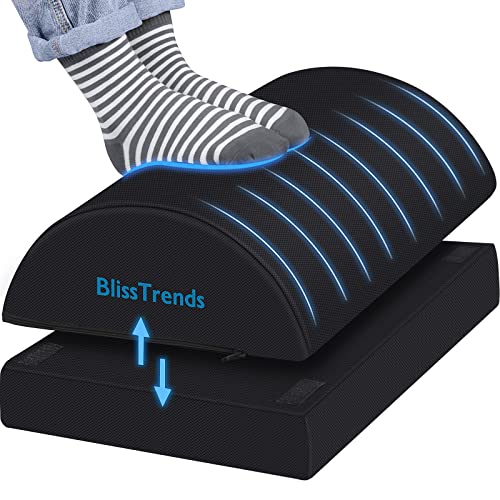
BlissTrends Foot Rest for Under Desk at Work-Versatile Foot Stool with Washable Cover-Comfortable Footrest with 2 Adjustable Heights for Car,Home and Office to Relieve Back,Lumbar,Knee Pain-Black
[Comfortable Experience] The BlissTrends foot rest has two layers: the lower layer measures 16.2"*9.9"*2.0", and the upper layer…
As an affiliate, we earn on qualifying purchases.
As an affiliate, we earn on qualifying purchases.

Lumbar Support Pillow for Office Chair, Office Home Essentials,Gifts for Mom,Dad, Back Support Pillow for Car, Chair Cushions,Back Pain Relief Improve Posture,Mesh Cover Double Adjustable Straps
For convenience and durability, we upgraded and lengthened the straps to fit more chairs instead of adding extra…
As an affiliate, we earn on qualifying purchases.
As an affiliate, we earn on qualifying purchases.