Welcome to your ultimate 2026 ergonomic home office essentials checklist! Whether you’re setting up a new workspace or upgrading your current setup, this guide is designed for anyone who values comfort, productivity, and health during long hours at the desk. From ergonomic chairs to accessories that support your posture, we’ve curated a selection of must-have items tailored to various needs and preferences.

Get comfort and recovery gear delivered free with Prime
- Fast, free delivery on millions of items
- Prime Video, Amazon Music and more included
- Member-only deals all year
This checklist is organized into key categories, each focusing on a specific aspect of your home office setup. You’ll find detailed insights into why each product matters, common pitfalls to avoid, and expert sizing and compatibility tips. Use this guide to make informed decisions that will transform your workspace into a comfortable, efficient environment—because a well-designed home office is essential for both well-being and work performance.
To get the most out of this list, consider your unique space, body dimensions, and work habits. Check the ‘lookFor’ sections for specific features to prioritize, and read the verdicts for quick recommendations. Remember, investing in quality ergonomic essentials is an investment in your health and productivity—so choose wisely and enjoy the benefits of a truly supportive workspace.
Ergonomic Office Chairs
An ergonomic office chair is the cornerstone of a healthy workspace, helping to prevent back pain and promote good posture. The Steelcase Gesture Office Chair is renowned for its adaptive design that supports a wide range of postures, making it ideal for long hours. When selecting a chair, ensure it has adjustable features like seat height, armrests, and lumbar support to suit your body perfectly. Proper fit is crucial—measure your seat height and arm length, and verify that the chair’s dimensions match your workspace.
Common mistakes include choosing a chair based solely on aesthetics or ignoring adjustability options. Also, avoid chairs that do not offer lumbar support or have limited movement, as these can lead to discomfort over time. For carpeted floors, consider chairs with soft casters or a chair mat to facilitate smooth movement. Remember, a good ergonomic chair should allow your feet to rest flat on the floor with knees at a 90-degree angle, supporting your lower back naturally.
What to look for:
- Adjustable seat height and depth
- Adequate lumbar support
- Smooth-rolling casters suitable for carpet
- Breathable, durable upholstery
- Ergonomic armrest adjustability
Steelcase Gesture Office Chair, Carpet Floors, Licorice

The Steelcase Gesture Office Chair is ergonomically designed to adapt to various body types and postures, making it suitable for extended use. It features adjustable settings, a contoured back, and wheels optimized for carpeted floors, providing comfort and support for long work sessions.
Pros:
- Ergonomic design that adapts to different postures
- Adjustable features for personalized comfort
- Suitable for long hours of use
- Wheels optimized for carpeted floors
Cons:
- May be expensive for some budgets
- Complex adjustments might require some learning
- Design may be too specialized for non-carpeted floors
Best for: Long hours of daily use
Not ideal for: Limited adjustability and support
Bottom line: Choose a chair that adapts to your body and workspace.
Adjustable Standing Desks
An adjustable standing desk transforms your workspace into a flexible environment that promotes movement and reduces sedentary behavior. The Vari ComfortEdge Electric Standing Desk offers a spacious 60×30 inch surface with smooth electronic height adjustments, making it easy to switch between sitting and standing. When selecting a standing desk, consider the range of height adjustments to match your ergonomic needs, as well as stability and build quality. Proper setup ensures your monitor is at eye level and your keyboard at a comfortable height to prevent strain.
Common mistakes include choosing desks with limited height options or inadequate stability, which can be unsafe or uncomfortable. Also, pay attention to the desk’s weight capacity and compatibility with accessories like monitor arms or keyboard trays. For smaller spaces, look for models with a compact footprint, and verify that the surface can accommodate your essential equipment. Remember, alternating between sitting and standing throughout the day supports circulation and reduces fatigue.
What to look for:
- Wide height adjustment range
- Sturdy frame and stable surface
- Cable management features
- Compatibility with accessories
- Size suitable for your space
Vari ComfortEdge Electric Standing Desk – 60×30 – Walnut/Slate

This modern electric standing desk features a spacious 60×30 inch walnut laminate surface with a sturdy engineered wood frame. It offers adjustable height with four preset positions, making it suitable for ergonomic work setups.
Pros:
- Spacious 60×30 inch work surface provides ample space for multiple monitors and accessories.
- Adjustable height with four preset positions for ergonomic comfort.
- Modern walnut laminate finish adds a stylish look to any office.
Cons:
- No mention of motor noise level during height adjustment.
- Limited to four height presets, which may not suit all users.
- Assembly instructions and process are not detailed.
Best for: Frequent sit-stand transitions
Not ideal for: Limited height range or instability
Bottom line: Invest in a sturdy desk that adapts to your workflow.
Lumbar Support Cushions
Adding a lumbar support cushion can significantly improve your sitting posture, especially during long work sessions. The Heated Seat Cushion with Lumbar Support for Office Chair provides targeted comfort and helps maintain the natural curve of your lower back. When choosing a lumbar cushion, look for adjustable straps to secure it firmly in place and compatible sizes to fit your chair comfortably. Consider features like heating elements or breathable fabric for added comfort, especially in cooler environments.
Many overlook the importance of proper lumbar support, leading to discomfort and long-term back issues. Avoid cushions that are too thin or lack support, as they won’t provide the necessary back relief. Ensure the cushion’s size and shape match your chair’s design, and position it to support the natural inward curve of your lower back. Proper placement and firmness are key to maximizing benefits and avoiding slouching.
What to look for:
- Adjustable straps for secure fit
- Supportive, firm padding
- Breathable, washable cover
- Optional heating feature
- Compatible with your chair size
Heated Seat Cushion with Lumbar Support for Office Chair
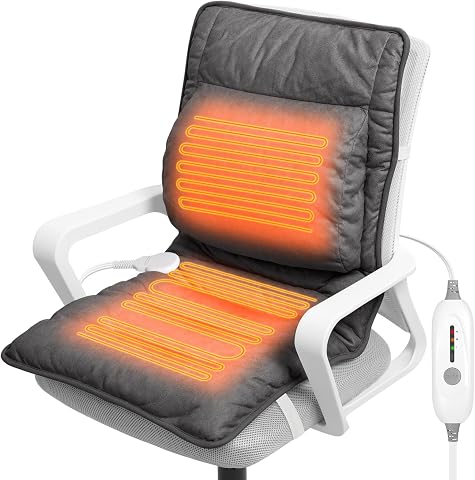
This heated seat cushion features an ergonomic design with larger heating zones that provide rapid, even warmth to the back, hips, and thighs. It offers targeted lumbar pain relief, adjustable heat settings, and is made from premium, easy-to-clean materials, making it suitable for various chair types.
Pros:
- Provides rapid, even heat distribution for full-back, hip, and thigh warmth
- Ergonomic design with lumbar support for targeted pain relief
- Adjustable heat settings and auto shut-off for safety and personalized comfort
- Made from soft, skin-friendly, easy-to-clean materials
Cons:
- Requires an electrical outlet for operation
- May be too bulky for small or compact chairs
Best for: Back pain prevention
Not ideal for: Lack of adjustability or support
Bottom line: Prioritize lumbar support for better posture and comfort.
Monitor Arms & Stands
A monitor arm provides flexibility in positioning your screen, reducing neck and eye strain. The Humanscale M10 Adjustable Heavy Duty Monitor Arm is designed for durability and precise movement, allowing you to customize your monitor’s height, tilt, and angle. When selecting a monitor arm, ensure it supports your monitor’s size and weight, and check compatibility with your desk setup. Proper positioning means the top of your screen should be at or slightly below eye level, with the monitor about an arm’s length away for optimal viewing.
Common mistakes include choosing arms that are too limited in movement or incompatible with your monitor’s size. Avoid fixed mounts if you prefer flexibility, and verify that the arm’s clamp or grommet mount fits your desk. Also, consider cable management features to keep your workspace tidy. A good monitor arm can help prevent neck strain and improve your posture, especially during long work hours, by allowing effortless adjustments throughout the day.
What to look for:
- Supports monitor weight and size
- Smooth, adjustable movement
- Secure mounting options
- Cable management features
- Ease of installation
Humanscale M10 Adjustable Heavy Duty Monitor Arm with Angled/Dynamic Links – Two

The Humanscale M10 monitor arm is designed to support heavier equipment, holding up to three monitors or 48 pounds with a sleek, adjustable design. It features patented Weight-Compensating Spring Technology and Smart Stop functionality for enhanced comfort, flexibility, and easy installation in various workspace setups.
Pros:
- Supports up to three monitors or 48 pounds, suitable for heavy equipment
- Features innovative Weight-Compensating Spring Technology for smooth adjustments
- Easy to install with quick-release joints and versatile clamp mounting
- Sleek and modern design suitable for various workspace styles
Cons:
- May be more expensive than lighter-duty monitor arms
- Requires sufficient desk space for clamp mounting
- Heavy-duty design might be overkill for users with lighter monitor setups
Best for: Ergonomic monitor positioning
Not ideal for: Limited adjustability or support
Bottom line: Choose a monitor arm that offers stability and flexibility.
Footrests & Anti-Fatigue Mats
Implementing a footrest or anti-fatigue mat can make a significant difference in your comfort, especially if you spend hours seated. The NOVA Heavy Duty Bariatric Transport Chair with a 400 lb. capacity and 22-inch width offers a sturdy platform for elevating your feet, promoting better circulation and reducing pressure on your lower back. When selecting a footrest or mat, consider the adjustability to match your height and the surface material for comfort and durability. An anti-fatigue mat is particularly beneficial on hard floors, providing cushioning to reduce fatigue and discomfort.
Many users neglect the importance of proper foot support, which can lead to leg cramps and back strain. Avoid low-quality mats that wear out quickly or footrests that are too small or unstable. Ensure your footrest is wide and sturdy enough to support your feet comfortably, and position it so your knees stay at a 90-degree angle for optimal ergonomic benefit. Regularly adjusting your foot position throughout the day helps maintain circulation and comfort.
What to look for:
- Sturdy, non-slip base
- Adjustable height or tilt
- Comfortable, durable surface
- Wide enough to support both feet
- Compatibility with your flooring
NOVA Heavy Duty Bariatric Transport Chair with 400 lb. Capacity, 22” Wide Seat,
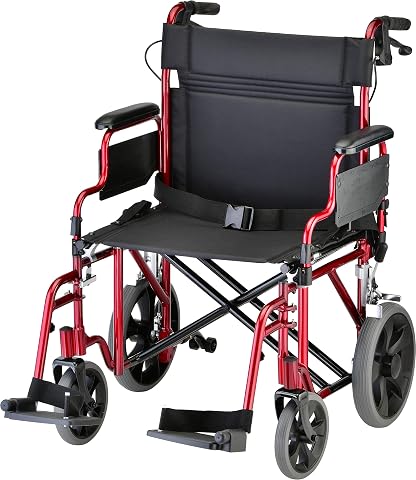
This heavy-duty bariatric transport chair features a 22-inch wide seat, a 400-pound weight capacity, and easy-to-use locking hand brakes. Designed for safety and versatility, it includes flip-up arms, anti-tippers, and rugged rear wheels, making it suitable for all terrains and easy transfers.
Pros:
- Heavy-duty design supports up to 400 lbs
- Wide 22-inch seat for added comfort
- Easy to maneuver and fold for transport
- Includes safety features like locking hand brakes and anti-tippers
Cons:
- Heavier than standard wheelchairs, may be harder to lift
- Limited color options (only red mentioned)
Best for: Reducing fatigue during long sitting sessions
Not ideal for: Unstable or poorly sized support
Bottom line: Prioritize stability and comfort in foot support tools.
Ergonomic Keyboard & Mouse
The ergonomic keyboard and mouse combination is essential for reducing repetitive strain injuries and maintaining healthy wrists. The Kinesis Advantage360 Professional Split Ergonomic Keyboard offers a split design that encourages natural hand positioning, while Bluetooth connectivity adds convenience. When choosing ergonomic input devices, look for features like adjustable tenting, wrist support, and customizable keys to suit your workflow. Proper placement—keeping your wrists straight and elbows close to your body—can prevent discomfort and long-term issues.
Many overlook the importance of ergonomic input devices, opting for standard keyboards and mice that can cause strain over time. Avoid devices that do not support natural hand posture or lack adjustability. Consider your workspace layout and ensure your keyboard and mouse are positioned to keep your forearms parallel to the floor. Regular breaks and wrist stretches complement a good ergonomic setup, helping you maintain comfort and productivity throughout your workday.
What to look for:
- Split or tented design
- Adjustable height and tilt
- Wrist support features
- Wireless connectivity
- Customizable keys
Kinesis Advantage360 Professional Split Ergonomic Keyboard – Bluetooth, Quiet Me

The Kinesis Advantage360 is an ergonomic split keyboard designed to enhance comfort and productivity with a contoured shape, adjustable tenting, and thumb keys. It features quiet mechanical switches, Bluetooth connectivity, and full programmability, making it suitable for various operating systems.
Pros:
- Ergonomic split design increases comfort and reduces strain
- Quiet mechanical switches provide a smooth typing experience
- Fully programmable and open source for customization
- Adjustable tenting for personalized ergonomic setup
Cons:
- May be expensive for some users
- Requires setup time for customization
- Additional palm pads sold separately
Best for: Prolonged typing and mouse use
Not ideal for: Lack of ergonomic features or support
Bottom line: Opt for a keyboard and mouse that promote natural posture and reduce strain.
Starting your ergonomic home office with budget-conscious choices is a smart way to prioritize your health without overextending your budget. Focus on the essentials first—like a supportive chair and adjustable desk—and then gradually add accessories for enhanced comfort. Remember, small investments in ergonomic tools can lead to big benefits in comfort, productivity, and overall well-being.
Stay proactive about your workspace setup, and don’t be afraid to experiment with different configurations to find what works best for you. Your comfort and health are worth it—happy working in your optimized, ergonomic home office!
Fall Picks

Therabody Theragun Mini 3rd Gen Massage Gun (Travel Essential, Black)
As an affiliate, we earn on qualifying purchases.