Whether you’re working from a home office or a corporate setup, maintaining ergonomic comfort is essential for productivity and well-being. This checklist is designed for anyone looking to optimize their workspace with high-quality ergonomic accessories that support proper posture and reduce fatigue.

Get comfort and recovery gear delivered free with Prime
- Fast, free delivery on millions of items
- Prime Video, Amazon Music and more included
- Member-only deals all year
Organized into practical categories, this guide helps you navigate the key components of a well-rounded ergonomic setup. Each section highlights top picks and provides insights to help you make informed decisions. Use this checklist as a reference when shopping to ensure your workspace promotes health and comfort.
Remember, choosing the right accessories depends on your specific needs and workspace constraints. Consider your desk size, seating arrangement, and personal comfort preferences when selecting items. Take your time to read through each section, and prioritize fit, compatibility, and quality for the best results.
Ergonomic Keyboard
An ergonomic keyboard like the Kinesis Advantage360 Professional Split Ergonomic Keyboard – Bluetooth can significantly reduce strain during long typing sessions. Its split design encourages a more natural hand position, helping to prevent repetitive strain injuries such as carpal tunnel syndrome. When shopping for a keyboard, look for features like adjustable tenting, a comfortable key layout, and wireless connectivity options to enhance usability.
Many users make the mistake of choosing keyboards based solely on aesthetics or brand reputation without considering ergonomic features. Proper sizing and compatibility with your setup are crucial—ensure the keyboard fits comfortably within your workspace and is compatible with your computer’s connectivity options. Also, consider whether you prefer a split, tented, or curved design based on your hand and wrist comfort.
Investing in an ergonomic keyboard tailored to your needs can make a noticeable difference in comfort and productivity. Take time to test different models if possible, and prioritize features that support your natural typing posture.
What to look for:
- Split or tented design for natural hand position
- Wireless or Bluetooth connectivity
- Adjustable tenting angles
- Comfortable, well-spaced keys
- Compatibility with your devices
Kinesis Advantage360 Professional Split Ergonomic Keyboard – Bluetooth, Quiet Me

The Kinesis Advantage360 is an ergonomic split keyboard designed to increase comfort and productivity with a contoured shape, adjustable tenting, and quiet mechanical switches. It offers wireless connectivity, full programmability, and compatibility with major operating systems, making it suitable for professional and power users.
Pros:
- Ergonomic split design enhances comfort and reduces strain
- Fully programmable with open-source support
- Quiet mechanical switches provide a premium typing experience
- Adjustable tenting and separation for personalized ergonomics
Cons:
- Premium price may be high for some users
- Requires setup and customization for optimal use
- Limited backlighting options
Best for: Long hours of typing and reduced strain
Not ideal for: Casual or infrequent computer use
Bottom line: Prioritize comfort and ergonomic features for best typing experience.
Adjustable Monitor Stands
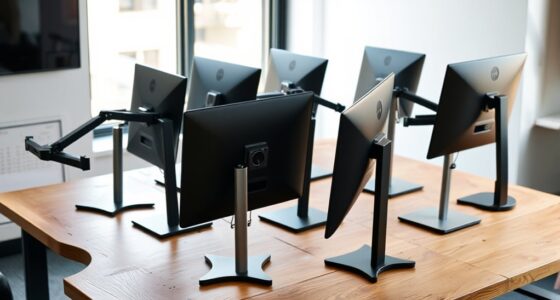
The HUANUO Dual Monitor and Laptop Mount offers a versatile solution for elevating your screens to eye level, which is vital for maintaining a healthy posture. Proper monitor height reduces neck strain and encourages better alignment of your head and spine. When selecting an adjustable stand, ensure it supports the weight and size of your monitors and laptops.
Common mistakes include choosing stands that are too low or too rigid, forcing improper neck angles. Look for adjustability in height, tilt, and rotation to customize your setup. Compatibility with your monitor sizes and VESA mounting options are also key considerations for a secure fit.
Investing in a sturdy, adjustable stand helps create an ergonomic workspace that minimizes discomfort during extended work sessions. Measure your monitor and desk space beforehand to select a stand that fits seamlessly into your setup, and always prioritize stability and ease of adjustment.
What to look for:
- Supports multiple monitor sizes
- Adjustable height, tilt, and rotation
- VESA compatibility
- Sturdy, stable base
- Ease of installation and adjustment
HUANUO Dual Monitor and Laptop Mount for 32” Monitors and 17” Laptop, Adjustable

This versatile dual monitor and laptop mount supports two 32-inch monitors and a 17-inch laptop, allowing for customizable positioning to enhance productivity. It features adjustable arms with tilt, swivel, and rotation, providing ergonomic flexibility and space-saving benefits.
Pros:
- Supports two monitors and a laptop simultaneously, saving desk space
- Adjustable arms with tilt, swivel, and rotation for ergonomic positioning
- Multiple mounting options for versatile installation
Cons:
- Grommet mount only compatible with wooden and plastic desks
- Maximum monitor weight limit may restrict heavier monitors
- Limited to desks within specified thickness range
Best for: Dual monitor users and multi-device setups
Not ideal for: Limited desk space or small monitors
Bottom line: An adjustable stand promotes healthier viewing angles and comfort.
Supportive Footrests
The Massage Office Chair with Heat and Footrest combines support and relaxation, making it an excellent addition to any ergonomic workspace. A supportive footrest encourages proper leg and lower back alignment, reducing pressure on your hips and thighs. Features like heat and massage functions add extra comfort, especially during long work hours.
Many overlook the importance of foot support, often leading to poor circulation and fatigue. When choosing a footrest, look for adjustable height and tilt, ensuring it fits comfortably under your desk and supports your feet naturally. Compatibility with your chair height and personal preferences are also important factors.
Proper foot support can help prevent discomfort and improve overall posture. Take the time to select a model that offers adjustability and comfort features to suit your needs, and position it so your feet rest flat with knees at a 90-degree angle.
What to look for:
- Adjustable height and tilt
- Non-slip surface for stability
- Built-in massage or heat functions
- Compact size for your workspace
- Supports feet comfortably
Massage Office Chair with Heat and Footrest

This ergonomic office chair features built-in lumbar heating, 6-point vibration massage, and a reclining backrest with a retractable footrest for added comfort. Designed for long hours of sitting, it offers adjustable support, a sturdy build, and a modern appearance suitable for work or gaming.
Pros:
- Includes heating and vibration massage for relaxation
- Adjustable lumbar support and reclining backrest for personalized comfort
- Sturdy construction with modern design
Cons:
- May be bulky for small spaces
- Complex assembly process
- Potentially high price for some users
Best for: Extended work sessions and comfort-focused setups
Not ideal for: Limited desk space or minimal foot support needs
Bottom line: A quality footrest enhances comfort and promotes good posture.
Lumbar Support Cushions
The Lumbar Support Pillow for Office Chair is a simple yet effective way to improve your back health during work. Proper lumbar support helps maintain the natural curve of your spine and prevents slouching, which can lead to pain and fatigue. When selecting a cushion, look for adjustable straps and contoured designs that fit your chair and back shape.
Common mistakes include choosing cushions that are too flat or too bulky, which can cause discomfort or inadequate support. Ensure the pillow is compatible with your chair size and provides firm, supportive cushioning without restricting movement. Proper positioning—just above the belt line—is essential for optimal support.
Using a lumbar support pillow regularly can help reduce lower back pain and improve your overall posture. Take the time to test different shapes and firmness levels to find the best fit for your body and workspace, and always ensure it stays securely in place during use.
What to look for:
- Adjustable straps for secure fit
- Contoured, ergonomic shape
- Firm but comfortable cushioning
- Compatibility with various chair sizes
- Ease of cleaning and maintenance
Lumbar Support Pillow for Office Chair, Seat Cushion with Back Support, for Tail

This ergonomic lumbar support pillow and seat cushion set provides targeted relief for back pain, sciatica, and tailbone discomfort caused by prolonged sitting. Made with high-density memory foam and a breathable, washable cover, it offers enhanced comfort and support for office chairs, car seats, and gaming chairs.
Pros:
- Ergonomic design effectively relieves back and tailbone pain
- Large size provides ample support and comfort
- Breathable, washable cover enhances hygiene and temperature regulation
- Anti-slip bottom ensures stability during use
Cons:
- May be too large for smaller chairs or limited space
- Memory foam may retain heat for some users
- Requires regular washing to maintain cleanliness
Best for: Prolonged sitting and back pain prevention
Not ideal for: Minimal back support needs
Bottom line: A supportive lumbar cushion is key for comfortable sitting.
Anti-Fatigue Mats
The Topo by Ergodriven Standing Desk Mat is designed to combat fatigue during standing work. Its premium comfort and anti-slip surface encourage movement and subtle shifts, reducing pressure on your legs and feet. An anti-fatigue mat is a must-have for anyone who spends significant time standing at their desk.
Many users select mats based on appearance rather than support features, which can lead to discomfort. Look for mats with ergonomic cushioning, durable materials, and appropriate thickness to provide real relief. Compatibility with your workspace and ease of cleaning are also worth considering.
Investing in a high-quality standing desk mat can make a substantial difference in comfort and energy levels. Be sure to measure your standing area carefully and choose a mat that fits well, supports natural movement, and encourages good posture throughout your workday.
What to look for:
- High-density, supportive cushioning
- Non-slip surface
- Appropriate size for your workspace
- Durable, easy-to-clean materials
- Encourages subtle movement
Topo by Ergodriven Standing Desk Mat – Anti-Fatigue, Premium Comfort, Obsidian B

The Topo standing desk mat is designed to reduce fatigue and improve comfort for users of standing desks. Its unique 3D terrain encourages movement, helping users feel more energized and less sore after long hours of standing.
Pros:
- Encourages movement and reduces fatigue during standing
- Unique 3D terrain design improves comfort and posture
- Repositionable with one foot for convenience
- Durable and supported by a 7-year warranty
Cons:
- Price not specified, may be expensive for some users
- Dimensions not provided, uncertain fit for all spaces
- Requires some adjustment to get used to the terrain
Best for: Long standing periods at desk
Not ideal for: Primarily seated work routines
Bottom line: A quality anti-fatigue mat enhances standing comfort and reduces fatigue.
Posture Correcting Devices
The Foldable Ergonomic Lumbar Support Seat is a versatile device designed to correct posture and provide lumbar support during work. Its foldable design makes it easy to carry and use on various chairs, promoting proper spine alignment. Incorporating such a device can help prevent slouching and reduce back strain over time.
Many users make the mistake of relying solely on cushions or chairs without addressing posture correction. Look for features like adjustable straps, breathable materials, and compatibility with your seating arrangements. Proper placement—just above the lower back—is crucial for maximum benefit.
Using a posture-correcting device regularly encourages healthier sitting habits, especially during long work hours. Choose a model that is lightweight, adjustable, and comfortable, ensuring it supports your back without restricting movement or causing discomfort.
What to look for:
- Adjustable straps for secure fit
- Breathable, supportive materials
- Foldable for portability
- Compatibility with various chairs
- Easy to clean and maintain
Foldable Ergonomic Lumbar Support Seat for Office Chairs

This foldable lumbar support features a firm PP resin frame and breathable memory foam cushioning, providing ergonomic back support to promote better posture during extended sitting. Its compact design allows easy transport and versatile use at home, office, car, or outdoor settings.
Pros:
- Compact and portable with easy folding and carrying handle
- Provides firm, ergonomic support to improve posture
- Suitable for various settings including office, car, and outdoor
Cons:
- May be too firm for those preferring softer cushions
- Designed for users up to 5’9"; may not fit taller individuals
- Limited color options (not specified)
Best for: Office chairs and remote work
Not ideal for: Minimal back support needs
Bottom line: A posture-correcting device fosters better sitting habits and reduces strain.
When building an ergonomic workspace, start with the essentials that address your most immediate needs. Focus on quality, adjustability, and compatibility to create a setup that supports your health and productivity.
Remember, investing in the right accessories pays off by reducing discomfort and enhancing your overall work experience. Take your time, prioritize your comfort, and enjoy a healthier, more efficient workspace.
Fall Picks
fall essentials
As an affiliate, we earn on qualifying purchases.