Clip-on lamps for monitor edges add task lighting without taking up desk space, but the best choice depends on screen fit, glare control, and whether you need light for work or a camera-facing call. I’d put the Quntis ScreenLinear Pro first for a monitor-focused setup, with the NEEWER NL10 standing out for adjustable bi-color light and the LitONES Diffused LED Ring Light for webcam-friendly illumination. Light bars and ring lights serve different jobs: bars generally direct light toward the desk, while rings are better suited to lighting a face. Clip shape and screen design also affect compatibility, so a lamp that fits one monitor may not suit another. Read on for how all eight options compare and which tradeoffs matter most.

Get comfort and recovery gear delivered free with Prime
- Fast, free delivery on millions of items
- Prime Video, Amazon Music and more included
- Member-only deals all year
Complete the kit


Key Takeaways
- The Quntis ScreenLinear Pro is the clearest monitor-task-light pick in this group; ring lights such as the LitONES and InnoGear make more sense when video-call lighting matters.
- Two SAMPHON light bars offer different size options, so check the listed 11.8-inch model against your usable screen width rather than assuming the longer bar will fit better.
- The NEEWER NL10’s bi-color lighting gives buyers more control over light tone than a basic lamp, though its 10W output and controls may be more than a simple desk setup needs.
- HIOUME and Colorpanda emphasize straightforward USB bar lighting; their appeal is simplicity, but buyers should verify clip compatibility and desired light coverage before choosing.
- Clip geometry is a deciding factor across all eight picks: curved, very thin, or unusually thick monitor tops can rule out a lamp even when its lighting features look suitable.
| LitONES Diffused LED Ring Light for Laptop, Monitor, and Desk |  | Best for Video Calls and Streaming | Lamp head: 5 inches | Color temperatures: 3000K–6000K; 5 settings | Brightness: 10 levels | VIEW ON AMAZON | See Our Full Breakdown |
| SAMPHON USB Monitor Light Bar with Dimmable LED and 3 Color Temperatures |  | Best for Wide Monitors | Length: 15.75 inches | Central brightness: Up to 900 lux | Color temperature: 3000K–6500K | VIEW ON AMAZON | See Our Full Breakdown |
| InnoGear Ring Light for Computer and Monitor | 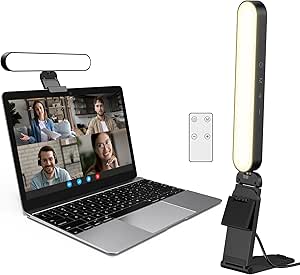 | Best for Flexible Setup | Lighting modes: 3 color modes | Brightness: 10 levels | Clamp range: 1.55–2.35 inches | VIEW ON AMAZON | See Our Full Breakdown |
| HIOUME USB LED Monitor Light Bar with Clip |  | Best for Narrow Monitor Edges | Length: 10.2 inches | Compatible monitor thickness: 0.2–0.4 inches | Color temperatures: 3 adjustable settings | VIEW ON AMAZON | See Our Full Breakdown |
| SAMPHON 11.8-Inch USB Monitor Light Bar with Dimmable LED and 3 Color Temperatures |  | Best Compact Light Bar | Length: 11.8 inches | Central brightness: Up to 800 lux | Coverage area: 30 × 20 inches | VIEW ON AMAZON | See Our Full Breakdown |
| NEEWER NL10 10W Bi-Color LED Monitor Light |  | Best for Flexible Positioning | Power: 10W | Dimensions: 5 × 5 inches | Color temperature: 3000K–6500K, 5 settings | VIEW ON AMAZON | See Our Full Breakdown |
| Quntis ScreenLinear Pro Monitor Light Bar |  | Best for Glare-Conscious Desk Lighting | Power: 5W | Light source: 78 LEDs | Color temperature: 3000K–6500K | VIEW ON AMAZON | See Our Full Breakdown |
| Colorpanda USB Monitor Light Bar, 16.14-Inch LED Desk Lamp |  | Best for a Wide Range of Monitor Fits | Length: 16.14 inches | Brightness: 250 lumens | Color temperatures: 2700K, 4000K, and 6500K | VIEW ON AMAZON | See Our Full Breakdown |
| clipon lamps for monitor edge | Power | Brightness | Color temperatures | Length |
|---|---|---|---|---|
| LitONES Diffused LED Ring Ligh | USB, 5V 2A | 10 levels | 3000K–6000K; 5 settings | — |
| SAMPHON USB Monitor Light Bar | USB, 5V, 5W | — | — | 15.75 inches |
| InnoGear Ring Light for Comput | — | 10 levels | — | — |
| HIOUME USB LED Monitor Light B | USB, 5V DC, 5W | 10 levels | 3 adjustable settings | 10.2 inches |
| SAMPHON 11.8-Inch USB Monitor | USB, 5V | — | 3000K, 4000K, 6500K | 11.8 inches |
| NEEWER NL10 10W Bi-Color LED M | 10W | 10 levels | — | — |
| Quntis ScreenLinear Pro Monito | 5W | — | — | — |
| Colorpanda USB Monitor Light B | — | 250 lumens | 2700K, 4000K, and 6500K | 16.14 inches |
More Details on Our Top Picks
LitONES Diffused LED Ring Light for Laptop, Monitor, and Desk
The LitONES ring light is the better fit when the monitor-edge lamp needs to light a face as well as a workspace. Its diffused 5-inch head and 50 combinations of color and brightness settings let you tune softer illumination for calls, while the 360-degree rotation and 180-degree tilt give more control over where that light falls. Compared with the SAMPHON 15.7-inch monitor light bar, this is less suited to spreading light across a desk, but more adaptable for video framing and use with phones.
The tradeoff is a smaller light source and a USB power requirement; its clamp must also fit the listed 1.57–2.3-inch range. The listing gives conflicting warranty durations, so I would not rely on one specific term without confirming it.
Pros:- Diffused light is designed to soften shadows on camera.
- Five color temperatures and 10 brightness levels offer useful lighting adjustment.
- Rotates and tilts for flexible positioning across supported devices.
- Lightweight, compact design works for portable call setups.
Cons:- USB power means it needs a compatible power source nearby.
- The smaller ring head is less suited to lighting a wide desk than a monitor light bar.
- The listing gives inconsistent warranty durations.
Best for: People who take frequent video calls or stream from a laptop and want adjustable, softened light near their camera.
Not ideal for: Readers seeking broad, glare-reduced desk illumination rather than face lighting, or anyone whose device falls outside the stated clip range.
- Lamp head:5 inches
- Color temperatures:3000K–6000K; 5 settings
- Brightness:10 levels
- Lighting combinations:50
- Power:USB, 5V 2A
- Clip extension:1.57–2.3 inches
- Positioning:360° rotation; 180° tilt
- Weight:11.8 ounces
Our verdict“Choose the LitONES if camera-friendly, adjustable face lighting matters more than broad desk coverage.”
SAMPHON USB Monitor Light Bar with Dimmable LED and 3 Color Temperatures
Among these monitor-edge options, the 15.7-inch SAMPHON light bar makes the strongest case for lighting a broad desk without placing a lamp on it. Its asymmetric output is designed to send light downward while limiting direct glare and screen reflections, a more workspace-focused approach than the LitONES ring light, which prioritizes video-call illumination. Stepless dimming and a memory function make it easy to keep a preferred setup rather than cycling through fixed brightness steps.
The counterweight clip mounts without tools, but monitor fit still matters, and the listing does not give a compatible thickness range. Its plastic construction is less substantial than the aluminum-and-polycarbonate HIOUME bar. USB power also ties placement to a nearby port or adapter, so this is best for a stationary desk rather than a self-powered setup.
Pros:- 15.7-inch bar offers broader desk coverage than compact clip-on lights.
- Asymmetric lighting is intended to reduce direct glare and screen reflections.
- Stepless dimming and setting memory support consistent daily use.
- Counterweight clip mounts without tools and keeps the desk clear.
Cons:- Plastic construction may feel less substantial than metal-bodied alternatives.
- USB power requires a compatible source near the monitor.
- The product data does not specify a monitor-thickness fit range.
Best for: Desk workers with wider monitors who want a space-saving lamp for reading, typing, and general desktop tasks.
Not ideal for: Buyers who need a face light for video calls, prefer metal construction, or need clearly specified monitor-thickness compatibility.
- Length:15.75 inches
- Central brightness:Up to 900 lux
- Color temperature:3000K–6500K
- Dimming:Stepless
- Power:USB, 5V, 5W
- Mounting:Counterweight monitor clip
- Dimensions:15.75 × 0.78 × 3.3 inches
- Material:Plastic
Our verdict“Pick this SAMPHON when broad, adjustable desk lighting for a wide monitor matters more than video-call lighting or a metal build.”
InnoGear Ring Light for Computer and Monitor
The InnoGear ring light stands out for buyers who want one lamp to work both clipped to a monitor and on a desktop. That two-way setup, paired with a remote control and 360-degree rotation, gives it more placement flexibility than the LitONES, whose listing emphasizes an adjustable clip and stand but does not include a remote. Three color modes and 10 brightness levels cover basic call-light adjustment, while the soft illumination is aimed at reducing shadows on camera.
This is not the best choice for lighting a broad work surface: the compact ring is designed more for a person in front of the screen than the desk below it, unlike the longer SAMPHON bar. Check the 1.55–2.35-inch clamp range against the monitor, and plan for a 5V supply rated at least 2A. The remote adds convenience, but it does not remove the need for a nearby power source.
Pros:- Can be used as a clip-on monitor light or a standalone desktop light.
- Remote control makes brightness and color changes easier from the desk.
- Three color modes and 10 brightness levels offer basic lighting control.
- Rotates horizontally and adjusts vertically for flexible aiming.
Cons:- Compact ring format is less suited to broad desk illumination than a light bar.
- Requires a 5V power source providing at least 2A.
- The stated clamp range may exclude some monitor edges.
Best for: People who alternate between monitor-mounted calls and a desktop setup and want remote control over a compact light.
Not ideal for: Users who need wide desk coverage or have a screen outside the specified clamp range.
- Lighting modes:3 color modes
- Brightness:10 levels
- Clamp range:1.55–2.35 inches
- Stand height:5.5–8.3 inches
- Adjustment:360° horizontal rotation; 180° vertical adjustment
- Power requirement:5V, minimum 2A
- Controls:Remote control included
- Warranty:12 months
Our verdict“Choose the InnoGear for a compact video light that can move between a monitor clip and desktop stand.”
HIOUME USB LED Monitor Light Bar with Clip
The HIOUME HI-L002 is the most clearly specified fit for a narrow monitor edge in this group: its clip is listed for screens 0.2–0.4 inches thick. That makes it easier to judge compatibility than the longer SAMPHON bars, whose product data does not state a thickness range. Its 10.2-inch body, memory function, and three color temperatures suit a compact workstation where a conventional desk lamp would take up room.
The tradeoff is that the narrow fit can be limiting: monitors outside that range are poor candidates, and the short bar offers less reach across a desk than SAMPHON’s 15.7-inch model. Aluminum and polycarbonate give it a different build profile from the plastic SAMPHON bars, but it still needs USB power. The supplied carry pouch is useful for packing it away, though this is primarily a fixed-edge task light, not a portable battery lamp.
Pros:- Specified 0.2–0.4-inch monitor thickness range helps buyers check fit.
- Compact 10.2-inch body saves space along the monitor edge.
- Three color settings, 10 brightness levels, and memory provide adjustable repeat use.
- Aluminum and polycarbonate construction differs from the plastic SAMPHON bars.
Cons:- The narrow compatibility range excludes many monitor edges.
- Shorter bar provides less desk coverage than the 15.7-inch SAMPHON.
- Requires a USB power source and is not waterproof.
Best for: Owners of slim-edged monitors within the stated thickness range who want a compact bar for desk work or study.
Not ideal for: People with thicker or unusually shaped monitor edges, or those who want wide desk coverage from one lamp.
- Length:10.2 inches
- Compatible monitor thickness:0.2–0.4 inches
- Color temperatures:3 adjustable settings
- Brightness:10 levels
- Power:USB, 5V DC, 5W
- Materials:Aluminum and polycarbonate
- Dimensions:10.2 × 0.8 × 0.59 inches
- Warranty:24 months
Our verdict“Pick the HIOUME if your monitor edge falls within its narrow fit range and you want a compact, adjustable desk light.”
SAMPHON 11.8-Inch USB Monitor Light Bar with Dimmable LED and 3 Color Temperatures
The 11.8-inch SAMPHON SC02 keeps the workspace-light-bar approach but trims the footprint compared with the 15.7-inch SAMPHON. Its 45-degree beam is designed to illuminate a stated 30 × 20-inch area while reducing screen glare, so it makes sense for compact desks where a longer bar could feel oversized. Three color temperatures, stepless dimming, and memory give it more adjustment than a basic fixed-output clip lamp.
Compared with the HIOUME, this SAMPHON claims a broader monitor fit, including most flat and curved screens, though the listing does not provide a precise thickness range. The plastic body is a tradeoff against HIOUME’s aluminum-and-polycarbonate build, and the bar still depends on USB power. Its stated 800-lux central brightness is below the 15.7-inch SAMPHON’s 900-lux figure, making the longer model the clearer pick when maximum central illumination and bar width matter most.
Pros:- 11.8-inch length suits smaller monitor setups and desks.
- 45-degree beam is designed to light the desk while reducing screen glare.
- Stepless dimming, three color temperatures, and memory allow fine adjustment.
- Counterweight clip is described as compatible with most flat or curved monitors.
Cons:- Plastic construction may be less appealing than the HIOUME’s aluminum-and-polycarbonate build.
- Its stated 800-lux central brightness is below the longer SAMPHON bar’s 900-lux figure.
- Requires a USB power source.
Best for: People with a compact desk who want a short monitor bar with adjustable output and stated flat- and curved-monitor compatibility.
Not ideal for: Buyers who need the longest bar or higher stated central brightness, or who prefer a metal-bodied light.
- Length:11.8 inches
- Central brightness:Up to 800 lux
- Coverage area:30 × 20 inches
- Beam angle:45 degrees
- Color temperatures:3000K, 4000K, 6500K
- Dimming:Stepless, with memory function
- Power:USB, 5V
- Mounting:Counterweight clip; table mount
Our verdict“Choose the SC02 when you want adjustable light-bar coverage in a shorter format and do not need the longer SAMPHON’s extra reach.”
NEEWER NL10 10W Bi-Color LED Monitor Light
The NEEWER NL10 is the most adaptable pick here for buyers who want a small light they can aim beyond the screen. Its 180° tilt and 360° rotation, plus a clip and 1/4-inch threaded hole, offer more mounting options than the fixed-style bar format of the Quntis ScreenLinear Pro. Edge-lit diffusion softens the light, while five color temperatures and ten brightness levels let you adjust the look for work calls or a dim room. The memory function also saves your last settings between sessions. The tradeoff is coverage: its 5 × 5-inch panel illuminates a smaller area than a monitor-spanning bar, so it suits targeted lighting better than broad desk coverage. It also needs a USB power source.
Pros:- Edge-lit design provides soft, diffused illumination
- Five color temperatures and ten brightness levels allow fine adjustments
- Clip mount, threaded hole, tilt, and rotation support flexible placement
- Memory function recalls the last settings
Cons:- Small panel provides less coverage than monitor-spanning bars such as the Quntis ScreenLinear Pro
- Requires a USB power source
Best for: People who switch between a monitor, laptop, and webcam setup and want a compact light they can reposition and angle.
Not ideal for: Buyers seeking even, wide desk illumination across a large monitor; the 5 × 5-inch panel covers less area than a light bar.
- Power:10W
- Dimensions:5 × 5 inches
- Color temperature:3000K–6500K, 5 settings
- Brightness:10 levels
- Color rendering index:CRI 95
- Illuminance:Up to 656 lux at 0.5 m
- Mounting and adjustment:Clip mount and 1/4-inch threaded hole; 180° tilt and 360° horizontal rotation
- Power connection:USB-A to USB-C adapter included; 6.3 ft (193 cm) cable
Our verdict“Choose the NEEWER NL10 if flexible positioning and adjustable, softened light matter more to you than broad monitor-wide coverage.”
Quntis ScreenLinear Pro Monitor Light Bar
For a monitor-edge lamp meant to light the desk without shining straight into the display, the Quntis ScreenLinear Pro has a strong case. Its asymmetrical lighting design directs illumination toward the work surface, while the ambient-light sensor adjusts brightness to changing room conditions. That makes it a more screen-focused choice than the compact, freely aimable NEEWER NL10, which is better suited to targeted light around a webcam or laptop. Touch controls adjust brightness and the 3000K–6500K color temperature, and the clip-on form keeps the lamp off the desk. The compromise is reliance on USB power and a monitor-bar format that offers less freedom to reposition the light than NEEWER’s pivoting panel. It is best for a settled desk setup, not a lamp you plan to move between devices.
Pros:- Asymmetrical lighting is designed to direct light toward the desk and limit screen glare
- Ambient-light sensor provides automatic dimming
- Touch controls adjust brightness and color temperature
- Clip-on mounting saves desk space
Cons:- Requires a USB power connection
- Bar format offers less flexible aiming than the NEEWER NL10’s adjustable panel
Best for: Desk workers who want a monitor-mounted light aimed at the work surface, with automatic brightness adjustment as room light changes.
Not ideal for: People who need a portable light for several devices or want to aim illumination in many directions; its monitor-bar format is less repositionable than the NEEWER NL10.
- Power:5W
- Light source:78 LEDs
- Color temperature:3000K–6500K
- Color rendering index:Ra98
- Controls:Touch control with adjustable brightness and color temperature
- Auto-dimming:Ambient light sensor
- Mounting:Clip-on
- Power source:USB, 5V corded electric
Our verdict“Pick the Quntis ScreenLinear Pro for a fixed monitor setup where glare-conscious desk lighting and auto-dimming are priorities.”
Colorpanda USB Monitor Light Bar, 16.14-Inch LED Desk Lamp
The Colorpanda 16.14-inch light bar is a practical fit-focused option for buyers whose monitor thickness rules out some clip-on lamps. Its stated compatibility spans 0.12 to 2.2 inches, and the aluminum body gives it a different build profile from the compact NEEWER panel. The bar’s glare-reduced, flicker-free lighting is intended for work, reading, and gaming, with touch controls for brightness and three color temperatures. A memory function saves the last setting, which keeps routine adjustments simple. Compared with the Quntis ScreenLinear Pro, Colorpanda offers a specified broad thickness range, while Quntis adds an ambient-light sensor and a wider color-temperature range. Colorpanda’s three fixed color choices are less flexible, and it still needs USB power, so check your setup for a suitable port or adapter.
Pros:- Fits monitors from 0.12 to 2.2 inches thick
- Glare-reduced, flicker-free lighting is suited to screen-side use
- Adjustable brightness and three color temperatures
- Memory function saves the last setting
Cons:- Three color-temperature choices offer less flexibility than the NEEWER NL10 or Quntis ScreenLinear Pro
- Requires a USB power source
Best for: Monitor owners who want a 16.14-inch clip-on bar and need stated compatibility with screens from 0.12 to 2.2 inches thick.
Not ideal for: Buyers who want automatic brightness adjustment or more color-temperature choices; the Quntis ScreenLinear Pro offers auto-dimming and a continuous stated range.
- Length:16.14 inches
- Brightness:250 lumens
- Color temperatures:2700K, 4000K, and 6500K
- Controls:Touch controls with adjustable brightness
- Monitor thickness compatibility:0.12 to 2.2 inches
- Material:Aluminum
- Power source:USB, corded electric
- Warranty:1 year
Our verdict“Choose Colorpanda if your main concern is a clip-on bar with a broad stated monitor-thickness range and straightforward touch controls.”

How We Picked
I compared these eight products as lamps for monitor edges, not as general desk lights. The main criteria were the type and direction of light, available brightness or color controls, the likely usefulness of the form factor for desk work versus video calls, and how much information the product name provides about size and intended setup. I also weighed practical fit questions—clip design, screen shape, and whether the lamp could interfere with a webcam or other accessories—because compatibility can matter more than extra lighting modes.
The ranking favors products with a clear role and a strong match for common monitor use. The Quntis ScreenLinear Pro leads as a purpose-built monitor light bar; the NEEWER earns attention for bi-color control, while the ring-light models rank higher for camera-facing use than for broad desk illumination. The USB bars from SAMPHON, HIOUME, and Colorpanda offer simpler alternatives, but their place depends on choosing the right size and clip fit. Product names alone cannot confirm every dimension or monitor limitation, so I recommend checking the manufacturer’s specifications against your screen before buying.
Factors to Consider When Choosing Clipon Lamps For Monitor Edges
Choosing a clip-on lamp is less about collecting the most features and more about matching light direction, attachment style, and controls to your actual desk. These checks can help you avoid a lamp that technically clips on but leaves glare, shadows, or awkward controls behind.
Match the Light Shape to the Job
A light bar and a ring light solve different problems, even when both attach near a monitor. A bar is generally a better starting point for illuminating a keyboard, notebook, or work surface from above. A ring light is more useful when your face needs even light for calls, though it may take up more visual space near the screen. Before buying, decide whether your main target is the desk, your face, or both. If you need both, check whether one lamp can be positioned without creating reflections or whether a separate light source would work better. Choosing by the task helps avoid paying for a form factor that does not serve your daily routine.
Check the Monitor Top Before You Check the Feature List
Monitor edges vary: some are flat and broad, while others are slim, curved, or tapered. A clip that suits a thick monitor housing may wobble on a narrow bezel, and a bar can sit poorly if its support expects a particular top profile. Measure the usable top width and review the product’s stated clip range where available. Also check whether the clip or lamp body would cover a webcam, light sensor, or ventilation area. Do not assume that a product described as suitable for monitors fits every monitor design. Fit is a basic requirement, not a minor comfort feature.
Think About Glare and Screen Reflections
A bright lamp can still be uncomfortable if its beam lands on the display or shines into your eyes. Screen angle, room lighting, glossy panels, and the lamp’s mounting position all affect reflections. Look for a design that directs light toward the desk rather than straight at the screen, and expect to adjust placement after installation. If your monitor is glossy or tilted upward, glare may be more noticeable than it would be on a matte, upright display. Avoid solving eye strain by simply choosing the highest brightness setting. A balanced room light and a lower, well-aimed monitor lamp can feel more usable.
Choose Controls You Will Actually Use
Dimming and color-temperature settings are helpful when your work shifts between daylight, evening use, and video calls. They matter less if you prefer one fixed setting and want a simple control. Before choosing a feature-rich lamp, check how its controls are accessed and whether they are easy to reach once the light is clipped in place. USB power can keep wiring simple, but confirm what power source the lamp expects and where that cable will run. A bright or adjustable lamp is not automatically better if the controls interrupt your workflow. Prioritize the settings that solve a real problem in your room.
Compare Coverage With Screen and Desk Width
A longer bar may spread light across more of a desk, but length alone does not guarantee useful coverage. A narrow work surface may not need a wide lamp, while a large monitor paired with a wide keyboard area can leave dark zones under a short one. Compare the lamp’s stated dimensions with the area you want lit, not just the monitor’s diagonal measurement. Consider whether you write on paper, use multiple input devices, or keep equipment near the screen. For a compact setup, a shorter bar can be easier to place and less visually prominent. For broader coverage, confirm the beam and mounting position as well as the bar length.
Pay More Only for a Benefit You Need
Additional controls, specialized light modes, and more elaborate mounting can be useful, but they do not improve every setup. A buyer who mainly wants a little desk illumination may be better served by a straightforward USB bar than by paying for features aimed at video or color adjustment. Conversely, someone who joins frequent calls or works under changing room light may value those controls every day. Compare the product’s role with your routine before treating extra specifications as an upgrade. Check replacement, warranty, and manufacturer support details if long-term ownership matters. The right spend is the one that fixes your specific lighting limitation without adding clutter.
Frequently Asked Questions
Will a clip-on monitor lamp fit a curved or ultra-thin monitor?
It depends on the clip shape and the monitor’s top edge, so the product name alone cannot confirm a fit. Check the manufacturer’s supported thickness range and any notes about curved screens or narrow bezels. A curved back can leave a clip tilted, while an ultra-thin display may not give a clamp enough material to grip securely. Look for a mounting design intended to rest on the monitor rather than clamp tightly if your screen is especially slim. If the fit remains unclear, compare the lamp’s mounting diagram with your monitor profile before ordering.
Should I choose a light bar or a ring light for my monitor?
Choose a light bar if your priority is illuminating the desk, keyboard, or notes in front of the screen. Choose a ring light if you mainly want more even light on your face during calls. The LitONES and InnoGear options in this roundup are the ring-light alternatives, while the Quntis, NEEWER, SAMPHON, HIOUME, and Colorpanda products are bar-style choices. A ring light can be less suited to broad desk coverage, and a bar may not give your face the same direct illumination. Decide which area needs light most before comparing controls or size.
Can a monitor lamp cause glare on my screen?
Yes, especially if the lamp points toward the display or your screen has a reflective finish. Room lighting, screen tilt, and your seating position also affect what you see, so even a well-designed lamp may need repositioning. Aim the light at the work surface and adjust the screen angle if reflections persist. Lowering brightness can help, but it will not fix a beam aimed directly at the panel. When comparing options, favor a light bar designed to direct illumination downward rather than relying on brightness alone.
Is an 11.8-inch monitor light bar long enough for my setup?
It may suit a compact monitor and a narrow desk area, but the number by itself does not tell you how evenly the lamp will light your workspace. Compare the listed bar length with the usable width of your monitor and the desk area you want illuminated. A short bar can be a practical choice when space is limited, while a wider display or broad keyboard area may benefit from more coverage. The 11.8-inch SAMPHON model is one of the shorter named options in this roundup, so check its dimensions carefully against your layout. Treat lamp length as one part of coverage, alongside beam direction and mounting position.
Is USB power convenient enough for a monitor lamp?
USB power can reduce the need for another wall adapter, but convenience depends on your available ports and cable route. Check the lamp’s power requirements and whether your monitor or computer port can supply what it needs. A busy USB hub may already support several devices, and a cable hanging across the desk can create clutter. Some setups are cleaner with a separate USB power adapter placed near the monitor. Before buying, plan where the cable will run and confirm that the power source will remain accessible.
Conclusion
For a desk-first setup, I’d choose the Quntis ScreenLinear Pro as the best overall because it is the most directly aligned with monitor light-bar use. The NEEWER NL10 is my best premium-style pick for buyers who want bi-color adjustment, while the SAMPHON 11.8-inch bar is the best compact option when space and screen width are limited. For a simpler entry point, compare the USB bar options from HIOUME and Colorpanda after checking dimensions and clip fit; their basic approach may suit beginners better than a feature-heavy lamp. If video calls are the main reason for adding light, pick the LitONES or InnoGear ring light instead of a desk-focused bar. My final check for every buyer is the same: verify monitor compatibility and decide whether your priority is desk coverage, face lighting, or adjustable light tone.