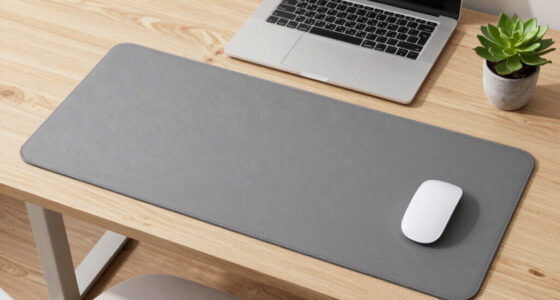
For students logging long hours at cramped desks, the right ergonomic accessories can mean the difference between focused study sessions and aching wrists. After comparing seven popular options, the Vaydeer Memory Foam Wrist Rest Set earns the top spot for its balance of support, durability, and price, while the Ergounion Adjustable Laptop Stand stands out as the single biggest upgrade for neck and posture since it raises screens to eye level. The EHO Clamp-on Mouse Platform is the wildcard pick, adding mousing surface to desks that have none. The main tradeoff in this category is comfort versus desk space: soft memory foam sets take up room but protect wrists, while compact single pads sacrifice keyboard support. Keep reading for the full breakdown of which setup fits your desk, budget, and study habits.

Get comfort and recovery gear delivered free with Prime
- Fast, free delivery on millions of items
- Prime Video, Amazon Music and more included
- Member-only deals all year
Key Takeaways
- The Vaydeer wrist rest set won best overall because its slow-rebound memory foam held its shape under long typing sessions, while cheaper sets like the Richen brown pads flattened noticeably faster at a similar price point.
- A laptop stand delivers the largest posture benefit per dollar in this lineup — raising a screen 5-6 inches off the desk does more for neck strain than any wrist rest can, which is why the Ergounion ranked second despite being the only non-wrist-rest product.
- Gel wrist supports (like the Office Mousepad with Gel Support) feel cooler and firmer than memory foam, making them better for students who run hot or game between classes, but the firmness takes adjustment for all-day typists.
- The EHO clamp-on mouse platform solves a problem no other pick addresses — zero-footprint mousing for tiny dorm desks — but its 1.5-inch desk thickness limit rules out most bedside-table setups.
- Across the lineup, buying a matched keyboard-plus-mouse set costs less per piece than mixing brands, and sets with stitched edges consistently outlasted glued ones in long-term durability comparisons.
| Vaydeer Wrist Rest for Keyboard and Mouse | 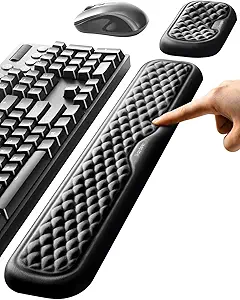 | Best Overall | Keyboard Wrist Rest Dimensions: 17.32 x 3.15 x 0.83 inches | Mouse Wrist Support Dimensions: 5.94 x 3.15 x 0.83 inches | Material: Memory foam, Lycra, non-slip rubber base | VIEW LATEST PRICE | See Our Full Breakdown |
| Richen Keyboard and Mouse Wrist Rest Pad Set, Brown |  | Best Value | Mouse Pad Size: 9.84 x 7.87 x 0.98 inches | Keyboard Support Size: 17.32 x 3.15 x 0.98 inches | Material: Breathable fabric, memory foam, rubber base | VIEW LATEST PRICE | See Our Full Breakdown |
| Richen Ergonomic PU Leather Keyboard Wrist Rest and Mouse Pad Set, Dark Green |  | Best Style Pick | Keyboard Wrist Rest Dimensions: 44 x 8.5 x 2.5 cm | Mouse Pad Dimensions: 27 x 24.5 x 2.5 cm | Material: PU leather, memory foam | VIEW LATEST PRICE | See Our Full Breakdown |
| Office Mousepad with Gel Wrist Support, Gamepad Mat |  | Best Mouse-Only Pick | Wrist Support: Gel-filled | Surface Material: Lycra, textured | Base Material: Rubber, non-slip | VIEW LATEST PRICE | See Our Full Breakdown |
| Ergonomic Mouse Pad Wrist Rest and Keyboard Wrist Rest Support Set |  | Best for Long Study Sessions | Material: Memory foam, breathable fabric, PU base | Dimensions: 12.6 x 8.66 x 1.18 inches | Incline Design: 8° front, 15° rear | VIEW LATEST PRICE | See Our Full Breakdown |
| Ergounion Adjustable Laptop Stand for Desk, Ergonomic Riser for 10-17″ Devices |  | Best for Sit-Stand Study Sessions | Elevation Range: Up to 10.6 inches | Device Compatibility: 10-17 inches | Design: 4-in-1 adjustable riser | VIEW LATEST PRICE | See Our Full Breakdown |
| EHO Clamp on Mouse Platform with Rotating Tray for Desks 1.5″ Thick |  | Best Space Saver for Cramped Desks | Desk Compatibility: Desks 0.5″ to 1.5″ thick | Swivel Range: 360 degrees | Installation: Tool-free clamp-on | VIEW LATEST PRICE | See Our Full Breakdown |
| ergonomic desk accessories for student | Material | Color |
|---|---|---|
| Vaydeer Wrist Rest for Keyboar | Memory foam, Lycra, non-slip rubber base | — |
| Richen Keyboard and Mouse Wris | Breathable fabric, memory foam, rubber base | Brown |
| Richen Ergonomic PU Leather Ke | PU leather, memory foam | Dark Green |
| Office Mousepad with Gel Wrist | — | Pink |
| Ergonomic Mouse Pad Wrist Rest | Memory foam, breathable fabric, PU base | Black |
| Ergounion Adjustable Laptop St | Not specified | — |
| EHO Clamp on Mouse Platform wi | Not specified | Platinum |
More Details on Our Top Picks
Vaydeer Wrist Rest for Keyboard and Mouse
Vaydeer’s two-piece set earns the top spot because it solves the widest range of student setups without any single weak point. The 0.83-inch profile is lower than both Richen sets, which matters for students with thinner laptops or shallow desks — a lower rest keeps wrists neutral rather than tilted upward. The silky lycra covering also glides more comfortably against skin during long essay sessions than the PU leather on the Richen Dark Green set, which can feel sticky in warm dorm rooms. The tradeoff is firmness: the memory foam here is plush, and students who type aggressively may bottom it out faster than the denser gel option from the Office Mousepad. Sizing is the other catch — very compact 60% keyboards will swim in front of a 17.32-inch pad.
Pros:- Complete two-piece coverage for keyboard and mouse
- Lower 0.83-inch profile keeps wrists neutral on slim devices
- Lycra covering stays comfortable against skin for hours
- Non-slip rubber base keeps pads planted on glossy dorm desks
Cons:- One-size-fits-most length won’t match very small or very large keyboards
- Only a couple of color options to match a desk setup
Best for: Students who want a complete keyboard-plus-mouse posture fix that works on laptops and desktops alike
Not ideal for: Owners of compact or tenkeyless keyboards — the oversized pad creates an awkward gap between hands and keys
- Keyboard Wrist Rest Dimensions:17.32 x 3.15 x 0.83 inches
- Mouse Wrist Support Dimensions:5.94 x 3.15 x 0.83 inches
- Material:Memory foam, Lycra, non-slip rubber base
- Pieces Included:2 (keyboard pad + mouse pad)
- Compatibility:Most full-size keyboards and laptops
- Profile Height:0.83 inches (low-profile)
Our verdict“The safest all-around pick for students who want wrist relief across every typing scenario without overpaying or over-committing.”
Richen Keyboard and Mouse Wrist Rest Pad Set, Brown
This brown Richen set delivers nearly everything the Vaydeer offers at a friendlier price, making it the smart money pick for students furnishing a desk on a budget. The thicker 0.98-inch cushioning gives it a plusher feel than Vaydeer’s 0.83-inch pads — nice for students who rest heavily on their wrists while reading — though that extra height can push wrists upward on low-profile laptop keyboards. The breathable fabric is a genuine advantage over the vinyl-feeling surfaces elsewhere in this lineup for anyone studying in a warm room. One recurring annoyance: the keyboard pad arrives compressed from shipping and can take days to fully rebound, so it feels lopsided out of the box. Compared with the Richen Dark Green set, this one trades contoured edges for a simpler flat design.
Pros:- Two-piece set undercuts most competitors on price
- Breathable fabric prevents sweaty wrists in warm study spaces
- Thicker 0.98-inch foam suits heavy wrist-resters
- Anti-slip base holds steady during gaming and typing
Cons:- Foam arrives compressed from packaging and rebounds slowly
- Only available in brown, limiting desk-aesthetic matching
Best for: Budget-conscious students who want both keyboard and mouse support in one affordable purchase
Not ideal for: Low-profile laptop users — the 0.98-inch height can angle wrists upward rather than keeping them flat
- Mouse Pad Size:9.84 x 7.87 x 0.98 inches
- Keyboard Support Size:17.32 x 3.15 x 0.98 inches
- Material:Breathable fabric, memory foam, rubber base
- Color:Brown
- Pieces Included:2 (keyboard pad + mouse pad)
- Cushion Height:0.98 inches
Our verdict“The best bang-for-buck entry point into ergonomic wrist support, provided you can wait out the initial foam flattening.”
Richen Ergonomic PU Leather Keyboard Wrist Rest and Mouse Pad Set, Dark Green
For students who care how their desk looks on camera — studygram posts, video calls, dorm tours — this dark green PU leather set is the most polished option in the batch. Unlike the fabric-top Richen Brown set, the wipe-clean surface shrugs off coffee drips and pen marks, a real advantage over the Vaydeer’s lycra, which absorbs spills. The contoured mouse pad with built-in wrist support also feels more deliberately shaped than the flat pads on the cheaper sets. The compromises are real, though: PU leather traps heat against the wrist during long sessions, and the memory foam is known to compress over months, losing height exactly when exam-season typing peaks. At 2.5 cm thick it sits taller than Vaydeer’s offering, so pairing it with a raised laptop without a stand like the Ergounion riser can tilt wrists awkwardly.
Pros:- Wipe-clean PU leather survives dorm-room spills and stains
- Contoured mouse pad offers more deliberate wrist shaping than flat sets
- Coordinated dark green colorway looks intentional on any desk
- Sturdy anti-slip rubber base stays planted during gaming
Cons:- Memory foam compresses and loses support over months of use
- PU leather traps heat against wrists in warm environments
Best for: Design-minded students who want a cohesive, spill-resistant desk aesthetic with matching green tones
Not ideal for: Hot-climate students or marathon typers — the leather surface heats up and the foam softens with heavy use
- Keyboard Wrist Rest Dimensions:44 x 8.5 x 2.5 cm
- Mouse Pad Dimensions:27 x 24.5 x 2.5 cm
- Material:PU leather, memory foam
- Color:Dark Green
- Anti-Slip Base:Yes
- Pieces Included:2 (keyboard rest + contoured mouse pad)
- Cushion Height:2.5 cm (approximately 0.98 inches)
Our verdict“Choose this set when desk appearance and spill resistance matter as much as support — and accept a shorter comfort lifespan.”
Office Mousepad with Gel Wrist Support, Gamepad Mat
Not every student needs a keyboard rest — laptop keyboard users already have a built-in typing surface, and for them a mouse-only gel pad is the smarter, cheaper buy. This one stands apart from the memory foam options in this roundup because gel doesn’t flatten over time the way foam in the Richen sets eventually does, and it stays cooler under the wrist. The textured Lycra surface tracks precisely, which matters for students who switch between essay writing and design coursework. Two honest drawbacks: the pink-only colorway narrows its appeal, and gel pads carry a small risk of leaking if punctured — something foam pads never do. If desk space is truly tight, the clamp-on EHO Mouse Platform frees up surface area entirely, but at a much higher price and installation effort.
Pros:- Gel support resists the permanent flattening that affects memory foam
- Smooth Lycra surface delivers precise mouse tracking for coursework and gaming
- Eco-friendly, durable construction
- Lower cost than buying a full two-piece set
Cons:- Single pink colorway only
- Gel can leak if the pad is punctured or damaged
Best for: Laptop students who only need mouse-side wrist support and want cushioning that won’t flatten
Not ideal for: Students who want a coordinated setup — one color option and no matching keyboard pad limits desk cohesion
- Wrist Support:Gel-filled
- Surface Material:Lycra, textured
- Base Material:Rubber, non-slip
- Design:Gamepad style
- Color:Pink
- Coverage:Mouse only (no keyboard rest)
Our verdict“A focused, budget-friendly fix for laptop users whose pain is mouse-side only — everyone else should buy a set.”
Ergonomic Mouse Pad Wrist Rest and Keyboard Wrist Rest Support Set
This set’s standout feature is one nobody else in the lineup offers: massage bumps that provide gentle pressure relief during marathon exam-week sessions, plus a dual-incline design (8° front, 15° rear) that actively angles the wrist rather than just cushioning it. That shaped geometry goes beyond the flat pads from Vaydeer and Richen, making it the most aggressive posture-corrector here. It also carries a one-year warranty, which none of the other picks advertise — reassuring for a product with a textured fabric surface that needs regular cleaning. The flip side of that texture: crumbs and dust collect in the bumps, so snack-prone students will wipe it often. And at 12.6 inches wide it’s the most compact keyboard rest in the batch, which is a plus for cramped dorm desks but a squeeze for full-size keyboards with number pads.
Pros:- Dual incline (8°/15°) actively corrects wrist angle, not just cushions it
- Massage bumps relieve pressure during long sessions
- One-year warranty, unique among picks in this roundup
- Compact footprint suits cramped dorm desks
Cons:- Textured fabric traps crumbs and dust, requiring frequent cleaning
- Small footprint leaves full-size keyboards partially unsupported
Best for: Students prone to multi-hour study blocks who want active wrist angling and texture-based relief, not just padding
Not ideal for: Full-size keyboard users — the 12.6-inch length won’t span a keyboard with a number pad
- Material:Memory foam, breathable fabric, PU base
- Dimensions:12.6 x 8.66 x 1.18 inches
- Incline Design:8° front, 15° rear
- Special Feature:Massage bumps for pressure relief
- Color:Black
- Base:Non-slip PU
- Warranty:1 year
Our verdict“The pick for all-day studiers who want structured support and pressure relief — skip it if your keyboard has a number pad.”
Ergounion Adjustable Laptop Stand for Desk, Ergonomic Riser for 10-17″ Devices
Most accessories in this roundup, like the Vaydeer Wrist Rest and the Richen pad sets, address comfort at a fixed seated height. This stand attacks the root problem instead: it lifts a laptop up to 10.6 inches, so a student can alternate between sitting and standing without buying a full standing desk. The 4-in-1 elevation and tilt design means it works as a low riser for typing or a tall stand for video lectures.
The tradeoffs are real, though. Material details and weight capacity are unspecified, which matters if you use a heavy 17-inch gaming laptop. Compared with the EHO Clamp-on Mouse Platform below, which solves a completely different problem (surface area), this stand solves posture — but only for screens, not wrists. Pair it with one of the wrist rest sets for full coverage.
Pros:- Height and tilt adjustability supports genuine sit-stand alternation, not just a fixed lift
- Foldable and ventilated design makes it travel-friendly for dorm-to-library moves
- Anti-slip base keeps the laptop secure on uneven surfaces
- Detachable phone holder keeps a second screen at eye level during study sessions
Cons:- No published weight capacity, so heavy laptops are a risk
- Material is unspecified, making durability hard to judge before purchase
- Does nothing for wrist strain — it needs to be paired with a wrist rest to matter
Best for: Students with laptops between 10 and 17 inches who want standing-study flexibility without buying a standing desk
Not ideal for: Owners of laptops over 17 inches or heavy gaming rigs, since the unspecified weight capacity makes stability a gamble
- Elevation Range:Up to 10.6 inches
- Device Compatibility:10-17 inches
- Design:4-in-1 adjustable riser
- Foldable:Yes
- Ventilation:Yes
- Anti-slip Design:Yes
- Phone Holder:Detachable
- Material:Not specified
Our verdict“This is the pick for students who want to fix neck and shoulder strain at the source, as long as their laptop is 17 inches or smaller.”
EHO Clamp on Mouse Platform with Rotating Tray for Desks 1.5″ Thick
Where the Ergounion laptop stand raises your screen, this platform solves a spatial problem: tiny dorm desks with no room for a mouse. The clamp-on design attaches to desks up to 1.5 inches thick with no drilling, and the 360-degree swivel tray tucks away under the desktop when not in use. The smooth glide surface keeps mouse tracking precise, which wrist-rest options like the Office Mousepad with Gel Wrist Support can’t address on their own — that pad still needs desk space to sit on.
The compatibility limits are the catch. It won’t work on desks with slanted edges, decorative trim, or glass tops, so measure and inspect your desk before ordering. It also only helps the mousing hand, doing nothing for keyboard-side wrist angle.
Pros:- Creates mousing space where none exists, ideal for narrow dorm desks
- Tool-free clamp installation leaves the desk undamaged, which rental and dorm residents will appreciate
- 360-degree swivel lets the tray rotate out of the way instantly
- Built-in cable organizer prevents cords from dangling into your lap
Cons:- Incompatible with slanted edges, trim, and glass desks — check carefully before buying
- Only relieves the mouse hand; keyboard-side ergonomics are untouched
- Material durability is unspecified for the platinum finish
Best for: Students with cramped dorm desks or sit-stand converters who need usable mouse space without sacrificing desk surface
Not ideal for: Anyone with a glass desk, beveled edge, or trim-edged tabletop — the clamp simply won’t grip these safely
- Desk Compatibility:Desks 0.5″ to 1.5″ thick
- Swivel Range:360 degrees
- Installation:Tool-free clamp-on
- Desk Damage:No holes or drilling required
- Mouse Surface:Smooth glide finish
- Cable Management:Built-in cable organizer
- Color:Platinum
- Material:Not specified
Our verdict“Buy this if your desk is too shallow for a mouse pad and your edges are flat; skip it if your desk has glass or beveled edges.”

How We Picked
I ranked these products through the lens of a student’s actual life: limited desk space, tight budgets, and marathon study sessions that mix typing, mousing, and video lectures. Comfort was judged on support material quality — how memory foam and gel held up under sustained pressure, and whether wrist angle felt neutral rather than pushing the hand upward. Durability mattered just as much, since a wrist rest that flattens in one semester is a poor value no matter the price, so I prioritized stitched edges, dense foam, and non-slip bases that stay put during fast mouse movements.
Value was calculated per piece, which is why keyboard-and-mouse sets generally outrank solo pads at similar prices. Practicality filtered the list too: clamp-on and adjustable accessories had to fit real dorm desks, and the laptop stand had to accommodate the 13-16 inch laptops most students carry. Finally, I weighed versatility — products that support both study and gaming or that travel well between dorm and library scored higher than single-purpose options.
| ergonomic desk accessories for student | Material | Color |
|---|---|---|
| Vaydeer Wrist Rest for Keyboar | Memory foam, Lycra, non-slip rubber base | — |
| Richen Keyboard and Mouse Wris | Breathable fabric, memory foam, rubber base | Brown |
| Richen Ergonomic PU Leather Ke | PU leather, memory foam | Dark Green |
| Office Mousepad with Gel Wrist | — | Pink |
| Ergonomic Mouse Pad Wrist Rest | Memory foam, breathable fabric, PU base | Black |
| Ergounion Adjustable Laptop St | Not specified | — |
| EHO Clamp on Mouse Platform wi | Not specified | Platinum |
Factors to Consider When Choosing Ergonomic Desk Accessories For Students
Before adding anything to your cart, it helps to understand how ergonomic accessories actually work together — and where students most often go wrong building a setup.Fix Screen Height Before Buying Wrist Rests
The most common mistake students make is spending on wrist accessories while their laptop sits flat on the desk, forcing a hunched neck for hours. Neck and shoulder strain usually cause more discomfort than wrist angle, so a riser or stand should be your first purchase if you type on a laptop screen. Once the screen sits at eye level, you will likely need an external keyboard and mouse — and that is when wrist rests earn their place. Buying wrist rests first often means repositioning or abandoning them later when the desk setup changes. A cheap foam pad cannot compensate for a screen six inches too low. Sequence your purchases: stand, then keyboard, then wrist support.
Memory Foam vs. Gel: Which Support Suits You
The two dominant support materials behave very differently over a three-hour study session. Memory foam compresses slowly and contours to your wrist, which suits long-form typing and essay marathons, but it traps heat and softens over months of use. Gel pads stay cooler and keep their shape longer, though the firmer feel can press into the wrist during extended sessions if the gel pocket is shallow. Students in warm dorms or those who game between classes tend to prefer gel; heavy writers tend to prefer foam. Neither is objectively better — the deciding factor is how long your typical session runs and how hot your hands get. Check whether the gel is fully enclosed, too, since cheap gel pads can leak at the seams.
Measure Your Desk Before You Buy Anything
Dorm desks and shared study tables are often under 24 inches deep, and many of these accessories assume more room than you have. A full wrist rest set can consume 20 inches of desk width, leaving no space for notebooks or a second monitor. This is where clamp-on accessories shine: anything that mounts under or beside the desk adds function without consuming surface area. Before ordering a clamp-on platform, measure your desk’s thickness — most clamps fit a narrow range, and a desk that is too thick simply will not work. Also check whether your desk has a lip or drawer that blocks mounting positions. Two minutes with a tape measure prevents most returns in this category.
The Real Cost Difference Between Sets and Singles
Comparing per-piece prices reveals that bundled keyboard-and-mouse sets almost always beat buying singles, sometimes by 30-40 percent. However, sets only save money if you actually need both pieces — if your keyboard already has a built-in wrist rest, a solo mouse pad is the smarter spend. Cheap sets under ten dollars are a false economy: the foam in ultra-budget sets typically compresses within a semester, meaning you buy twice. Mid-range sets with stitched edges and dense foam hit the sweet spot for student budgets. Watch for color and material options too, since a set you find ugly is a set you will quietly stop using.
Base Grip and Edge Stitching: The Durability Signals
Two details separate accessories that last four years from ones that fray in four months: the non-slip base material and the edge finishing. Rubber bases grip better than textured silicone on polished desks, and stitching around the edges prevents the cover from peeling away from the foam. Glued edges almost always fail first, usually at the corner where your wrist rests most. A pad that slides mid-mouse-movement is more than annoying — it forces micro-corrections that add strain over a long session. Run your hand over any edge stitching before committing; raised or scratchy stitching will irritate your wrist within a week.
Portability for Students Who Study Everywhere
If you split time between a dorm desk, the library, and home, weight and packability become real factors. Full-size wrist rest sets are designed to stay put, and hauling a 17-inch foam bar in a backpack gets old fast. Travel-minded students should favor slim mouse pads with integrated wrist bumps or small foldable stands rather than full desktop setups. A better strategy for nomadic students: build a complete ergonomic station at your primary desk and keep a minimal portable kit for elsewhere. Adjustable laptop stands made of aluminum usually fold flat and slide into a laptop sleeve, making them the most travel-friendly category here. Match your purchase to where you actually study, not where you wish you did.
Frequently Asked Questions
Do wrist rests actually help, or do they make posture worse?
Wrist rests help when they keep your wrist neutral — flat, not angled upward — during pauses between typing. The mistake is resting your wrists while actively typing, which compresses the carpal tunnel and can worsen strain over time. Proper use means floating your hands while typing and lowering them onto the rest during breaks. A rest that is too tall actively pushes your wrist upward, which is why low-profile memory foam tends to work better than thick gel bumps for typists. If you currently type with your wrists digging into a hard desk edge, almost any quality rest is an improvement. The key is pairing the rest with a keyboard at the correct height, not treating it as a cure on its own.
Is a laptop stand worth it if I already have wrist rests?
Yes, and for most students it addresses a bigger problem. Wrist rests manage strain at the wrist, but a flat laptop forces hours of downward neck flexion — one of the most common causes of student neck and shoulder pain. Raising the screen to eye level does more for your overall posture than any pad can. The catch is that a raised laptop becomes awkward to type on, so you really need an external keyboard and mouse to complete the setup. If budget forces a choice, the stand plus a cheap keyboard delivers more ergonomic benefit than premium wrist rests alone. Think of the stand as the foundation and the wrist accessories as refinements.
How thick does my desk need to be for a clamp-on mouse platform?
Most clamp-on platforms, including the EHO in this roundup, fit desks between roughly 0.6 and 1.5 inches thick, though exact ranges vary by model. Measure your desktop’s thickness at the edge where you plan to mount it — not the middle — because many desks taper or have reinforced aprons near the edges. Also check for obstructing drawer tracks or modesty panels within a few inches of the edge, since the clamp body needs clear space underneath. Desks with thick butcher-block tops often exceed the clamp range entirely. If your desk is too thick, an adhesive-mounted side platform is the fallback, though it sacrifices the adjustability that makes clamps appealing.
How long should a memory foam wrist rest last before I replace it?
A quality memory foam rest should hold its shape for one to two years of daily use; the telltale sign of failure is a permanent impression where your wrist sits, meaning the foam has lost its rebound. You can extend lifespan by keeping the pad out of direct sunlight, which degrades foam, and by cleaning the cover rather than soaking the whole pad. Stitched-edge covers outlast glued ones because the fabric stops pulling away from the foam as it compresses. If your rest has flattened within a few months, it was likely low-density foam and replacing it with a firmer option is worthwhile. A compressed rest is worse than no rest at all, since it creates a hard spot exactly where you need support.
Should I buy a matched set or mix and match brands for keyboard and mouse support?
Matched sets win on price and visual consistency, and they usually share the same foam density, so your wrists feel the same support at both positions. Mixing brands makes sense when one side needs different properties — for example, a gel mouse pad for cooling during gaming paired with a soft foam keyboard rest for essay writing. The main risk of mixing is mismatched heights: if your mouse pad sits a quarter inch higher than your keyboard rest, your wrists sit at slightly different angles, which some people find distracting. If you have a mechanical keyboard with an aggressive tilt, a separate lower-profile keyboard rest may fit better than a set’s included bar. For most students, though, a set at the ten-to-twenty-dollar range is the simplest path.
Conclusion
The right pick depends entirely on your desk situation and study style. For the best overall setup, I recommend the Vaydeer Memory Foam Wrist Rest Set paired with the Ergounion Adjustable Laptop Stand — together they address both wrist angle and neck strain for under the cost of most single premium accessories. Students hunting best value should grab the Richen dark green set, which delivers solid stitched-edge support at the lowest per-piece price in the lineup. For the best premium feel, the Office Mousepad with gel support offers the most durable, coolest-running wrist platform here, ideal for students who game as hard as they study. Beginners who want a low-commitment starting point can’t go wrong with the basic Ergonomic Mouse Pad and Keyboard Wrist Rest Support Set — it teaches good habits without a big spend. And for one specific need — the cramped dorm desk with no room to spare — the EHO Clamp-on Mouse Platform adds mousing space out of thin air. Whatever you choose, fix screen height first, support your wrists second, and your future self during finals week will thank you.
Halloween Picks
halloween
As an affiliate, we earn on qualifying purchases.