
You need a proper standing desk layout more than a bigger desk because it directly supports your posture and comfort during long coding sessions. When your desk and monitor are correctly positioned at eye level and your keyboard and mouse are within easy reach, you reduce strain and fatigue. This setup helps you stay focused and productive while preventing discomfort and long-term health issues. Keep going to discover how to create the ideal ergonomic workspace tailored to you.
Key Takeaways
- An ergonomic layout prioritizes proper monitor, keyboard, and mouse placement over desk size, reducing strain during long coding sessions.
- Correct desk and monitor height adjustments improve posture, decreasing neck and shoulder discomfort.
- Positioning accessories like wrist rests and anti-fatigue mats enhances comfort without requiring a larger workspace.
- Incorporating movement options, such as adjustable standing features, promotes circulation and reduces static posture issues.
- A well-designed ergonomic setup boosts focus and productivity, making it more beneficial than simply having a bigger desk.

If you spend hours coding at your desk, upgrading your workspace isn’t just about getting a bigger surface—it’s about optimizing your posture and comfort. A larger desk might seem appealing, but what really makes a difference is a well-designed standing desk layout that encourages ergonomic adjustments. When you focus on how your workstation is arranged, you’ll notice posture improvements that can significantly reduce fatigue and discomfort over long coding sessions.
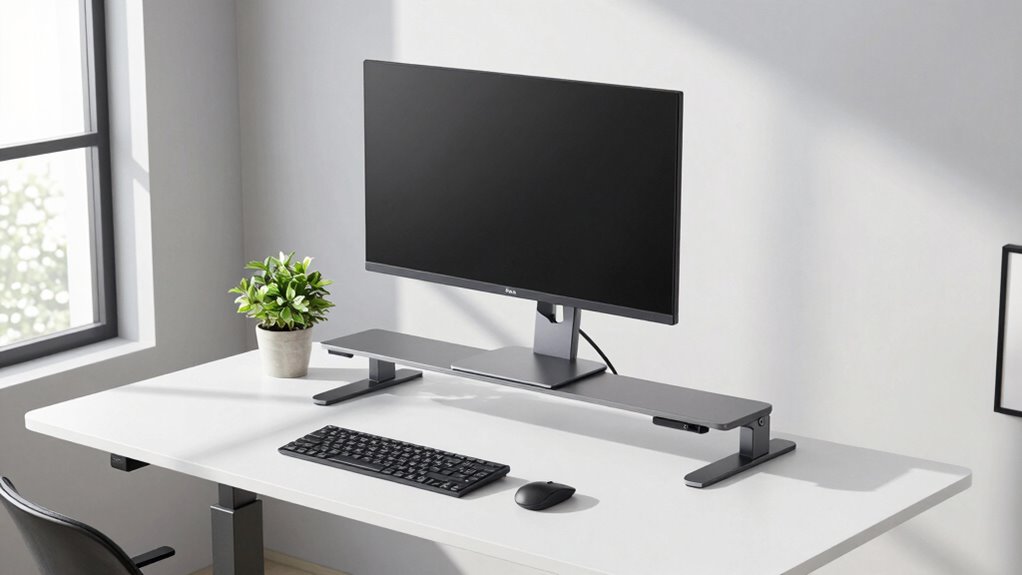
The key is to set your desk height so your elbows are at a 90-degree angle when typing. This position minimizes strain on your shoulders and wrists. Your monitor should be at eye level, so you avoid craning your neck downward or upward. Using adjustable stands or monitor arms helps you achieve this easily. When your screen is at the right height, you can maintain a neutral neck position, preventing tension headaches and neck pain that often come with poor posture.
Set your desk height so elbows are at 90 degrees and your monitor at eye level for optimal comfort.
A common mistake is neglecting the placement of your keyboard and mouse. They should be positioned close enough to prevent reaching, which can cause shoulder strain. Keep them at a height where your wrists are straight and relaxed, not bent upward or downward. Wrist rests or ergonomic pads can support your hands during breaks, further promoting posture improvements. These adjustments may seem small, but they add up, creating a workspace that supports your body naturally.
In addition to the core setup, don’t forget to incorporate movement into your routine. Standing desks make it easy to switch between sitting and standing, helping you avoid the static postures that lead to discomfort. Use ergonomic accessories like anti-fatigue mats to reduce pressure on your feet and legs when standing. Regularly shifting your position and stretching helps keep your muscles engaged and your circulation flowing. Maintaining awareness of ergonomic principles can further enhance your workspace setup.
Ultimately, the aim isn’t to create a larger desk but to craft a layout that promotes ergonomic adjustments. When your workspace is set up correctly, you’ll find it easier to sustain focus and productivity without sacrificing comfort. Proper posture isn’t just a matter of health; it’s a productivity booster. By fine-tuning your standing desk setup, you ensure your body stays supported and tension-free during those long coding marathons. Remember, a thoughtfully arranged workspace prioritizes your well-being and makes coding a more comfortable, efficient experience.

VIVO Black 32 inch Stand Up Desk Riser, DESK-V000S
- Instant Active Standing: Provides on-demand standing for health and productivity
- Space-Efficient Surface: 32-inch top surface with synchronized keyboard tray
- Sturdy Steel Frame: Supports up to 26 lbs for dual monitors or laptops
As an affiliate, we earn on qualifying purchases.
As an affiliate, we earn on qualifying purchases.
Frequently Asked Questions
How Do I Adjust My Standing Desk for Optimal Comfort?
To adjust your standing desk for ideal comfort, start by setting the desk height so your elbows are at a 90-degree angle when your hands are on the keyboard. Make certain your monitor is at eye level to maintain an ergonomic posture, preventing neck strain. Regularly adjust the desk height as needed, and take breaks to stretch. Proper desk height adjustment promotes comfort and reduces fatigue during long coding sessions.
What Are the Health Benefits of Using a Standing Desk?
Using a standing desk offers health benefits like improving your ergonomic posture, which reduces strain on your neck and back. It encourages better muscle flexibility by allowing you to move and shift positions more freely throughout the day. Standing desks can also boost circulation, decrease fatigue, and help prevent sedentary-related issues. By maintaining proper posture and staying active, you support overall well-being and reduce the risk of musculoskeletal problems.
Can a Standing Desk Improve Productivity for Programmers?
Surprisingly, a standing desk can boost your productivity, even if you think it’s just a fancy gimmick. By maintaining an ergonomic posture and adjusting your desk height properly, you stay more alert and focused. The irony? Sitting all day hampers efficiency, but with the right desk height adjustment, you’ll find yourself more engaged and less fatigued. So, yes, a standing desk can make you a more effective programmer.
What Accessories Should I Consider for My Standing Desk?
You should consider ergonomic accessories like a monitor arm, keyboard tray, and anti-fatigue mat to enhance comfort and posture. Desk organization tools such as cable management, storage bins, and desk organizers help keep your workspace tidy, boosting efficiency. These accessories make your standing desk more functional, reduce strain, and improve your overall experience, helping you stay focused and comfortable during long coding sessions.
How Long Should I Stand Versus Sit During Work Hours?
Think of your workday as a dance between sitting and standing; aim to stand for about 15 to 30 minutes every hour. This rhythm encourages posture correction and keeps your muscles engaged. Use ergonomic accessories like anti-fatigue mats and adjustable monitor stands to support this balance. Remember, listening to your body is key—don’t stay static too long, and switch seamlessly between sitting and standing to maintain ideal comfort.

ErGear Single Monitor Arm, Fully Adjustable Monitor Mount for 13–34 Inch Screens, Fast Install Computer Monitor Stand with Tool-Free VESA Mount, Cable Management, Holds 19.8 lbs, Max VESA 100x100mm
- Compatibility: Fits 13–34 inch monitors up to 19.8 lbs
- VESA Compatibility: Supports 75x75mm and 100x100mm patterns
- Durable Construction: Tested over 20,000 cycles for longevity
As an affiliate, we earn on qualifying purchases.
As an affiliate, we earn on qualifying purchases.
Conclusion
If you’re a programmer, optimizing your standing desk layout can boost your productivity and comfort more than just getting a bigger desk. Research shows that standing desks can increase focus and reduce fatigue, with users experiencing up to 15% more efficiency. By prioritizing the right setup, you’ll work smarter, not harder. So, invest in your workspace’s ergonomics—you might find it makes all the difference in your daily coding sessions.

KTRIO Keyboard Wrist Rest & Mouse Pad with Wrist Rest, Black
- Ergonomic Design: Reduces wrist pain and fatigue
- Memory Foam Comfort: Conforms to wrists for support
- Non-Slip Rubber Base: Keeps rest stable during use
As an affiliate, we earn on qualifying purchases.
As an affiliate, we earn on qualifying purchases.

FEATOL Anti Fatigue Mat for Standing, 9/10 Extra Thick Ergonomic Standing Desk Mat, Comfort Memory Foam Standing Mat at Home,Office All Day (20" x 32", Black, 1PC)
- Anti Fatigue Design: Reduces stress on feet, knees, and back
- Ergonomic Thickness: 9/10 inch high-density memory foam for comfort
- Durable & Easy to Clean: PU leather surface resists stains, tears, and deformation
As an affiliate, we earn on qualifying purchases.
As an affiliate, we earn on qualifying purchases.