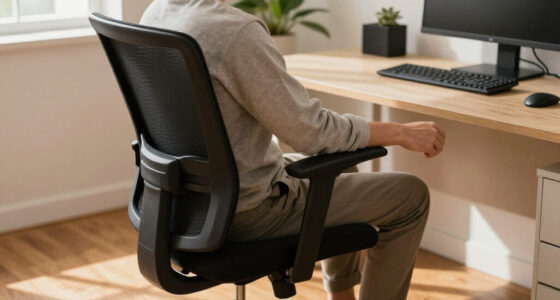
To sit properly in an office chair all day, keep your feet flat on the ground or on a footrest, with knees level to your hips. Adjust your chair so your back is supported with lumbar support, and your arms rest at a comfortable 90-degree angle. Position your monitor at eye level to avoid neck strain, and take regular breaks to stretch and move. If you want to learn more about maintaining better posture, continue exploring helpful tips and techniques.

Get comfort and recovery gear delivered free with Prime
- Fast, free delivery on millions of items
- Prime Video, Amazon Music and more included
- Member-only deals all year
Key Takeaways
- Adjust your chair so feet are flat, knees are level with hips, and lumbar support maintains natural lower back curve.
- Position your monitor at eye level to prevent neck strain and keep frequently used items within easy reach.
- Take regular breaks to stand, stretch, and move to relieve muscle tension and promote circulation.
- Keep shoulders relaxed, avoid hunching, and use ergonomic accessories like footrests and cushions for added support.
- Regularly review and modify your workspace setup and posture habits to ensure ongoing comfort and spinal health.

Sitting in an office chair all day can take a toll on your body if you don’t sit properly. Poor posture can lead to discomfort, muscle strain, and long-term health issues like back pain or repetitive stress injuries. To avoid these problems, it’s essential to optimize your sitting habits with ergonomic accessories and regular posture exercises. When you set up your workspace correctly, you create a supportive environment that encourages good posture naturally.
Proper sitting posture prevents discomfort and long-term health issues. Optimize your workspace for better support.
Start by adjusting your chair so that your feet are flat on the floor and your knees are roughly level with your hips. Use ergonomic accessories like a footrest if your feet don’t reach the ground comfortably. Your chair’s height should allow your arms to rest at a 90-degree angle when typing or using a mouse, reducing strain on your shoulders and wrists. The lumbar support feature in your chair helps maintain the natural curve of your lower back, preventing slouching and reducing pressure on your spine. If your chair lacks proper lumbar support, consider adding an ergonomic cushion or lumbar pillow to fill that gap.
Beyond adjusting your chair, incorporating posture exercises into your daily routine can greatly improve your spinal health and overall comfort. Simple stretches, like shoulder rolls, neck tilts, and back extensions, help counteract the stiffness that develops from prolonged sitting. Every hour, take a few minutes to stand, stretch, and move around. This not only relieves muscle tension but also boosts circulation and energy levels. Strengthening your core muscles through targeted exercises also supports your back and helps maintain proper alignment throughout the day. Good sitting habits require ongoing attention to stay effective.
Maintaining awareness of your posture is key. Keep your shoulders relaxed and avoid hunching forward toward your screen. Position your monitor at eye level to prevent neck strain, and keep frequently used items within easy reach to avoid unnecessary twisting or stretching. Remember, good sitting habits are not just about initial setup—they require ongoing attention. Regularly check in with your posture and make adjustments as needed to stay comfortable and healthy.
Incorporating ergonomic accessories and posture exercises into your daily routine isn’t complicated, but it makes a significant difference. Small changes can prevent discomfort and promote better spinal health, allowing you to focus on your work without distraction. Sitting properly isn’t a one-time fix; it’s a continuous effort that supports your well-being in the long run. By being mindful of your body and workspace, you’ll find that sitting in your office chair all day becomes less of a strain and more of a sustainable, comfortable routine.
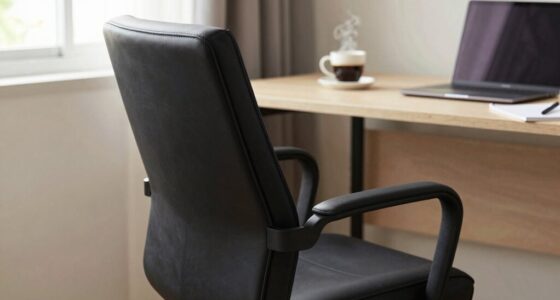
ergonomic office chair with lumbar support
As an affiliate, we earn on qualifying purchases.
As an affiliate, we earn on qualifying purchases.
Frequently Asked Questions
How Often Should I Take Breaks During Long Sitting Periods?
You should take breaks every 30 to 60 minutes during long sitting periods. During these breaks, do stretching routines to relieve muscle tension and improve circulation. Remember to stay hydrated by following hydration tips, such as drinking water regularly. Moving around helps prevent stiffness and discomfort, so stand up, stretch, and walk briefly. Consistent breaks keep you comfortable, focused, and healthy throughout your workday.
What Are Signs of Poor Sitting Posture?
You might notice signs of poor sitting posture like persistent back pain or a stiff neck, which can affect up to 80% of office workers. Poor spinal alignment causes muscle strain, leading to discomfort and fatigue. If you feel your shoulders are hunched, your back is aching, or you’re experiencing frequent headaches, these are red flags. Pay attention to your body, and adjust your posture to prevent long-term issues.
Can Ergonomic Chairs Prevent Back Pain Effectively?
Yes, ergonomic chairs can effectively prevent back pain when you use features like lumbar support and adjust the chair height properly. Lumbar support maintains the natural curve of your lower back, reducing strain. Making sure your chair height allows your feet to rest flat on the floor promotes good posture and relieves pressure on your back. Together, these adjustments help prevent discomfort and support long-term spinal health.
How Do I Adjust My Chair for Optimal Comfort?
Oh, because nothing says “I love discomfort” like sitting all day, right? First, adjust your lumbar support to cradle your lower back, not just for style. Then, set your armrests so your shoulders relax—no hiking or slouching allowed. Finally, make sure your seat height keeps your feet flat on the floor. Voila, your chair’s now optimized for comfort, even if your workday feels endless.
Are Standing Desks Better Than Sitting All Day?
Standing desks offer great alternative sitting options and can be more beneficial than sitting all day. They help reduce back pain, improve posture, and boost energy levels. By alternating between sitting and standing, you take advantage of sit-stand desk benefits, which prevent stiffness and promote movement. Incorporate regular breaks and adjust your desk height to maximize comfort and health benefits, making your workday more dynamic and less sedentary.
As an affiliate, we earn on qualifying purchases.
Conclusion
Remember, finding comfort in your office chair is like gently sailing through a peaceful sea. By sitting properly and taking small breaks, you create a smooth, balanced journey for your body. Think of your chair as a cozy harbor, supporting you quietly while you work. With mindful posture, you’ll glide effortlessly through your day, feeling refreshed and ready for whatever comes next. Your workspace becomes a sanctuary of ease, making every moment at your desk a little more enjoyable.
As an affiliate, we earn on qualifying purchases.
As an affiliate, we earn on qualifying purchases.
Halloween Picks
halloween
As an affiliate, we earn on qualifying purchases.