To position your floor chair for working comfortably, start on a flat, stable surface and make certain your feet are flat with knees bent at about 90°. Adjust the chair height so your hips are slightly higher than your knees, and tilt it slightly forward to support your lower back’s natural curve. Use back support like a cushion, keep your arms relaxed, and position your monitor at eye level. For better long-term comfort, explore more ergonomic tips to optimize your setup.
Key Takeaways
- Place the floor chair on a flat, stable surface with feet flat and knees at a 90° angle for balance.
- Adjust the chair height so hips are slightly above knees to support proper spinal alignment.
- Use back support—either the chair’s backrest or a cushion—to maintain the natural lumbar curve.
- Position arms comfortably on a desk or thighs, with elbows close to the body, and set the monitor at eye level.
- Take regular breaks to stand or stretch, and fine-tune your setup for long-term comfort and posture.

Finding the right position for your floor chair is essential to create a comfortable and productive workspace. When you sit correctly, you activate the ergonomic benefits that help reduce fatigue, minimize discomfort, and support your overall health. Proper positioning also promotes posture correction, which is critical when spending extended periods working or relaxing on the floor. To achieve this, start by placing your floor chair on a flat, stable surface that doesn’t cause wobbling or imbalance. Make certain your feet are flat on the ground, with your knees bent at roughly 90 degrees, forming a comfortable and natural sitting posture. This alignment is important because it distributes your weight evenly and reduces pressure on your lower back and hips.
Adjust the height of your floor chair so that your hips are slightly higher than your knees. This position encourages a slight forward tilt of your pelvis, which supports the natural curve of your lower back. Many floor chairs come with adjustable features, so take advantage of these to fine-tune your sitting angle. When your hips are positioned correctly, your spine stays in a more neutral, ergonomic alignment, helping to prevent slouching and strain. Keep your back supported by the chair’s backrest or add a small cushion if necessary. This additional support encourages posture correction by maintaining the natural curve of your spine, especially in the lumbar region.
Your arms should rest comfortably on your desk or your thighs, with your elbows close to your body. This setup reduces tension in your shoulders and neck, which often suffer from poor ergonomics. If your chair has armrests, adjust them so that your shoulders stay relaxed and not hunched. Position your monitor or work material at eye level to avoid craning your neck downward or upward. Eye-level positioning helps keep your head aligned with your spine, further promoting good posture. Additionally, selecting a vetted home theatre projector can enhance your viewing experience without compromising your ergonomic setup, especially if you plan to work or relax for extended periods.
Remember to take regular breaks from your seated position, standing or stretching to prevent stiffness. Maintaining this ergonomic setup and paying attention to your posture correction ensures that working on the floor remains comfortable and healthy over time. Properly positioning your floor chair isn’t just about comfort—it’s about supporting your body’s natural alignment and preventing long-term discomfort. By adjusting your chair and workspace thoughtfully, you’ll find that working on the floor becomes a sustainable, ergonomic experience that boosts your productivity and well-being.

Lumbar Support Pillow for Office Chair,Mothers Day Gifts for Mom, Back Support Pillow for Car, Office Supplies, Chair Cushions, Back Pain Relief Improve Posture, Mesh Cover Double Adjustable Straps
- Extended Adjustable Straps: Fits more chairs securely
- Ergonomic Back Support: Relieves back pain and improves posture
- High-Density Memory Foam: Maintains shape and provides firm support
As an affiliate, we earn on qualifying purchases.
Frequently Asked Questions
Can I Use a Floor Chair on Uneven Surfaces?
Using a floor chair on uneven surfaces can be tricky. You might experience discomfort or reduced chair stability, especially if the floor surface is irregular or soft. To stay comfortable and safe, check if your chair has adjustable or supportive features. If the surface is too uneven, consider placing a sturdy, flat base underneath or using a different seating option. This helps maintain stability and prevents potential falls or discomfort.
How Do I Prevent Back Pain With a Floor Chair?
Imagine the comfort of your favorite chair, now bring that feeling to your floor seat. To prevent back pain, focus on maintaining an ergonomic posture by adjusting your floor chair for proper lumbar support. Keep your back straight, shoulders relaxed, and feet flat on the ground. Regularly shift positions and take breaks to ease tension. Small adjustments like these can help you enjoy your workspace without discomfort and promote healthier sitting habits.
Are Adjustable Floor Chairs Better for Long Work Sessions?
Adjustable floor chairs are better for long work sessions because they offer ergonomic benefits and accommodate your changing needs. Their design considerations allow you to customize your seating position, reducing strain and discomfort. With adjustable features, you can support your back properly and shift positions easily, helping you stay comfortable and focused during extended periods. Overall, they promote better posture and help prevent fatigue, making them a smart choice for long work sessions.
What Materials Are Best for Floor Chairs Used for Work?
When choosing materials for your floor chair, prioritize ergonomic design and cushioning materials. Look for sturdy, breathable fabrics like mesh or high-quality polyester that provide comfort and support during long work sessions. Foam padding or memory foam offers excellent cushioning, reducing pressure points. Avoid flimsy or non-breathable fabrics, as they can cause discomfort. Selecting the right materials helps you stay comfortable and focused while working on the floor.
How Often Should I Change My Sitting Position?
You should change your sitting position every 30 to 60 minutes to maintain ergonomic posture and prevent discomfort. Regularly shifting helps reduce pressure on your chair padding, avoiding stiffness and strain. Adjusting your position encourages better circulation and supports your back. Listen to your body’s signals—if you feel discomfort or fatigue, it’s time to move or stretch. Staying aware of your posture keeps you comfortable and productive during long sitting periods.

Samsonite Lumbar Support Pillow for Office Chair, Lower Back Support for Car, Back Pillow Desk Chair Cushion with Memory Foam, Improved Posture Backrest
- Contoured Memory Foam: Provides all-day lumbar support
- Adjustable Straps: Ensures secure fit on chair and car seats
- Ventilated Mesh Cover: Promotes airflow for cooler sitting
As an affiliate, we earn on qualifying purchases.
Conclusion
Properly positioning your floor chair can boost comfort and productivity, helping you work longer without discomfort. Did you know that ergonomic setups can increase focus and reduce fatigue by up to 25%? By adjusting your chair to support good posture, you’re not just working—you’re working smarter. So, take a moment to find that perfect position, and enjoy a more comfortable, efficient work session every time. Your back will thank you!
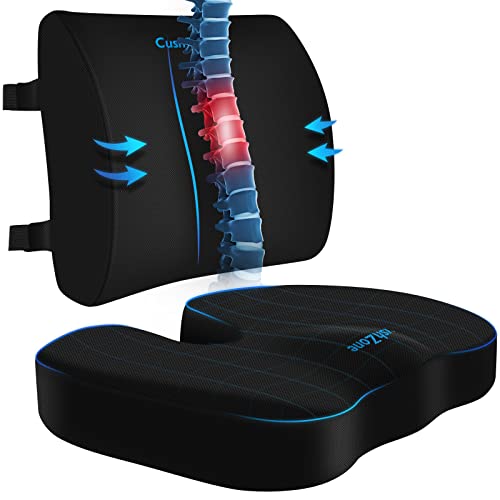
CushZone Seat Cushion and Lumbar Support Pillow for Office Chair, Black
- Ergonomic Dimensions for Comfort: Sized for most users with ergonomic design
- High-Quality Materials: Made of durable fabric with quality zippers
- Non-Slip and Adjustable Fit: Non-slip bottom and adjustable straps for stability
As an affiliate, we earn on qualifying purchases.

Everlasting Comfort The Original Lumbar Support Pillow for Office Chair - Improves Posture, Promotes Back Pain Relief - Superior Back Support for Gaming and Desk Chairs - Lumbar Pillow for Car, Couch
- High-Density Memory Foam: Provides firm, long-lasting support
- Supports Natural Spine Curve: Encourages better posture and reduces slouching
- Versatile Use: Suitable for office, car, couch, and gaming chairs
As an affiliate, we earn on qualifying purchases.