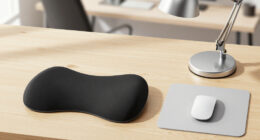
If you’re looking to create a truly comfortable and productive home workspace in 2026, you’re in the right place. This checklist is designed for remote workers, students, and anyone who spends a significant amount of time at their desk and wants to prioritize ergonomics and health. Whether you’re setting up a new office or upgrading your current setup, these carefully selected essentials will help you work smarter and feel better.
Our guide is organized into key categories, each focusing on a vital aspect of ergonomic comfort—from supportive chairs to accessories that promote better posture. Use this as a handy reference to understand what features matter most, and to compare options effectively. Remember, the goal is to find products that fit your unique space and body, so pay close attention to sizing, compatibility, and adjustability tips included in each section.
To get the most out of this checklist, start by identifying which areas need the most improvement—perhaps your chair or monitor placement—and then explore the recommended picks. Investing in quality ergonomic essentials can make a significant difference in reducing fatigue, discomfort, and long-term health issues. Happy shopping and here’s to a healthier, more comfortable workspace!
Ergonomic Office Chairs
An ergonomic office chair is the cornerstone of a healthy workspace. The Steelcase Gesture Office Chair stands out for its adaptability and support, making it a popular choice among professionals who spend hours at their desks. When selecting an ergonomic chair, focus on adjustability features like seat height, armrests, and lumbar support. Proper fit is essential to prevent discomfort and promote good posture. Many buyers overlook the importance of trying out chairs or checking for compatibility with their body type, which can lead to dissatisfaction or even strain over time. Consider your height, weight, and any specific back issues when choosing a chair. The chair should support your natural spine curve, allow your feet to rest flat on the floor, and enable easy movement.
Look for a chair with breathable mesh, adjustable lumbar support, and smooth-rolling casters for mobility. Remember, a well-fitted chair not only boosts comfort but also enhances productivity and focus. If you have limited space, opt for a model with a smaller footprint or wheels that lock in place. The right ergonomic chair will become your workspace’s backbone, so prioritize quality and adjustability for long-term satisfaction.
What to look for:
- Adjustable seat height and depth
- Lumbar support that can be customized
- Breathable mesh material
- Smooth-rolling casters suitable for your floor type
- Compatibility with your desk height
Steelcase Gesture Office Chair – Ergonomic Work Chair with Wheels for Carpet – C

The Steelcase Gesture Office Chair is an ergonomic and adjustable chair designed for long hours of comfortable work. It features a contoured back, 360-degree arms, and intuitive adjustments to fit a variety of postures and preferences.
Pros:
- Ergonomic design supports long hours of comfortable sitting
- Adjustable features for a personalized fit
- Contoured back fits natural spine shape
- Suitable for various postures and preferences
Cons:
- May be expensive compared to basic office chairs
- Complex adjustments might require some learning
Best for: Long hours at a desk
Not ideal for: Limited space environments
Bottom line: Prioritize adjustability and support for all-day comfort
Adjustable Sit-Stand Desks
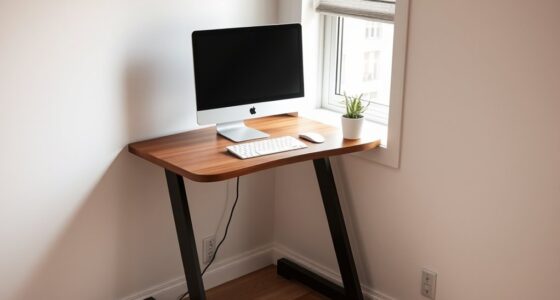
An adjustable sit-stand desk like the Ergotron WorkFit-TX offers the flexibility to switch between sitting and standing, which can help reduce fatigue and improve circulation. This type of desk converter is especially valuable if you want to upgrade your existing workspace without replacing your entire desk. When choosing a sit-stand solution, look for stability, ease of height adjustment, and compatibility with your monitor setup. Many models, including the Ergotron, feature dual-monitor support, which is ideal for multitasking and reducing neck strain. Proper height adjustment is crucial — your monitor should be at eye level, and your keyboard should allow your elbows to stay close to your body at about a 90-degree angle. Some buyers make the mistake of selecting a converter that is either too bulky or unstable, which can hinder productivity and cause frustration. Measure your desk space and consider the weight capacity to ensure compatibility.
Look for features like a smooth lift mechanism, sturdy construction, and adjustable height ranges. This will ensure seamless transitions between sitting and standing positions. If you work with multiple monitors or need extra workspace, check that the converter can support your setup without tipping or wobbling. An ergonomic sit-stand desk is a smart investment for those seeking to promote movement and reduce sedentary behavior throughout the day.
What to look for:
- Stable and sturdy construction
- Smooth and easy height adjustment
- Supports dual monitors if needed
- Adequate height range for your setup
- Compatibility with your existing desk

Ergonomic Lumbar Support Cushion for Back Support & Pain Relief | 6-Zone Pressure Distribution Posture Corrector for Office Chair, Car Seat, Desk, etc. | Great for Father's day (Gray)
- Posture Correction: Automatically aligns your spine
- Ergonomic Design: Contours to natural S-curve of spine
- Multi-Region Support: Distributes pressure across six zones
As an affiliate, we earn on qualifying purchases.
Ergotron WorkFit-TX Standing Desk Converter, Dual Monitor Sit-Stand Ergonomic De

The Ergotron WorkFit-TX is a spacious sit-stand desk converter designed for dual monitors, laptops, and keyboards, supporting ergonomic positioning and easy height adjustments. It features a large worksurface, smooth movement, and quick setup to enhance office comfort and productivity.
Pros:
- Large worksurface supports multiple monitors and accessories
- Smooth, stable height adjustments with quick setup
- No assembly required, ready to use out of the box
- Durable build with extensive quality testing
Cons:
- May be heavy and bulky to move frequently
- Limited to desk surfaces up to 32 inches wide
- Price not specified
Best for: Frequent sit-stand users
Not ideal for: Limited desk space
Bottom line: Enhance flexibility and movement in your workspace
Lumbar Support Cushions
To complement your ergonomic chair, a lumbar support cushion can provide targeted relief for your lower back. The Ergonomic Lumbar Support Cushion is designed to mold to your back’s natural curve, helping to prevent slouching and reduce pain during long hours of sitting. When selecting a lumbar cushion, check for adjustable straps to secure it firmly to your chair, and look for breathable, washable covers for easy maintenance. Many users make the mistake of choosing cushions that are too soft or too firm, which can either fail to provide support or create additional discomfort. It’s essential to find a cushion that offers firm yet comfortable support tailored to your body. Compatibility with your chair’s size and shape is also key—measure your chair’s backrest if possible.
Consider cushions made with memory foam or gel-infused materials for enhanced comfort. The right lumbar support will help maintain proper spinal alignment, reduce muscle tension, and prevent long-term issues. Use it consistently, especially if you spend many hours seated, to promote better posture and overall back health. Pairing a good cushion with an ergonomic chair creates a comprehensive support system that can dramatically improve your sitting experience.
What to look for:
- Adjustable straps for secure fit
- Breathable, washable cover
- Firmness suitable for your comfort
- Memory foam or gel material
- Compatibility with your chair size
Ergonomic Lumbar Support Cushion for Back Support & Pain Relief

This ergonomic lumbar support cushion features a 6-zone pressure distribution system that promotes proper spinal alignment and alleviates back pain during extended sitting. Designed with orthopedic-grade contouring, it helps improve posture and reduce muscle fatigue, making it suitable for office chairs, car seats, and more.
Pros:
- Promotes proper posture and spinal alignment
- Reduces back pain and muscle fatigue
- Versatile for use on various seating surfaces
- Durable with high-density foam
Cons:
- May require adjustment for optimal comfort
- Potentially less effective for severe back conditions
- Requires regular cleaning to maintain breathability
Best for: Prolonged sitting periods
Not ideal for: Limited back support needs
Bottom line: Invest in lumbar support for better posture
Monitor Stands & Mounts
Proper monitor placement is crucial for ergonomic health, making monitor stands and mounts an essential part of your setup. The Fenge Dual Monitor Stand Riser offers a stylish and functional way to elevate your screens, reducing neck and eye strain. When choosing a monitor stand or mount, consider adjustable height and tilt features to customize your viewing angle. Compatibility with your monitor size and weight capacity is vital—measure your monitors and check the specifications before purchase. A common mistake is using a stand that is too low or unstable, which can lead to poor posture and discomfort over time. Additionally, consider options with additional storage or compartments to keep your workspace organized and clutter-free.
Look for sturdy construction, easy assembly, and a design that complements your desk aesthetic. If you prefer a mount, ensure it is compatible with VESA standards and offers adjustable arm movement for maximum flexibility. Proper monitor placement will help you maintain a neutral neck position and reduce strain during long work sessions. Investing in a quality riser or mount is a simple yet effective way to promote ergonomic alignment and boost productivity.
What to look for:
- Adjustable height and tilt
- Supports VESA compatibility
- Sturdy and stable construction
- Additional storage options
- Compatible with monitor size and weight
Fenge Dual Monitor Stand Riser, Wooden Desk Shelf with 2-Tier Storage, 42.5-Inch

This sturdy dual monitor stand features a 42.5-inch wide wooden surface with two tiers for ample storage and organization. Made of waterproof MDF and supported by durable aluminum legs, it helps improve ergonomics and keep your workspace tidy.
Pros:
- Large 42.5-inch wide surface supports two monitors comfortably
- Sturdy aluminum legs with high weight capacity and stability
- Two-tier design offers ample storage and organization options
- Ergonomic height helps reduce neck and shoulder strain
Cons:
- Assembly may take some time despite detailed instructions
- Limited color options (not specified)
Best for: Multiple monitor users
Not ideal for: Limited desk space
Bottom line: Optimize your monitor height for comfort
Footrests & Under-Desk Supports
An adjustable footrest like the YEASHEIN Foot Rest can make a significant difference in your ergonomic setup. Proper foot support helps to improve circulation, reduce pressure on your lower back, and promote a more natural sitting posture. When selecting a footrest, look for features such as height adjustability, a non-slip surface, and a comfortable, textured surface for support. Many buyers overlook the importance of foot support, but a good footrest can prevent fatigue and discomfort during extended periods of sitting. Ensure the footrest fits well under your desk and can be easily adjusted to match your preferred height. If you have a smaller desk, choose a compact model that still provides sufficient support.
For maximum benefit, position the footrest so your feet are flat and your knees are at a 90-degree angle. Some models offer rocking or tilting features to promote subtle movements, which can further enhance comfort. Using an ergonomic footrest encourages better posture and helps reduce strain on your lower limbs and back. It’s a simple addition that can greatly improve your overall sitting experience and long-term health.
What to look for:
- Adjustable height
- Non-slip surface
- Comfortable textured surface
- Compact size for your desk
- Support for both feet
YEASHEIN Adjustable Foot Rest for Under Desk at Work, Ergonomic Foot Stool with

This adjustable foot rest features 7 positions with multiple height and angle settings, providing ergonomic support for various needs. Made with high-density memory foam and a durable metal frame, it relieves foot and leg pain while promoting better posture.
Pros:
- Adjustable for personalized comfort with 7 positions
- High-density memory foam provides soft yet supportive cushioning
- Sturdy metal frame supports up to 500 lbs and remains stable
- Removable, washable cover for easy maintenance
Cons:
- May be too large for small desks or limited space
- Memory foam could compress over time with heavy use
Best for: Long sitting sessions
Not ideal for: Limited space under desk
Bottom line: Support your feet for better posture
Desk Organization & Accessories
An organized workspace is key to maintaining productivity and reducing stress. The Ergonomic Tall Drafting Chair with mesh design and flip-up arms can help you create a flexible, clutter-free environment. Accessories like monitor arms, cable organizers, and desktop trays can keep your workspace tidy and ergonomic. When choosing desk accessories, prioritize items that promote easy access and reduce clutter, which can otherwise lead to distraction and discomfort. Avoid overloading your desk with unnecessary items, which can hinder movement and airflow. A well-organized desk also makes it easier to adjust your setup as needed, ensuring your ergonomic investments continue to pay off.
Look for accessories that are durable, easy to install, and compatible with your existing furniture. Modular solutions allow you to customize your workspace over time, adapting to your changing needs. Remember, the goal is to maintain a clean, efficient, and ergonomic environment that supports your work habits and minimizes physical strain. Investing in quality organization tools enhances your overall ergonomic setup and helps you stay focused and comfortable throughout your workday.
What to look for:
- Durable and easy to install
- Compatibility with your desk and chair
- Cable management features
- Adjustable and modular options
- Space-saving design
Ergonomic Tall Drafting Chair – Mesh Desk Chair with Flip-Up Arms, Adjustable He

This ergonomic drafting chair features adjustable height, lumbar support, and a repositionable footrest, making it suitable for high drafting tables and standard desks. It offers breathable mesh backrest, high-density foam cushioning, and smooth mobility for comfort during long work sessions.
Pros:
- Adjustable height and footrest for customized comfort
- Breathable mesh backrest keeps users cool
- Stable and durable with smooth-rolling casters
Cons:
- May be too tall for standard desks for some users
- Limited color options (not specified)
- Assembly instructions not provided
Best for: Maximum productivity
Not ideal for: Limited desk space
Bottom line: Keep your workspace tidy for better ergonomics
When building your ergonomic home workspace, start with the essentials that fit your budget and needs. Prioritize adjustable and supportive products like chairs, desks, and cushions to ensure long-term comfort and health. Remember, investing in quality ergonomic gear not only enhances your work experience but also safeguards your well-being over time.
Take your time to compare options, read reviews, and select the products that truly suit your space and body. Creating an ergonomic setup is an ongoing process—small adjustments can lead to big improvements in comfort and productivity. Keep experimenting and fine-tuning your workspace, and enjoy the benefits of a healthier, more comfortable working environment!