As a tall user, your standing desk setup needs to be customized to prevent discomfort and support your posture. Use adjustable monitor arms and risers to position screens at eye level, and choose height-adjustable desks or extenders to match your natural arm and eye alignment. Add footrests and ergonomic accessories like wrist supports for extra comfort. Tailoring your workspace guarantees long-term health and productivity—keep going to discover how to optimize your setup even further.

Get comfort and recovery gear delivered free with Prime
- Fast, free delivery on millions of items
- Prime Video, Amazon Music and more included
- Member-only deals all year
Key Takeaways
- Customize monitor height with adjustable stands or arms to ensure eye level and reduce neck strain.
- Use height-adjustable desks or risers to achieve proper arm and elbow angles comfortably.
- Incorporate footrests for added support if feet don’t reach the floor comfortably.
- Add ergonomic accessories like wrist supports and anti-fatigue mats tailored to taller users.
- Adjust workspace layout to promote good posture and reduce fatigue during extended work sessions.

If you’re tall and working at a standard desk feels uncomfortable or causes strain, adjusting your setup is crucial. Your workspace shouldn’t leave you slouching or stretching awkwardly just to keep up with a typical setup designed for average heights. Instead, you need to prioritize ergonomic accessories and height adjustment options that cater specifically to your stature. When you customize your workspace, you’ll find it easier to maintain good posture, reduce fatigue, and stay productive throughout the day.
Customize your workspace with ergonomic adjustments to stay comfortable and boost productivity.
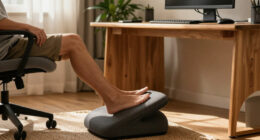
The first step is to explore ergonomic accessories that support your unique needs. A taller monitor stand or adjustable monitor arm can help position your screen at eye level, preventing neck strain. An under-desk keyboard tray can bring your keyboard and mouse closer, avoiding reaching or hunching. When choosing these accessories, look for options that are adjustable and sturdy enough to handle your height. Adjustable footrests can also improve comfort, especially if your feet don’t reach the floor comfortably when seated. These simple additions can greatly impact your comfort and help you maintain proper posture. Additionally, ergonomic design principles emphasize customizing your workspace to fit your body. Incorporating adjustable components allows you to adapt your workspace to your specific height, which is especially important for taller users. Incorporating height-specific solutions ensures your workspace remains functional and comfortable for your stature. Moreover, understanding the importance of body mechanics can help you prevent repetitive strain injuries and maintain long-term comfort.
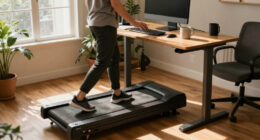
Next, focus on height adjustment options for your desk itself. Not all desks are built to accommodate taller users, so investing in a height-adjustable standing desk can be a game-changer. With a good standing desk, you can set the height to match your natural arm and eye positions, whether you prefer to sit or stand. If your current desk isn’t adjustable, consider using risers or height extenders designed specifically for desks. These solutions allow you to elevate your workspace without sacrificing stability. Remember, the goal is to create a setup where your elbows are at a comfortable 90-degree angle, your monitor is at eye level, and your feet are flat on the ground or on a footrest.
Finally, don’t underestimate the importance of proper monitor placement and ergonomic accessories that promote movement. Position your monitor directly in front of you, about an arm’s length away, and ensure it’s adjusted to your eye level. Use ergonomic accessories like wrist supports or anti-fatigue mats if you’re standing for extended periods. These small but impactful adjustments can help you avoid common issues like back pain, wrist strain, and eye fatigue. Paying attention to ergonomic accessories can greatly enhance your overall comfort and help prevent strain during long work sessions.
Products Worth Considering

Withings BPM Connect Wi-Fi and Bluetooth Blood Pressure Monitor

BowFlex SelectTech 840 Adjustable Kettlebell

BowFlex Results Series 552 SelectTech Adjustable Dumbbell
As an affiliate, we earn on qualifying purchases.
Frequently Asked Questions
How Do I Adjust a Standing Desk for Extreme Height?
To adjust your standing desk for extreme height, start by customizing the desk height using its adjustable features. Use ergonomic accessories like a standing mat or monitor risers to enhance comfort. Make certain your keyboard and monitor are at eye level to prevent strain. If the desk can’t reach your desired height, consider adding a sturdy riser or platform. Proper desk height customization ensures you stay comfortable and maintain good posture throughout the day.
Are There Specific Brands Catering to Tall Users?
Yes, there are brands like Fully and Uplift that cater to tall users, offering adjustable desks with higher maximum heights. You can enhance your setup with ergonomic accessories like monitor arms and keyboard trays for better customization. These brands focus on desk customization options, ensuring you find a comfortable, ergonomic fit that suits your height. Investing in their products helps you create a tailored workspace that promotes comfort and productivity.
What’s the Ideal Monitor Height for Tall Individuals?
You might think a higher monitor is uncomfortable, but for tall individuals, the ideal monitor height is roughly eye level, preventing neck strain. Use an ergonomic keyboard and adjustable footrest positioning to stay comfortable. Elevate your monitor so your eyes look straight ahead, and keep your feet supported. This setup reduces fatigue, improves posture, and makes working long hours much easier, even if you’re taller than average.
Can a Tall Person Use a Standard Desk Comfortably?
Yes, as a tall person, you can use a standard desk comfortably by adding ergonomic accessories and focusing on height customization. Adjustable monitor stands, keyboard risers, and footrests help optimize your setup, reducing strain. By customizing your workspace, you guarantee proper posture and comfort, even with a standard desk. These adjustments make it possible to work efficiently without needing a specialized or taller desk.
How Do I Prevent Back Pain With a Tall Standing Desk Setup?
Think of your back as a bridge that needs strong supports; to prevent pain, you should incorporate ergonomic accessories like lumbar cushions and footrests. Adjust your desk and monitor height to maintain a neutral spine, and practice posture correction regularly. These steps help keep your back aligned, reduce strain, and guarantee your setup supports your height comfortably, so you stay pain-free and focused throughout the day.
Conclusion
Remember, your desk setup isn’t just a workspace—it’s your personal stage. Just like a tailor crafts a suit to fit perfectly, customize your standing desk to match your height and comfort. Think of your setup as a tall tree reaching for the sky—strong, steady, and uniquely yours. When you optimize your space, you create a foundation where productivity blossoms and aches fade away. Stand tall, and let your workspace support you in growing every day.