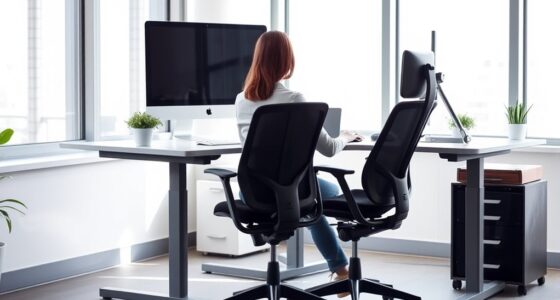
To optimize your workstation during pregnancy, make sure your feet are flat on the ground or on a footrest, with your back well-supported using lumbar cushions if needed. Position your monitor at eye level and keep it at arm’s length to prevent neck strain. Keep your elbows close to your sides at about 90°, and use ergonomic accessories for comfort. Moving and stretching regularly can also boost circulation. Continue exploring ways to adapt your setup for added comfort and health.
Key Takeaways
- Adjust chair height to keep feet flat and knees at a 90° angle, using a footrest if needed.
- Position the monitor at eye level and an arm’s length away to reduce neck strain.
- Keep keyboard and mouse close with elbows bent at 90°, ensuring wrists remain neutral.
- Take regular breaks to stretch and move, promoting circulation and reducing stiffness.
- Incorporate ergonomic accessories like lumbar supports and standing desk converters for added comfort.
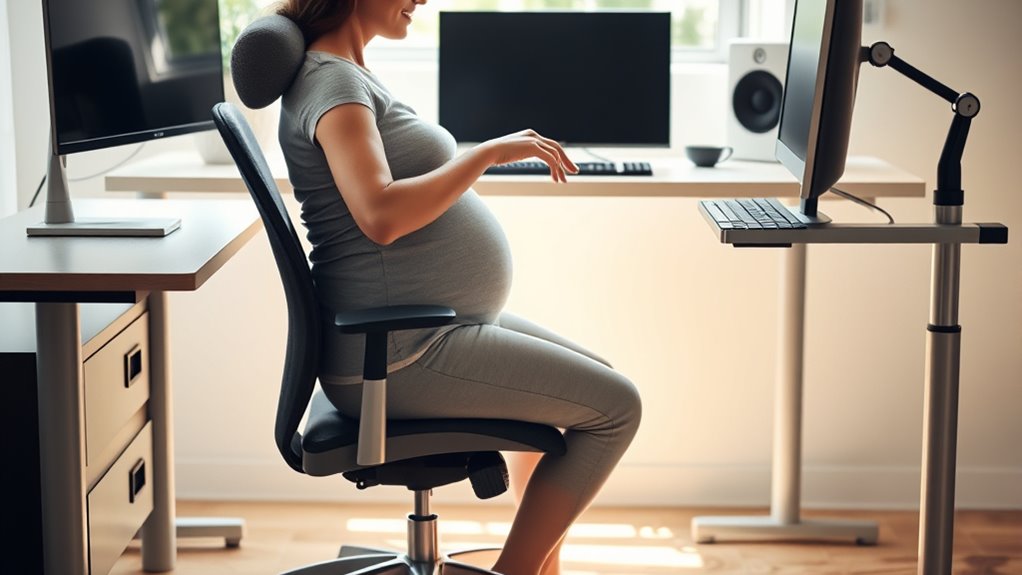
As your body changes during pregnancy, maintaining proper workstation ergonomics becomes essential to guarantee comfort and prevent strain. Your prenatal posture needs careful attention because shifts in your center of gravity and joint flexibility can cause discomfort or even injury if ignored. To support your changing body, focus on creating an ergonomic setup that encourages good posture, reduces muscle tension, and promotes circulation. Using ergonomic accessories can make a significant difference, allowing you to work more comfortably throughout your pregnancy.
Start by adjusting your chair so that your feet rest flat on the floor, and your knees are at a 90-degree angle. If your feet don’t reach the ground, use a footrest to provide stable support. Sit back in the chair so that your lower back is well-supported, which is critical as pregnancy can increase lumbar strain. Proper lumbar support helps maintain your prenatal posture by preventing slouching and reducing pressure on your spine. Consider adding a lumbar pillow or an ergonomic backrest to keep your lower back aligned naturally.
Your monitor should be positioned at eye level to avoid straining your neck and shoulders. Use an adjustable monitor stand or ergonomic accessories like a monitor riser to elevate your screen. Keep the monitor about an arm’s length away, ensuring you don’t lean forward or cran your neck, which can cause discomfort over time. Your keyboard and mouse should be positioned so that your elbows are close to your sides and bent at about 90 degrees. An ergonomic keyboard and mouse can help minimize wrist strain, especially as pregnancy can cause swelling or tenderness in your hands.
Take regular breaks to stretch and change positions, as prolonged sitting can lead to stiffness and circulation issues. Incorporate simple stretches that target your back, shoulders, and hips, or walk around briefly to promote blood flow. When working at a desk, consider using ergonomic accessories like a footrest, lumbar support, or an adjustable standing desk converter. These additions help you customize your workstation to support your prenatal posture and accommodate your comfort needs.
Additionally, understanding the importance of projector technology can enhance your overall setup, especially if you incorporate visual aids or presentations into your space. Lastly, don’t forget to listen to your body. If you feel discomfort, shift your position, adjust your accessories, or take a break. Proper workstation ergonomics isn’t just about comfort—it’s about protecting your health and your baby’s well-being. By making these adjustments and using ergonomic accessories, you can create a safe, supportive environment that adapts to your changing body during pregnancy.
Top picks for "workstation ergonomic expectant"
Open Amazon search results for this keyword.
As an affiliate, we earn on qualifying purchases.
Frequently Asked Questions
How Can I Adjust My Chair for Better Support During Pregnancy?
To improve support during pregnancy, adjust your chair by ensuring your lumbar support is properly aligned with your lower back, promoting better posture correction. Sit back fully, with your hips and knees at a 90-degree angle, and use a cushion if needed for extra lumbar comfort. Keep your feet flat on the ground, and avoid slouching to reduce strain. Regularly check and readjust as your body changes.
Are There Specific Ergonomic Tools Recommended for Pregnant Women?
Imagine you’re in the year 3024, and even then, prenatal ergonomic tools are essential. You should consider using maternity workstation accessories like supportive cushions, adjustable footrests, and ergonomic keyboards designed for comfort. These accessories help reduce strain and improve posture during pregnancy. Investing in quality maternity workstation accessories guarantees you stay comfortable and supported, making your workday smoother and safer for both you and your baby.
How Often Should I Take Breaks to Reduce Discomfort While Working?
You should take breaks every 30 minutes to reduce discomfort while working. During these breaks, do stretching exercises to ease muscle tension and improve circulation. Remember to stay hydrated by drinking water regularly and avoid caffeine. Incorporating these hydration tips and stretching exercises into your routine helps you stay comfortable and focused, minimizing strain and supporting your well-being throughout your workday.
Can Ergonomic Modifications Help Prevent Pregnancy-Related Back Pain?
Did you know that proper pregnancy posture can reduce back pain by up to 50%? Ergonomic modifications definitely help prevent pregnancy-related back pain. By adjusting your workstation with ergonomic accessories like supportive chairs, footrests, and lumbar cushions, you maintain better alignment. These modifications reduce strain on your back and promote comfort, making your workday less painful and more manageable during pregnancy.
Is Standing Workstation Preferable Over Sitting for Pregnant Employees?
A standing desk can be preferable for pregnant employees, as it encourages movement and reduces prolonged sitting, which can strain your back. However, it’s crucial to maintain proper sitting posture when sitting, using ergonomic chairs and taking breaks. Alternating between standing and sitting helps prevent fatigue and discomfort. Listen to your body, and adjust your workstation to support your changing needs during pregnancy.
Conclusion
By adjusting your workstation to fit your changing needs, you can stay comfortable and reduce discomfort during pregnancy. Remember, isn’t your well-being worth the small effort of ergonomic tweaks? Prioritizing your comfort not only benefits you but also helps you stay focused and productive. So, make those ergonomic improvements today—your body will thank you, and you’ll feel more empowered to navigate this special time with confidence.