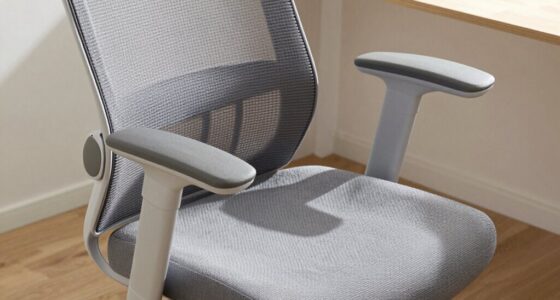
When choosing an ergonomic chair, look for adjustable features like lumbar support, armrests, and seat height to personalize your comfort. Make certain it has tilt and recline functions to distribute pressure evenly and promote flexibility. Materials matter—breathable mesh backs and sturdy frames boost durability and cooling. Proper support and customization are key to maintaining good posture during long hours. Want to discover how these features can best benefit you? Keep exploring to learn more tips.
Key Takeaways
- Look for adjustable lumbar support to maintain proper spine curvature and reduce back strain.
- Ensure armrests are adjustable in height and position to support arms and shoulders comfortably.
- Choose a chair with customizable seat height and a waterfall edge for optimal circulation and ergonomic posture.
- Opt for tilt and recline functions with lockable features to distribute weight evenly and relieve pressure.
- Prioritize build quality with breathable materials and durable frames for long-term ergonomic support.

When choosing an ergonomic chair, understanding its key features can make a significant difference in comfort and support. One of the most critical aspects to consider is lumbar support. Your lower back bears much of your sitting strain, so a chair that provides proper lumbar support helps maintain the natural curve of your spine. Look for a chair that either has built-in lumbar support or allows you to adjust it. Adjustable lumbar support lets you customize the fit, ensuring your lower back is properly supported throughout long work hours. This reduces the risk of back pain and fatigue, keeping you comfortable and focused.
Another essential feature is adjustable armrests. Your arms should rest comfortably without causing shoulder strain or neck tension. Adjustable armrests can be moved up or down, and sometimes side to side, to match your desk height and personal comfort preferences. When armrests are properly aligned, they help support your arms, reducing the load on your shoulders and neck. Proper positioning prevents slouching and encourages better posture. If the armrests aren’t adjustable, you might find yourself hunching or leaning forward, which can lead to discomfort over time.
Beyond lumbar support and adjustable armrests, guarantee the chair offers a seat height that allows your feet to rest flat on the floor with knees at a 90-degree angle. This positioning promotes circulation and prevents pressure buildup in your legs. The seat itself should be padded enough for comfort but firm enough to maintain support. A seat with a waterfall edge helps reduce pressure on your thighs and improves circulation.
Tilt and recline functions are also essential. A good ergonomic chair lets you lean back with a lockable tilt mechanism, giving you the flexibility to change your position during long work sessions. These features help distribute your weight evenly and relieve pressure points. Additionally, look for a chair with adjustable tension control, so you can set the resistance when reclining to match your weight and preference.
Finally, consider the overall build quality and materials. Breathable mesh backs promote airflow, keeping you cool throughout the day, while sturdy frames ensure durability. When all these features come together—lumbar support, adjustable armrests, proper seat height, tilt functions—you get a chair that adapts to your body, reduces strain, and enhances productivity. Taking the time to evaluate these key features will lead you to a comfortable, supportive ergonomic chair that meets your needs and helps you maintain good posture for years to come.
ergonomic office chair with adjustable lumbar support
As an affiliate, we earn on qualifying purchases.
As an affiliate, we earn on qualifying purchases.
Frequently Asked Questions
How Do I Determine the Best Ergonomic Chair for My Body Type?
To find the best ergonomic chair for your body type, focus on posture alignment and lumbar support. Test how well the chair supports your lower back naturally, ensuring your spine stays aligned. Adjust the seat height so your feet rest flat, and check if the armrests suit your shoulder width. By prioritizing these features, you’ll sit comfortably and reduce strain, making your chair perfect for your specific needs.
Are Adjustable Features More Beneficial Than Fixed Ones?
Adjustability benefits your comfort by allowing you to customize the chair to your body, promoting better posture and reducing strain. Fixed design advantages include simplicity and durability, often requiring less maintenance. While adjustable features are generally more beneficial for personalized support, fixed chairs can be a good choice if you prefer a straightforward, low-maintenance option. Ultimately, it depends on your needs; if you value customization, adjustability is the way to go.
What Is the Ideal Weight Capacity for Ergonomic Chairs?
You should look for an ergonomic chair with a weight capacity of at least 250 pounds, which guarantees durability and support for most users. Higher weight capacities, like 300 pounds or more, provide added durability and comfort for larger individuals. Choosing a chair with an appropriate weight capacity helps prevent wear and tear, extends its lifespan, and maintains proper support, making it a worthwhile investment for long-term comfort and durability.
How Often Should I Replace My Ergonomic Office Chair?
Think of your ergonomic chair as a trusty steed that ages with use. Typically, you should replace it every 5 to 10 years to guarantee maximum chair longevity and ergonomic chair lifespan. Over time, wear and tear can turn comfort into discomfort, and support into strain. Keep an eye on squeaks, sagging, or loss of support—these signs signal it’s time to saddle up with a new chair for better back health.
Do Ergonomic Chairs Require Special Maintenance or Cleaning?
You don’t need special maintenance for your ergonomic chair, but regular cleaning tips help it stay in top shape. Use a damp cloth to wipe down the frame and seat, avoiding harsh chemicals. Follow simple maintenance routines like checking for loose screws or worn-out parts every few months. This keeps your chair comfortable and extends its lifespan, ensuring you get the most out of your investment in ergonomic support.
mesh ergonomic desk chair with adjustable armrests
As an affiliate, we earn on qualifying purchases.
As an affiliate, we earn on qualifying purchases.
Conclusion
When choosing an ergonomic chair, prioritize adjustability, support, and comfort. Focus on features that promote good posture, reduce strain, and enhance productivity. Look for chairs that are customizable, breathable, and durable. Remember, an ergonomic chair isn’t just about comfort—it’s about supporting your health, boosting your focus, and improving your well-being. Make your choice wisely, prioritize your needs, and invest in a chair that works for you, because your comfort, health, and productivity depend on it.
ergonomic chair with tilt and recline lock feature
As an affiliate, we earn on qualifying purchases.
As an affiliate, we earn on qualifying purchases.
breathable mesh ergonomic chair for long hours
As an affiliate, we earn on qualifying purchases.
As an affiliate, we earn on qualifying purchases.