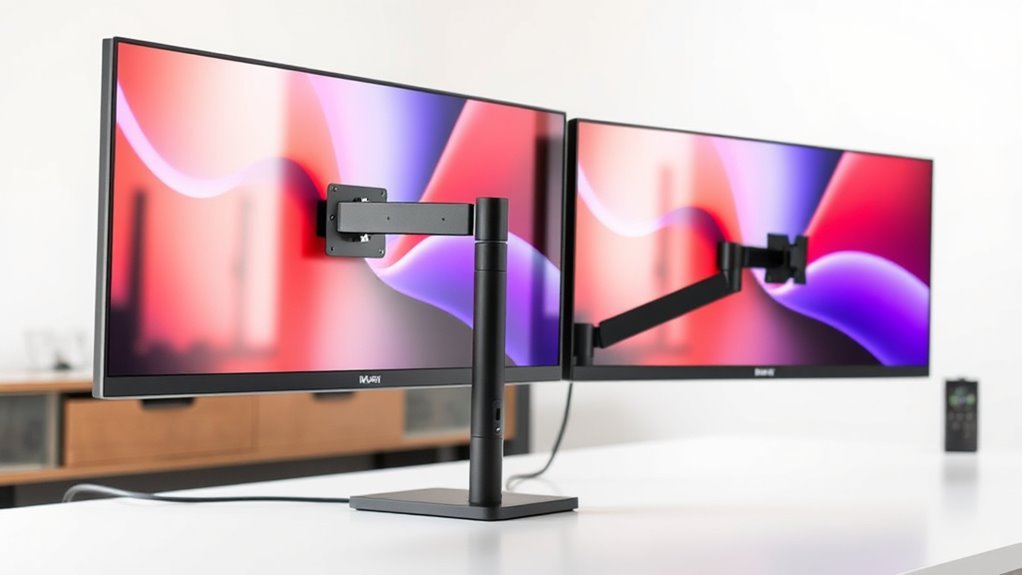
When choosing dual monitor arms with cable management, the key considerations are stability, flexibility, and how well they conceal wires. The BONTEC Dual Monitor Desk Mount stands out as the best overall due to its sturdy build and reliable cable routing, making it ideal for professional setups. For those seeking a versatile option, the HUANUO Dual Monitor Stand offers extensive height adjustability and integrated USB ports, though it’s slightly bulkier. Meanwhile, the VIVO Dual Monitor Desk Mount provides excellent value with solid performance at a more accessible price point. The main tradeoffs involve balancing durability, ease of installation, and cable concealment features. Continue reading for a detailed comparison to help you find the perfect fit.

Get comfort and recovery gear delivered free with Prime
- Fast, free delivery on millions of items
- Prime Video, Amazon Music and more included
- Member-only deals all year
Complete the kit


Key Takeaways
- Sturdiness and build quality significantly impact long-term reliability, especially for larger monitors.
- Cable management features vary from simple clips to integrated channels, affecting the overall neatness.
- Adjustability, including height and tilt, is crucial for ergonomic comfort and varies across models.
- Price often correlates with construction quality and cable routing sophistication, but some budget options perform well.
- Installation complexity differs, with some models offering quick-attach mechanisms and others requiring tools.
| BONTEC Dual Monitor Desk Mount, 13-27 Inch, 22 lbs, VESA 75×75/100×100, Black |  | Best Overall | Supported Screen Size: 13-27 inches | Maximum Load: 22 lbs per arm | VESA Compatibility: 75×75, 100×100 | VIEW ON AMAZON | See Our Full Breakdown |
| Dual Monitor Stand for 17-32 Inch Screens with Gas Spring Arms |  | Best Value Pick | Compatibility: 17-32 inch monitors, up to 19.8 lbs | VESA Standards: 75×75, 100x100mm | Mounting Methods: C-clamp and grommet mount | VIEW ON AMAZON | See Our Full Breakdown |
| monTEK Dual Monitor Mount Tall Monitor Arms for 17 to 35 Inch Screens |  | Best for Heavy Monitors | Compatibility: 17-35 inch screens | Weight Capacity: 35.27 lbs | VESA Standards: 75x75mm, 100x100mm | VIEW ON AMAZON | See Our Full Breakdown |
| VIVO Dual Monitor Desk Mount for 13-30 inch Screens, Heavy Duty Steel Stand with Adjustable Arms and C-Clamp |  | Best Heavy-Duty Steel Mount | Screen Size Range: 13-30 inches | Maximum Weight: 22 lbs | VESA Compatibility: 75x75mm, 100x100mm | VIEW ON AMAZON | See Our Full Breakdown |
| HUANUO Dual Monitor Stand for 13-40 inch Monitors with USB, Height Adjustable, VESA Mount, Clamp/Grommet Base |  | Best with USB Charging | Supported Monitor Size: 13-40 inches | Weight Capacity: 26.4 lbs per arm | VESA Compatibility: 75×75mm or 100×100mm | VIEW ON AMAZON | See Our Full Breakdown |
| monTEK Mechanical Spring Dual Monitor Arm with USB for 27-34 inch Screens |  | Best Overall for Heavy-Duty, Highly Adjustable Support | Supported Screen Size: 17-35 inches | Weight Capacity: 26.4 lbs per arm | VESA Compatibility: 75x75mm, 100x100mm | VIEW ON AMAZON | See Our Full Breakdown |
| ErGear Dual Monitor Arm for 13–32″ Screens, Full Adjustable VESA Mount |  | Best for Versatile, User-Friendly Adjustments | Compatibility: 13–32 inch monitors | Max Load: 19.8 lbs | VESA Pattern: 75x75mm, 100x100mm | VIEW ON AMAZON | See Our Full Breakdown |
| WALI Adjustable Dual Monitor Arm for 13-32 inch Screens, 22 lbs per Arm |  | Best for Space-Saving, Budget-Friendly Ergonomics | Screen Size Compatibility: 13-32 inches | Max Load Capacity: 22 lbs per arm | VESA Pattern: 75x75mm, 100x100mm | VIEW ON AMAZON | See Our Full Breakdown |
| Mount-It Dual Monitor Arm for 13-32 inch Screens |  | Best for Heavy-Duty, Professional-Grade Support | Supports Screen Size: 13-32 inches | Weight Capacity: 19.8 lbs per monitor | VESA Compatibility: 75x75mm, 100x100mm | VIEW ON AMAZON | See Our Full Breakdown |
| VIVO Dual Monitor Stand, Fully Adjustable Arms for 17 to 32 inch Screens, Mechanical Articulating Desk Mount, VESA 75×75, 100×100, Max 19.8 lbs, Black |  | Best for Fully Customizable, Space-Saving Setup | Screen Compatibility: 17-32 inches | Weight Capacity: 19.8 lbs per monitor | VESA Patterns: 75x75mm, 100x100mm | VIEW ON AMAZON | See Our Full Breakdown |
| monTEK Dual Monitor Mount for 17 to 35 Inch Screens |  | Best Overall for Versatile Ergonomics | Screen Size Compatibility: 17-35 inches | Weight Capacity: 35.27 lbs | VESA Compatibility: 75x75mm, 100x100mm | VIEW ON AMAZON | See Our Full Breakdown |
| monTEK Heavy-Duty Dual Monitor Stand for 17-32″ Screens |  | Best for Heavy Monitors and Durability | Supported Screen Size: 17-32 inches | Maximum Weight per Monitor: 22 lbs | VESA Compatibility: 75×75mm, 100×100mm | VIEW ON AMAZON | See Our Full Breakdown |
| Acer Dual Monitor Arm, Gas Spring VESA Mount Stand for 17-32″ Screens |  | Best for Smooth, Effortless Adjustment | Supported Screen Size: 17–32 inches | Weight Capacity: 4.4–19.8 lbs per monitor | VESA Compatibility: 75×75/100×100 mm | VIEW ON AMAZON | See Our Full Breakdown |
| Modernsolid Dual Monitor Arm Desk Mount for Two 17-32 Inch Screens |  | Best for Balanced Stability and Premium Build | Monitor Size Support: 17-32 inches | Max Monitor Weight: 16.5 lbs per monitor | Total Max Load: 33 lbs | VIEW ON AMAZON | See Our Full Breakdown |
| HUANUO FlowLift™ Dual Monitor Stand – Fully Adjustable Desk Mount for 13-32″ Screens |  | Best for Wide Compatibility and Full Motion | Monitor Size Range: 13-32 inches | Weight Capacity: 4.4-19.8 lbs per arm | VESA Compatibility: 75x75mm or 100x100mm | VIEW ON AMAZON | See Our Full Breakdown |
| dual monitor arms with cable management | VESA Compatibility | Swivel | Rotation | Weight Capacity |
|---|---|---|---|---|
| BONTEC Dual Monitor Desk Mount | 75×75, 100×100 | — | — | — |
| Dual Monitor Stand for 17-32 I | — | -90° to +90° | -180° to +180° | — |
| monTEK Dual Monitor Mount Tall | — | — | — | 35.27 lbs |
| VIVO Dual Monitor Desk Mount f | 75x75mm, 100x100mm | 180° | 360° | — |
| HUANUO Dual Monitor Stand for | 75×75mm or 100×100mm | — | — | 26.4 lbs per arm |
| monTEK Mechanical Spring Dual | 75x75mm, 100x100mm | — | — | 26.4 lbs per arm |
| ErGear Dual Monitor Arm for 13 | — | ±90° | 360° | — |
| WALI Adjustable Dual Monitor A | — | +90°/-90° | 360° | — |
| Mount-It Dual Monitor Arm for | 75x75mm, 100x100mm | — | — | 19.8 lbs per monitor |
| VIVO Dual Monitor Stand | — | 180° | 360° | 19.8 lbs per monitor |
| monTEK Dual Monitor Mount for | 75x75mm, 100x100mm | ±90° | ±180° | 35.27 lbs |
| monTEK Heavy-Duty Dual Monitor | 75×75mm, 100×100mm | Adjustable | Adjustable | — |
| Acer Dual Monitor Arm | 75×75/100×100 mm | — | — | 4.4–19.8 lbs per monitor |
| Modernsolid Dual Monitor Arm D | 75×75mm & 100×100mm | — | — | — |
| HUANUO FlowLift™ Dual Monitor | 75x75mm or 100x100mm | ±90° | 360° | 4.4-19.8 lbs per arm |
More Details on Our Top Picks
BONTEC Dual Monitor Desk Mount, 13-27 Inch, 22 lbs, VESA 75×75/100×100, Black
This model stands out for its versatility in supporting a wide range of monitor sizes from 13 to 27 inches, making it suitable for most typical desk setups. Its sturdy steel construction ensures stability, even with full motion adjustments like tilt, swivel, and rotation, surpassing some lighter alternatives like the WALI arm, which may feel less durable. The multiple installation options, including C-clamp and grommet, offer flexibility for different desk types, but assembly can be complex for less experienced users. Cable management is integrated smoothly, helping to keep clutter at bay. Compared with the monTEK mount, it provides slightly less maximum weight capacity but is easier to install and more universally compatible. Overall, this pick makes the most sense for those wanting reliable flexibility and durability in a mid-range price point.
Pros:- Supports a wide range of monitor sizes from 13 to 27 inches
- Sturdy steel structure ensures long-term durability
- Multiple installation options for versatile setup
- Integrated cable management keeps workspace tidy
Cons:- Heavy weight may require a sturdy desk support
- Assembly can be complicated for some users
Best for: Professionals or home office users seeking a sturdy, adjustable dual monitor setup with reliable cable management for daily use.
Not ideal for: Users with very limited desk space or those who prefer a minimal, lightweight mount that prioritizes simplicity over full motion features.
- Supported Screen Size:13-27 inches
- Maximum Load:22 lbs per arm
- VESA Compatibility:75×75, 100×100
- Material:Steel
- Extension Length:16.5 inches
- Tilt Range:±90 degrees
- Swivel Range:180 degrees
- Rotation Range:360 degrees
- Installation Options:C-clamp, Grommet base
Our verdict“This dual monitor mount is ideal for users needing a reliable, fully adjustable setup with strong cable management features.”
Dual Monitor Stand for 17-32 Inch Screens with Gas Spring Arms
This stand supports larger monitors from 17 to 32 inches and up to 19.8 lbs, making it a flexible choice for those with slightly bigger screens. Its gas spring arms provide smooth, effortless motion compared to traditional spring arms like the VIVO, which can feel stiff. The full motion adjustments—including tilt, swivel, and rotation—allow for ergonomic positioning, but it requires compatible VESA mounting holes; users with non-standard mounts may need adapters. Its space-saving design with built-in cable channels helps organize clutter effectively. Compared to the monTEK mount, it offers easier height adjustments thanks to the gas spring mechanism but may lack the same maximum weight capacity for very heavy monitors. This model is perfect for users seeking a balance of size support, ease of movement, and affordability.
Pros:- Supports a wide range of monitor sizes and weights
- Gas spring arms for easy, smooth movement
- Built-in cable management channels
- Easy installation with included hardware
Cons:- Requires compatible VESA mounting holes
- Maximum weight limit of 19.8 lbs may restrict larger or heavier monitors
Best for: Home office workers or creatives with larger monitors who want smooth, effortless adjustments and integrated cable management.
Not ideal for: Users with monitors outside the 17-32 inch range or those needing mounts for very heavy or curved monitors without additional adapters.
- Compatibility:17-32 inch monitors, up to 19.8 lbs
- VESA Standards:75×75, 100x100mm
- Mounting Methods:C-clamp and grommet mount
- Max Extension:21.7 inches
- Height Adjustment:24.7 inches
- Tilt:-45° to +80°
- Swivel:-90° to +90°
- Rotation:-180° to +180°
- Construction:High-grade steel
Our verdict“This stand offers a great combination of size support and effortless motion, ideal for users with mid-to-large monitors seeking ergonomic flexibility.”
monTEK Dual Monitor Mount Tall Monitor Arms for 17 to 35 Inch Screens
This mount supports larger screens up to 35 inches and a hefty maximum weight of 35.27 lbs, making it well-suited for professional or gaming setups with larger, heavier monitors. Its full range of motion—tilt, swivel, rotate, and height—provides excellent ergonomic customization. The aluminum construction offers durability while maintaining a more streamlined profile compared to steel mounts like the VIVO. However, the installation can be trickier, especially for users with non-standard desks or those unfamiliar with longer bolts or spacers needed for certain curved monitors. Unlike the VIVO, which emphasizes heavy-duty steel, monTEK’s aluminum design reduces weight but still handles substantial loads. It’s best for those who need maximum support for large, weighty displays with a focus on precise positioning.
Pros:- Supports up to 35 inches and 35.27 lbs
- Full motion for ergonomic flexibility
- Durable aluminum build for long-term use
- Supports a wide range of monitor sizes
Cons:- Installation may be complex for some users
- Requires longer bolts or spacers for certain curved monitors
Best for: Creative professionals or gamers with large, heavy monitors who require maximum support and full motion adjustments.
Not ideal for: Users with small or lightweight monitors or those seeking a simpler, less demanding installation process.
- Compatibility:17-35 inch screens
- Weight Capacity:35.27 lbs
- VESA Standards:75x75mm, 100x100mm
- Adjustments:Tilt -45° to +90°, Swivel ±90°, Rotate ±180°, Height 5.5-28 inches
- Material:High-grade aluminum
- Warranty:1 year
Our verdict“This mount excels for large, heavy monitors demanding maximum support and full motion flexibility, suited for serious gaming or professional use.”
VIVO Dual Monitor Desk Mount for 13-30 inch Screens, Heavy Duty Steel Stand with Adjustable Arms and C-Clamp
This VIVO model supports monitors from 13 to 30 inches, with a sturdy steel build that handles up to 22 lbs per arm. Its full articulation—tilt, swivel, rotation—delivers exceptional ergonomic flexibility, comparable to the HUANUO stand but with a focus on durability. The steel construction makes it more robust than lighter aluminum options like the monTEK, though it may add weight to your desk. The installation process is straightforward, with clear instructions and multiple mounting options including C-clamp and grommet, but it requires a sturdy desk surface to support the weight and movement. Cable management is integrated, although some users find the clamps slightly less refined than more premium models. It’s a strong choice for users needing a heavy-duty, reliable mount for standard office monitors.
Pros:- Supports monitors up to 30 inches and 22 lbs
- Full articulation for ergonomic positioning
- Heavy-duty steel construction for durability
- Multiple mounting options including C-clamp
Cons:- Requires a sturdy desk for optimal support
- Installation can be somewhat complex for some users
Best for: Office workers or heavy users needing robust, full-motion support for monitors up to 30 inches and 22 lbs.
Not ideal for: Users with very limited desk space or who prefer sleek, minimalist mounts with minimal weight.
- Screen Size Range:13-30 inches
- Maximum Weight:22 lbs
- VESA Compatibility:75x75mm, 100x100mm
- Tilt Range:+90° to -90°
- Swivel:180°
- Rotation:360°
- Height Adjustment:Yes
Our verdict“This steel-built dual mount is perfect for users demanding maximum stability and articulation for medium-sized monitors.”
HUANUO Dual Monitor Stand for 13-40 inch Monitors with USB, Height Adjustable, VESA Mount, Clamp/Grommet Base
This versatile stand supports an impressive range of monitor sizes from 13 to 40 inches, making it suitable for large or multiple displays. Its height adjustment and full motion—tilt, swivel, rotate—offer excellent ergonomic customization. The inclusion of USB ports adds a practical touch, allowing device charging directly from the mount, unlike many competitors that lack this feature. Cable management is straightforward, helping maintain a clean workspace. Compared with the monTEK mount, it provides more USB connectivity options and a broader size range, but it may be slightly bulkier due to its additional features. Installation is generally straightforward, though some users report needing to adjust for desk thickness limitations. This stand makes sense for tech-heavy or multi-device workspaces needing flexible positioning plus charging capabilities.
Pros:- Supports a wide range of monitor sizes up to 40 inches
- Includes USB ports for device charging
- Full motion adjustments for ergonomic comfort
- Cable management system keeps workspace organized
Cons:- Installation may require some adjustment for desk thickness
- Bulkier design due to added USB ports and size range
Best for: Tech enthusiasts or professionals needing large, heavy monitors with integrated USB charging and full ergonomic control.
Not ideal for: Users with very thin desks exceeding the 3.54-inch thickness limit or those who don’t need USB ports integrated into their mount.
- Supported Monitor Size:13-40 inches
- Weight Capacity:26.4 lbs per arm
- VESA Compatibility:75×75mm or 100×100mm
- Maximum Height Adjustment:21.1 inches
- Extension Length:25.59 inches
- Mounting Options:Clamp or Grommet
- USB Ports:2 ports
- Cable Length:5.25 ft
Our verdict“This stand is especially suited for those who want large, flexible mounts with the convenience of built-in USB charging for multi-device setups.”
monTEK Mechanical Spring Dual Monitor Arm with USB for 27-34 inch Screens
This model stands out for supporting larger, ultra-wide, and curved monitors securely thanks to its robust aerospace aluminum construction and 26.4 lbs weight capacity per arm. Its smooth, silent movement facilitated by precision bearings offers excellent ergonomics, surpassing lighter-duty options like the VIVO Dual Monitor Stand, which lacks the same level of adjustability and VESA compatibility for larger screens. The extensive tilt, swivel, and height adjustments make it ideal for customizing your workspace, though its complex installation process may challenge less experienced users. Additionally, integrated USB ports and cable management keep clutter at bay, promoting a tidy setup. Compared to lighter or simpler arms, this pick is best suited for professionals with large or curved monitors needing maximum stability and flexibility, but overkill for smaller, lightweight displays.
Pros:- Supports large, ultra-wide, and curved monitors securely
- Smooth, silent movement with precision bearings
- Extensive ergonomic adjustments for personalized comfort
- Built-in USB ports and cable management
Cons:- Complex installation process can be challenging for beginners
- Heavy, over-engineered for small or lightweight monitors
Best for: Professionals with large, curved, or ultra-wide monitors who need maximum stability and ergonomic flexibility.
Not ideal for: Casual users or those with small monitors, as its heavy-duty build and complex setup may be unnecessary and cumbersome.
- Supported Screen Size:17-35 inches
- Weight Capacity:26.4 lbs per arm
- VESA Compatibility:75x75mm, 100x100mm
- Tilt Range:-45° to +60°
- Swivel Range:±90°
- Rotation Range:±180°
- Height Adjustment:9.3 to 19.2 inches
- Material:Aerospace aluminum
Our verdict“This arm is best for users requiring maximum support and adjustability for large, high-end monitors despite its complex setup.”
ErGear Dual Monitor Arm for 13–32″ Screens, Full Adjustable VESA Mount
This pick makes the most sense for users who want flexible, tool-free setup and reliable support across a broad monitor size range. Its compatibility with monitors up to 32 inches and 19.8 lbs, combined with easy adjustments like tilt, swivel, and height, rivals the VIVO Dual Monitor Stand but with a more straightforward installation process. The ErGear arm supports multiple mounting options, including clamp and grommet, making it suitable for various desk types, although it’s less ideal for very heavy or large monitors that exceed its weight limit. Its cable management is effective, but some users may find the adjustment mechanisms less refined than premium models like the monTEK Mechanical Spring Arm. This arm suits users seeking a durable yet simple dual monitor setup without the complexity of heavy-duty support systems.
Pros:- Supports a wide range of monitor sizes and weights
- Easy, tool-free installation with multiple mounting options
- Flexible adjustments for ergonomic positioning
- Effective cable management
Cons:- Limited support for monitors over 19.8 lbs
- Adjustment mechanisms may feel less premium for some users
Best for: Home office users or professionals with mid-sized monitors seeking an easy-to-install, adjustable arm.
Not ideal for: Users with very heavy or ultra-wide monitors, as its weight support caps at 19.8 lbs and may lack the stability needed for larger displays.
- Compatibility:13–32 inch monitors
- Max Load:19.8 lbs
- VESA Pattern:75x75mm, 100x100mm
- Height Adjustment:up to 17.5 inches
- Extension:up to 18.1 inches
- Tilt:+80°/-50°
- Swivel:±90°
- Rotation:360°
Our verdict“Ideal for users desiring a straightforward, versatile dual monitor arm that simplifies setup without sacrificing flexibility.”
WALI Adjustable Dual Monitor Arm for 13-32 inch Screens, 22 lbs per Arm
This model is perfect for users aiming to elevate two monitors off the desk, freeing up space and reducing clutter, similar to the VIVO Dual Monitor Stand. Its full motion adjustments—tilt, swivel, and rotation—allow for ergonomic fine-tuning, though it’s somewhat limited by its 22 lbs weight capacity per arm, making it less suitable for very heavy or large monitors. Installation is straightforward with multiple mounting options, but users should verify their monitor’s VESA compatibility beforehand. The arm’s back extension can protrude past the desk edge, which might be less desirable in tight spaces. Compared to premium options like the monTEK Mechanical Spring Arm, it offers fewer premium features but at a more accessible price point, making it ideal for budget-conscious setups.
Pros:- Helps organize workspace by elevating monitors
- Full motion adjustments for ergonomic comfort
- Supports a wide range of monitor sizes and weights
- Easy to install with multiple mounting options
Cons:- Limited to 22 lbs per arm, not suitable for heavier monitors
- Back of arms may extend past desk edge in some setups
Best for: Users seeking an affordable, space-saving solution with full motion for mid-sized monitors.
Not ideal for: Heavy or large monitors exceeding 22 lbs, or users needing premium build quality and extra features.
- Screen Size Compatibility:13-32 inches
- Max Load Capacity:22 lbs per arm
- VESA Pattern:75x75mm, 100x100mm
- Extension:19.3 inches
- Height Adjustment:17.3 inches
- Tilt:+70°/-45°
- Swivel:+90°/-90°
- Rotation:360°
Our verdict“Best for budget-conscious users seeking space savings and flexible positioning for mid-sized monitors.”
Mount-It Dual Monitor Arm for 13-32 inch Screens
This heavy-duty mount is tailored for users needing robust, stable support for two monitors up to 32 inches. Its steel construction and 19.8 lbs per monitor capacity make it a step above lighter models like the VIVO Dual Monitor Mount, especially for demanding professional or gaming setups. Its full motion features—tilt, swivel, and rotation—maximize ergonomics, and the cable management system helps maintain a clean workspace. Installation requires compatible desk thickness, and it’s less suited for drywall-only surfaces, similar to the monTEK Mechanical Spring Arm with its high weight capacity but with potentially more complex setup. This model is ideal for users who prioritize stability and durability over ultra-lightweight or minimal profiles.
Pros:- Supports dual monitors with full motion adjustments
- Heavy-duty steel construction for stability
- Helps free up desk space and improve ergonomics
- Includes cable management features
Cons:- Requires compatible desk thickness for secure mounting
- Not suitable for drywall-only surfaces
Best for: Professionals or gamers with heavy or multiple monitors seeking maximum stability and full motion flexibility.
Not ideal for: Users with lightweight, small monitors or those with limited desk thickness, due to mounting requirements.
- Supports Screen Size:13-32 inches
- Weight Capacity:19.8 lbs per monitor
- VESA Compatibility:75x75mm, 100x100mm
- Arm Extension:17.1 inches
- Desk Thickness:0.39 to 3.3 inches (clamp)
Our verdict“Best for demanding users requiring a durable, stable, and highly adjustable dual monitor support system.”
VIVO Dual Monitor Stand, Fully Adjustable Arms for 17 to 32 inch Screens, Mechanical Articulating Desk Mount, VESA 75×75, 100×100, Max 19.8 lbs, Black
This stand makes a compelling choice for users who want full control over their viewing angles and maximum desk space. Its fully adjustable arms support monitors from 17 to 32 inches, with tilt, swivel, and rotation allowing personalized positioning. It’s comparable to the ErGear Dual Monitor Arm but with a more straightforward and sturdy clamp system that appeals to those prioritizing ease of assembly. Its cable management helps keep a clutter-free workspace, though the maximum weight of 19.8 lbs per monitor limits support for very heavy displays. The design’s back portion may protrude past the desk edge, which could be an issue in tight spaces. This model is ideal for users seeking a reliable, customizable dual monitor solution with simple installation.
Pros:- Fully adjustable for personalized viewing angles
- Supports a wide range of monitor sizes and VESA patterns
- Helps save desk space by elevating monitors
- Easy to assemble with included hardware
Cons:- Maximum weight limit of 19.8 lbs per monitor
- Back of arms may extend past desk edge in some configurations
Best for: Users who want a highly adjustable, space-efficient dual monitor setup for mid to large-sized monitors.
Not ideal for: Heavy or ultra-wide monitors exceeding 19.8 lbs or users needing ultra-minimalist desk setups.
- Screen Compatibility:17-32 inches
- Weight Capacity:19.8 lbs per monitor
- VESA Patterns:75x75mm, 100x100mm
- Tilt Range:+90° to -90°
- Swivel:180°
- Rotation:360°
- Mounting Options:Heavy-duty clamp, bolt-through grommet
Our verdict“A versatile, customizable arm ideal for users wanting full control over monitor positioning without sacrificing stability or ease of setup.”
monTEK Dual Monitor Mount for 17 to 35 Inch Screens
This model stands out for its broad compatibility, supporting screens from 17 to 35 inches, which surpasses the size range of the monTEK Heavy-Duty Dual Monitor Stand. Its full adjustability—tilt, swivel, rotation, and height—enables highly ergonomic setups, making it ideal for users who want precise control over their workspace. The compact design with cable management helps keep desks tidy without sacrificing stability. Compared to more straightforward mounts, its durable aluminum construction ensures longevity, but some curved monitors may require longer bolts or spacers for proper mounting. Overall, this pick is best for professionals needing flexible, ergonomic support for multiple monitor sizes without clutter.
Pros:- Supports a wide range of monitor sizes and weights
- Full adjustability for ergonomic comfort
- Cable management keeps workspace tidy
- Durable aluminum construction
Cons:- May require additional spacers for curved monitors
- Compatibility check needed for some monitor models
Best for: Designers or programmers who need height flexibility and a wide monitor size range
Not ideal for: Users with very limited desk space or who prefer quick, tool-free setup without compatibility concerns
- Screen Size Compatibility:17-35 inches
- Weight Capacity:35.27 lbs
- VESA Compatibility:75x75mm, 100x100mm
- Tilt:-45° to +90°
- Swivel:±90°
- Rotation:±180°
- Height Adjustment:8.8 to 20.4 inches
- Base Options:C-clamp and grommet
Our verdict“Ideal for users who prioritize flexibility and ergonomic positioning across various monitor sizes.”
monTEK Heavy-Duty Dual Monitor Stand for 17-32″ Screens
Compared with the monTEK Dual Monitor Mount, this stand emphasizes strength, supporting monitors up to 22 lbs each with solid steel construction. Its adjustable tilt, swivel, and rotation make it suitable for ergonomic setups, yet it lacks the extensive height adjustment of more premium options like the Acer Gas Spring Mount. Its mounting options—C-clamp and grommet—offer versatility, but the added weight makes it less portable and more challenging to reposition frequently. This model is better suited for users with heavier monitors who value stability and durability over extensive motion range. In essence, it’s a reliable choice for fixed, heavy-duty workspace setups rather than flexible or lightweight configurations.
Pros:- Supports heavy monitors up to 22 lbs each
- Sturdy steel construction for durability
- Versatile mounting options
- Supports ergonomic tilt, swivel, and rotation
Cons:- Limited to monitors 17-32 inches
- Less portable due to weight
- No height adjustment feature
Best for: Professionals with heavy or large monitors who prioritize stability
Not ideal for: Users seeking frequent repositioning or lightweight monitors under 17 inches
- Supported Screen Size:17-32 inches
- Maximum Weight per Monitor:22 lbs
- VESA Compatibility:75×75mm, 100×100mm
- Installation Options:C-clamp, Grommet
- Tilt:Adjustable
- Swivel:Adjustable
- Rotation:Adjustable
Our verdict“Best for users needing a robust, stable mount for heavier monitors in fixed setups.”
Acer Dual Monitor Arm, Gas Spring VESA Mount Stand for 17-32″ Screens
This mount’s gas spring mechanism, found in the Acer Dual Monitor Arm, offers a level of smooth, stable motion that surpasses the manual adjustments of the Modernsolid Dual Monitor Arm. Its adjustable height, tilt, swivel, and rotation make it a strong choice for ergonomic customization. The flexible mounting options, including C-clamp and grommet, fit various desk types, but it’s less suitable for glass or plastic surfaces. Its max weight capacity of 19.8 lbs per monitor is adequate for most office monitors, yet it’s somewhat limited compared to larger, more versatile models. This pick excels in providing effortless motion, making it ideal for users who frequently adjust their screens during work.
Pros:- Smooth gas spring mechanism for effortless adjustments
- Supports a wide range of monitor sizes and weights
- Flexible mounting options
- Over 20,000 durability tests
Cons:- Not suitable for glass or plastic desks
- Limited to 19.8 lbs per monitor
- Requires desk depth verification
Best for: Office workers or creative professionals who need frequent, effortless repositioning of monitors
Not ideal for: Users with glass desks or very lightweight monitors below 17 inches
- Supported Screen Size:17–32 inches
- Weight Capacity:4.4–19.8 lbs per monitor
- VESA Compatibility:75×75/100×100 mm
- Max Height Adjustment:18.1 inches
- Max Extension:21.25 inches
- Mounting Options:C-Clamp, Grommet
Our verdict“Excellent for users who want effortless, frequent adjustments with reliable support for mid-weight monitors.”
Modernsolid Dual Monitor Arm Desk Mount for Two 17-32 Inch Screens
The Modernsolid Dual Monitor Arm distinguishes itself through its innovative crossbar design, providing balanced support for two monitors up to 16.5 lbs each. While the HUANUO FlowLift™ offers full motion with a wider weight range, the Modernsolid’s focus on stability and the Red Dot Award highlight its durability and premium feel. Its full motion—including tilt, swivel, and rotation—combines with effortless adjustments via an integrated handle, making it ideal for users who value intuitive control. However, the crossbar may require extra space on the desk, and initial stiffness in adjustments can be a consideration. This model is best for those who want a high-quality, stable dual arm with a sleek, modern aesthetic.
Pros:- Supports two monitors with balanced stability
- Easy to adjust with integrated handle
- Built with durable, high-quality materials
- Red Dot Design Award winner
Cons:- Requires space for the crossbar
- Adjustments can be stiff initially
- Limited to 16.5 lbs per monitor
Best for: Designers or professionals seeking stable, high-quality dual monitor support with a premium feel
Not ideal for: Users with very limited desk space or those who need lighter monitors under 13 inches
- Monitor Size Support:17-32 inches
- Max Monitor Weight:16.5 lbs per monitor
- Total Max Load:33 lbs
- VESA Compatibility:75×75mm & 100×100mm
- Material:Industrial-grade aluminum
- Award:Red Dot Design Award
Our verdict“Ideal for users who prioritize stability, premium quality, and balanced dual monitor support over maximum weight capacity.”
HUANUO FlowLift™ Dual Monitor Stand – Fully Adjustable Desk Mount for 13-32″ Screens
The HUANUO FlowLift™ excels with its broad monitor size support from 13 to 32 inches and full motion abilities, including 360° rotation—making it highly adaptable for diverse workflows. Its cable management and dual mounting options—C-clamp and grommet—offer flexibility for various desk types. Compared to the monTEK Dual Monitor Mount, its wider size compatibility and full rotation give more versatility, though it’s recommended mainly for wooden desks, limiting some surface options. Installation can be tricky on desks with cross beams or panels. This model suits users who need a cost-effective, highly flexible dual monitor setup with organized, clutter-free workspaces.
Pros:- Supports a wide range of monitor sizes and weights
- Full motion with 360° rotation
- Cable management keeps workspace tidy
- Secure dual mounting options
Cons:- Recommended only for wooden desks
- Installation can be difficult on desks with cross beams
- Requires monitors with VESA holes
Best for: Home office users or students with wooden desks requiring extensive motion and cable management
Not ideal for: Users with glass desks or those who need a simple, tool-free mount without full rotation
- Monitor Size Range:13-32 inches
- Weight Capacity:4.4-19.8 lbs per arm
- VESA Compatibility:75x75mm or 100x100mm
- Tilt:+85°/-50°
- Swivel:±90°
- Rotation:360°
- Height Adjustment:Up to 15.75 inches
Our verdict“Best for users seeking maximum flexibility and organized workspace on compatible desks with a broad size range.”

How We Picked
These monitor arms were evaluated based on durability, adjustability, ease of installation, cable management effectiveness, and overall value. Products with robust build materials, smooth articulation, and well-designed cable channels ranked higher. We also considered user feedback on stability, especially for larger screens, and whether the mounting options suited various desk types. The ranking reflects a balance between premium features and affordability, aiming to guide different types of buyers—from beginners to professionals—toward options that excel in cable concealment and overall performance.Factors to Consider When Choosing Dual Monitor Arms With Cable Management
Choosing the right dual monitor arm with cable management involves weighing several factors that impact usability, longevity, and workspace aesthetics. Beyond basic features, understanding how each element affects your daily setup helps ensure you pick a model that truly fits your needs. Here are key considerations to keep in mind:Build Quality and Stability
Durability is essential, especially if you plan to hold heavy monitors or adjust the arms frequently. Look for materials like steel or high-grade aluminum, which resist wear and wobble. A sturdy mount reduces the risk of accidents and maintains smooth movement over time, making it worth investing in a model with robust construction even if it costs a bit more.
Adjustability and Range of Motion
Ergonomics hinge on how freely and precisely you can position your screens. Check for height adjustability, tilt, swivel, and rotation. Some models feature gas springs or mechanical springs, which offer easier, smoother adjustments. Consider your workspace layout and whether you need quick, frequent changes or a fixed setup.
Cable Management Features
Effective cable management prevents tangles and keeps your desk looking tidy. Look for integrated channels, clips, or sleeves that conceal wires from monitor to desk. Beware of models that only offer clips without dedicated channels; they may not hold cables securely or hide them well, diminishing the aesthetic benefits.
Mounting Options and Compatibility
Ensure the mount suits your desk type—clamp or grommet base—and supports your monitor sizes and weights. Some arms are limited to lighter screens, while others accommodate larger, heavier models. Compatibility with VESA standards (75×75 or 100×100) is also a must for seamless installation.
Ease of Installation and Maintenance
Simpler installation saves time and frustration. Quick-release mechanisms and tool-less setups are advantageous, especially for DIYers. Regularly check cable channels and joints for dust or wear, and choose models with accessible adjustment points for maintenance without dismantling the entire arm.
Price and Value
While premium models might offer advanced features and durability, many mid-range options deliver excellent performance at a lower cost. Consider your priorities: if you need heavy-duty support and sleek cable concealment, investing more makes sense. Conversely, for lighter use or smaller monitors, budget-friendly options can suffice without sacrificing essential functionality.
Frequently Asked Questions
Can I use a dual monitor arm with different sizes and weights?
Yes, many dual monitor arms are designed to support different sizes and weights, but it’s important to verify each arm’s maximum weight capacity and size limits. Some models feature independent adjustment for each arm, allowing for varied monitor dimensions. Always check the specifications to ensure your monitors are compatible to avoid instability or damage over time.
How effective are cable management features in preventing clutter?
Quality cable management features can greatly reduce desk clutter and prevent tangling. Integrated channels and clips keep cables organized along the arm and under the desk, maintaining a clean workspace. However, the effectiveness depends on proper setup and cable lengths—poorly managed cables, even with channels, can still create mess if not arranged carefully.
Is it better to choose a gas spring or mechanical spring monitor arm?
Gas spring arms typically offer smoother, more effortless adjustments, making them preferable for frequent repositioning. Mechanical springs tend to be more budget-friendly and durable but may require more force to move, which can be less convenient. Your choice depends on how often you’ll adjust your monitors and your preference for ease of movement versus longevity.
Do all dual monitor arms support mounting on desks with thick edges?
No, not all mounts are compatible with thick desks. Many models specify maximum desk thickness for their clamps or grommet bases. If your desk has a wide edge or a grommet hole, verify the mounting specifications before purchasing. Adjustable clamp mechanisms are generally more flexible for different desk thicknesses than fixed mounts.
How do I choose the right size and weight capacity for my monitors?
Start by checking each monitor’s weight and size, then select an arm rated to support at least 10-20% more than your monitors weigh. Overloading can cause instability or damage, so matching or slightly under-specifying is safer. For heavier or larger screens, opt for models explicitly rated for those weights to ensure safety and durability.
Conclusion
For most users seeking a reliable, versatile setup, the BONTEC Dual Monitor Desk Mount offers a strong balance of stability, adjustability, and cable management. If you’re new to monitor arms or want an easy install, the HUANUO Dual Monitor Stand is a great beginner-friendly choice with extra features like USB ports. Professionals or power users who prioritize durability and sleek cable concealment might lean toward premium options like the VIVO Dual Monitor Desk Mount or the monTEK Heavy-Duty Dual Monitor Stand. Budget-conscious buyers can find capable, tidy solutions among mid-range picks without sacrificing too much quality or functionality.