TL;DR
Building an AI workstation used to be cheaper, but recent component shortages and price spikes have shifted the balance. Buying offers faster deployment, validated thermals, and support, while building provides control and upgradeability. The right choice depends on your workload, expertise, and timeline.
Imagine needing a powerful AI workstation—fast. Would you spend months sourcing parts, testing compatibility, and tuning settings, or would you buy a ready-made system that’s good to go straight out of the box? The old rule—build cheaper, buy faster—no longer holds true in 2026. The AI boom has reshaped the landscape, making prebuilt systems more accessible and sometimes even more affordable than assembling your own.
This article breaks down the real tradeoffs. Whether you’re a solo dev, a startup, or a corporate lab, understanding when to build or buy can save you time, money, and headaches. We’ll explore the hidden costs, performance factors, and support issues behind each choice—so you can decide your best move today.
Build vs buy
an AI workstation.
The real question behind this whole series: do you pull the five heat-and-noise levers yourself, or buy a prebuilt where the vendor pulled them for you? And in 2026, the old “building is cheaper” rule has broken. Match your situation in Part 3.
Key Takeaways
- Recent component shortages have made prebuilt AI workstations often match or beat DIY prices, especially when factoring in support.
- Choosing between build and buy hinges on workload complexity—quick inference or standard training favors prebuilt, while customization favors building.
- Support, validation, and warranty are significant advantages of prebuilt systems, reducing downtime risk.
- Building provides control over hardware choices, thermals, and future upgrades, but requires time, expertise, and patience.
- Hybrid approaches—buying the core system and customizing key components—often strike the best balance.

Dell ECT1250 Tower Desktop Computer - Intel Core Ultra 5 225 Processor, 16GB DDR5 RAM, 512GB NVMe SSD, Intel UHD Graphics, Wi-Fi 6 & Bluetooth 5.4, Keyboard & Mouse, AI Copilot, Windows 11 Pro
- Processor: Intel Core Ultra 5-225 10-Core
- Memory: 16GB DDR5 RAM
- Storage: 512GB NVMe SSD
As an affiliate, we earn on qualifying purchases.
As an affiliate, we earn on qualifying purchases.
What Does 'Buy' Really Mean in the AI World Today?
Buying a prebuilt AI workstation isn’t just about grabbing a box off the shelf. It’s about systems validated for heat, noise, and stability, tested under real workloads. Vendors like Lambda or BIZON don’t just assemble parts—they stress-test for hours, optimize fan curves, and often include custom cooling options.
For example, a prebuilt system with a Nvidia RTX 4090 GPU and 128GB of RAM can come with thermal management tuned for hours of continuous training. This validation process is crucial because it ensures the system will perform reliably under demanding AI workloads, reducing the risk of overheating or hardware failures that could cause costly downtime. Additionally, support and warranties mean that if a component fails, you’re covered, which is especially important when dealing with complex AI tasks that require high uptime. The quick deployment—often within days—means you can start your projects sooner, minimizing delays that are common with sourcing and assembling parts yourself. The strategic value lies in reducing the uncertainty and time investment, enabling a focus on your core AI work rather than troubleshooting hardware issues.
Recent data shows that high-end prebuilt systems now often cost comparable to or slightly more than DIY builds, primarily because of economies of scale and validation processes. This shift means that the convenience and reliability of prebuilt systems are becoming more financially attractive, especially for teams or individuals who cannot afford delays or extensive troubleshooting. Ultimately, choosing a prebuilt in 2026 is about balancing the assurance of performance and support against the potential premium price, with the added benefit of rapid deployment and peace of mind.
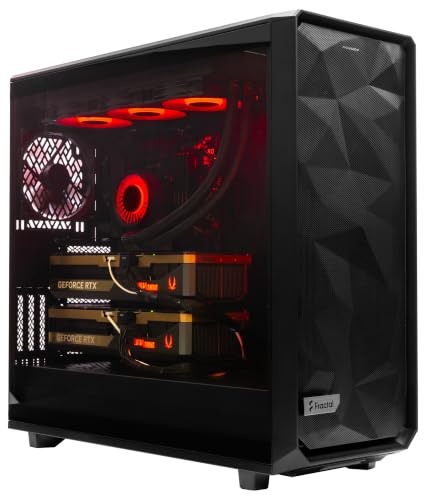
ArsenalPC MES2X Dual GPU AI Workstation - AMD Ryzen 9-9950X3D2 16 core 4.3GHz - Dual GPU GeForce RTX 5090-8TB (2x4TB RAID) NVMe SSD - 256GB DDR5-1600W - Windows 11 Pro - Liquid Cooled
- Processor: AMD Ryzen 9-9950X3D2 16-core 4.3GHz
- Memory: 256GB DDR5 RAM
- Graphics: Dual NVIDIA GeForce RTX 5090 64GB
As an affiliate, we earn on qualifying purchases.
As an affiliate, we earn on qualifying purchases.
When Does Building Your Own AI Workstation Make Sense?
Building your own system makes sense when control, customization, or future upgrades matter most. If you’re an enthusiast who loves tweaking settings or a team with unique hardware needs, DIY gives you the flexibility to choose specific GPUs, cooling solutions, and expandability. But more than that, it’s about the implications of these choices—how they affect performance, reliability, and long-term costs.
For instance, selecting a custom cooling system or a particular GPU configuration can significantly impact thermal performance and noise levels, which are critical in high-load AI training. This level of control allows you to optimize thermals, reduce power consumption, and fine-tune fan curves for efficiency—factors that directly influence hardware longevity and operational costs. Additionally, building your own system means you can tailor it precisely to your workload, whether that’s multi-GPU training, high-speed data transfer, or specialized hardware accelerators. The ability to upgrade components later means your system can evolve with your needs, potentially extending its useful life and reducing the need for complete replacements.
While recent shortages and rising prices have increased the complexity and cost of DIY, the tradeoff remains compelling for those who need specific configurations or want to learn about hardware. The control over every detail—from thermal management to component compatibility—can lead to better performance and cost savings in the long run. However, it requires a significant upfront investment of time, expertise, and patience, which might not be suitable for everyone. The key is understanding that building in 2026 isn’t just about saving money; it’s about crafting a system that perfectly aligns with your workload and future plans, even if it demands more effort initially.

High-Performance Gaming Desktop PC – Ryzen 7 5700X, GeForce RTX 3050 8GB
- High-Performance CPU: Ryzen 7 5700X with 8 cores
- Powerful Graphics Card: GeForce RTX 3050 8GB GDDR6
- Ample RAM for Multitasking: 16GB DDR4 RAM
As an affiliate, we earn on qualifying purchases.
As an affiliate, we earn on qualifying purchases.
The Hidden Costs and Risks: Build vs Buy in 2026
Both options come with hidden costs. Building a system involves labor hours, troubleshooting, and ongoing maintenance—costs often overlooked. During shortages, sourcing compatible parts can become a prolonged process, sometimes stretching into months, which delays your project timelines significantly. Beyond time, you face the risk of compatibility issues, thermal problems, or unstable configurations that require extensive testing and troubleshooting, adding to the overall cost and complexity.
Buying reduces these risks by providing a system that has already undergone validation, with vendor support ready to address hardware or thermal issues. This reduces downtime and increases reliability, which is critical in professional or time-sensitive environments. However, this convenience often comes at a premium—sometimes 10–20% higher than DIY, especially when support, warranty, and validation are factored in. Vendor lock-in is another consideration; once you choose a vendor, switching later can be costly and complicated, limiting flexibility in the future. The tradeoff is clear: you pay more upfront for reliability and speed, but you gain peace of mind and less day-to-day hassle. Conversely, DIY offers the potential for lower initial costs but demands significant ongoing effort, expertise, and risk management. For a startup or a research team, the decision hinges on balancing these hidden costs against strategic priorities like speed, reliability, and future adaptability.

NVD RTX PRO 6000 Blackwell Professional Workstation Edition Graphics Card for AI, Design, Simulation, Engineering - 96GB DDR7 ECC Memory - 4th Gen RT/5th Gen Tensor Core GPU - OEM Packaging
- Enhanced Processing Power: NVIDIA Blackwell Streaming Multiprocessor with neural shaders
- Advanced Cooling Design: Double-flow-through cooling for peak performance
- Next-Gen Tensor Cores: 5th Gen with 3X performance boost
As an affiliate, we earn on qualifying purchases.
As an affiliate, we earn on qualifying purchases.
How to Match Your Workload to the Right Choice
Matching workload needs to your build or buy decision is crucial. For quick prototyping, model inference, or standard training, a prebuilt system is often enough. It’s reliable, validated, and ready in days. These systems are designed to handle typical AI tasks efficiently, reducing setup time and minimizing technical hurdles that can delay your project. The key is understanding that for many common workloads, the tradeoff favors speed and reliability over customization.
For complex, proprietary, or multi-GPU training where every detail impacts performance—such as large-scale research or specialized AI applications—building might be better. Customization allows you to optimize cooling, power delivery, and expandability to match your workload precisely. This can lead to higher efficiency, better thermal management, and longer hardware lifespan. However, it also means investing time in testing, validation, and ongoing maintenance—costs that can be significant if not carefully managed.
Here’s a quick guide—
| Use Case | Recommended Choice |
|---|---|
| Standard model training/inference, quick deployment | Prebuilt |
| Custom hardware configuration, multi-GPU, future upgrades | Build |
| Security, compliance, strict control | Build or select enterprise prebuilt |
Common Pitfalls When Choosing Build or Buy
Many buyers fall into traps like underestimating support needs or overestimating their hardware expertise. Rushing into a build without thorough testing can lead to thermal issues, incompatibilities, and unstable configurations—costing time and money that could have been avoided with proper planning. The temptation to cut corners during assembly or overlook thermal management can result in hardware failures or degraded performance, which may require costly troubleshooting or replacements.
Conversely, opting for a prebuilt solely for convenience might lead to paying a premium for features you don’t need, or feeling locked into a vendor’s ecosystem, limiting future flexibility. It’s essential to evaluate whether the system can be customized or expanded later. A hybrid approach—buying a validated core system and customizing key components—can mitigate these pitfalls, providing a balance of reliability and flexibility. Proper planning, thorough research, and understanding your workload’s specific needs are critical to avoiding these common mistakes, ensuring your investment aligns with your long-term goals.
Conclusion
Deciding whether to build or buy isn’t just about costs—it's about your goals, skills, and timeline. In 2026, the smart move often means leveraging prebuilt systems for speed and reliability, especially when component shortages inflate DIY costs. But if control and future-proofing matter more, building offers unmatched customization and learning.
Whatever you choose, remember: the best system is the one that aligns with your workload, budget, and comfort level. Your AI journey starts with a decision—make it count.