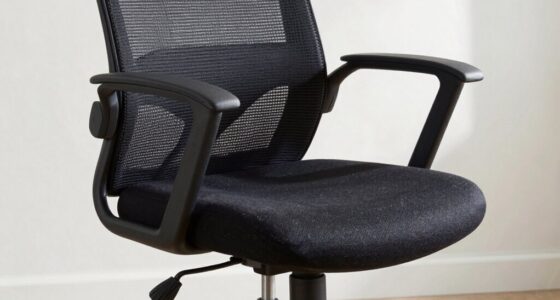
To improve your posture, start by adjusting your lumbar support so it fits snugly against your lower back, maintaining its natural curve. Set your seat height so your feet are flat on the ground and your knees are at about 90°. Position your armrests to keep your shoulders relaxed and elbows bent at around 90°. Remember to check and tweak these settings regularly; exploring more tips will help you stay comfortable and healthy during long hours.
Key Takeaways
- Adjust the lumbar support to fit snugly against your lower back, maintaining the natural inward curve.
- Set the seat height so your feet are flat on the floor and knees are at about 90°.
- Position the armrests to keep shoulders relaxed and elbows bent at approximately 90°.
- Slightly recline the backrest to 100-110° for comfort and support during extended sitting.
- Regularly monitor and modify your posture, incorporating movement and stretching breaks throughout the day.

Maintaining good posture while working at your desk starts with properly adjusting your office chair. The first step is to ensure that your chair provides adequate lumbar support. When you sit down, your lower back should naturally curve into the chair’s lumbar region, supporting the spine’s natural inward curve. If your chair lacks built-in lumbar support, consider adding a small cushion or lumbar pillow to fill the gap. Proper lumbar support helps reduce strain on your lower back and prevents slouching, which can lead to discomfort and long-term issues. Adjust the lumbar support so that it fits snugly against your lower back, right above your belt line, ensuring you maintain an upright and relaxed posture.
Proper lumbar support maintains natural spine curvature and reduces back strain during long work hours.
Next, focus on setting the armrest height correctly. Your armrests should be adjusted so that your shoulders stay relaxed, not hunched up towards your ears or sagging downward. When your arms rest comfortably on the armrests, your elbows should be close to your body and bent at roughly a 90-degree angle. This minimizes tension in your shoulders and neck. If your armrests are too high, they can push your shoulders upward, causing tension and discomfort. Conversely, if they’re too low, you may find yourself leaning forward or straining to support your arms. Take a moment to sit back in your chair and adjust the armrest height to achieve that natural, relaxed position. Your forearms should rest lightly on the armrests without causing shoulder elevation or downward pull.
Once the lumbar support and armrest height are set, move on to adjusting the seat height. Your feet should be flat on the floor, with your knees at about a 90-degree angle or slightly lower. This position promotes proper circulation and reduces pressure on your lower back. If your feet don’t reach the ground comfortably, use a footrest. Additionally, ensure that the backrest reclines slightly—about 100 to 110 degrees—to allow for movement and reduce strain during long periods of sitting. Adjust the tilt tension if your chair has that feature, so you can lean back comfortably without feeling like you’re sliding down.
Furthermore, consider the importance of regular movement, such as standing or stretching, to prevent stiffness and promote circulation, especially given the high divorce rates that can lead to stress and discomfort. Finally, remember that these adjustments are just the starting point. Regularly check your posture throughout the day and make small tweaks as needed. Maintaining awareness of your body’s position helps prevent discomfort and supports better long-term health. Properly adjusting your office chair isn’t a one-time task; it’s an ongoing process that ensures you stay comfortable, focused, and free from preventable aches and pains.

Lumbar Support Pillow for Office Chair,Mothers Day Gifts for Mom, Back Support Pillow for Car, Office Supplies, Chair Cushions, Back Pain Relief Improve Posture, Mesh Cover Double Adjustable Straps
- Extended Adjustable Straps: Fits more chairs securely
- Ergonomic Back Support: Relieves back pain and improves posture
- High-Density Memory Foam: Maintains shape and provides firm support
As an affiliate, we earn on qualifying purchases.
As an affiliate, we earn on qualifying purchases.
Frequently Asked Questions
How Often Should I Readjust My Office Chair During the Day?
You should readjust your office chair whenever you notice discomfort or your posture slipping. Keep an eye on your ergonomic cushions and chair height—these are key to staying comfortable. Usually, every hour or so, take a moment to fine-tune your position. This habit prevents strain and keeps you alert. Don’t wait until pain strikes—regular adjustments are your secret weapon for better posture and ongoing comfort.
Can an Office Chair Improve Overall Spinal Health?
Yes, an office chair can improve your overall spinal health if you choose an ergonomic model and make proper adjustments. Using ergonomic accessories like lumbar supports and footrests enhances support, reducing strain. Incorporate posture exercises into your routine to strengthen your back muscles. Regularly adjusting your chair to maintain proper alignment combined with these practices helps prevent back pain and promotes healthier spinal posture throughout the day.
What Signs Indicate My Chair Is Not Properly Adjusted?
If your back aches or your shoulders feel tense after sitting, your chair isn’t properly adjusted. You might slouch or lean forward, battling discomfort that ergonomic accessories could fix. Signs include uneven weight distribution, eye strain from looking up or down, or frequent fatigue. Incorporate posture exercises and double-check your chair settings regularly to maintain comfort and prevent long-term issues. Recognizing these signs helps you make quick adjustments for better support.
Is It Necessary to Replace My Office Chair Regularly?
Yes, you should replace your office chair when it no longer supports proper ergonomics or shows signs of wear. Regular office furniture maintenance helps prolong its lifespan, but ergonomic accessories like lumbar supports can enhance comfort without full replacement. Prioritize your health by upgrading when necessary, ensuring your chair promotes good posture, reduces strain, and keeps you comfortable during long work hours.
How Do I Customize Lumbar Support for My Back?
To customize lumbar support, simply slide or tilt the support piece until it snugly supports your lower back. Focus on fine-tuning for comfort with ergonomic customization, ensuring your spine stays straight and supported. Feel free to adjust the height and firmness of the lumbar support, so it aligns perfectly with your natural curve. This personalized positioning helps prevent pain and promotes proper posture, making your workday more comfortable and productive.

Office Chair, Ergonomic Desk Chairs 330LBS Capacity High Back Mesh Computer Chair with Flip-up Armrests, Comfy Work Chair with Adjustable Lumbar Support, Rolling Chair
- Ergonomic Design for Proper Posture: Supports spine, reduces back strain
- Flip-up Armrests for Space Saving: Easily tuck under desks, soft padded arms
- Adjustable Height and Tilt: 4-inch height adjustment, 135° tilt
As an affiliate, we earn on qualifying purchases.
As an affiliate, we earn on qualifying purchases.
Conclusion
By adjusting your office chair properly, you can substantially improve your posture and reduce discomfort. For example, imagine Sarah sitting all day with her monitor too low and her chair too high; she experienced neck strain. After making simple adjustments—raising her seat and aligning her monitor—she felt more comfortable and energized. Remember, small tweaks make a big difference. Take the time to set up your chair correctly, and you’ll work more comfortably every day.

Ergonomic Office Chair with Footrest, 90-145° Reclining Desk Chair with Adjustable Lumbar Support & Headrest, High Back Mesh Computer Chair for Home Office/Gaming, 350lbs Capacity
- Adjustable Lumbar & Headrest: Customizable support for neck and back
- Reclining Range & Footrest: Reclines 90°-145° with retractable footrest
- Ergonomic Seat Cushion: High-density foam for lasting comfort
As an affiliate, we earn on qualifying purchases.
As an affiliate, we earn on qualifying purchases.

Comermax Comfortable Reclining Office Desk Chair with Foot Leg Rest, Beige
- Fully Adjustable Reclining: Reclines from 90° to 160° for relaxation
- Lumbar Support: Flexible, movable back support for comfort
- Sturdy & Durable: Reinforced metal base and stable structure
As an affiliate, we earn on qualifying purchases.
As an affiliate, we earn on qualifying purchases.