Choosing between screen risers and monitor arms depends on your workspace needs and comfort priorities. Risers are quick, budget-friendly solutions that elevate your monitor to prevent neck strain, but they lack adjustability. Monitor arms offer greater flexibility, letting you fine-tune height, angle, and position for ideal ergonomics. If you want long-term comfort and workspace customization, monitor arms are the better choice. Keep exploring to find the setup that best fits your routine and workspace.
Key Takeaways
- Monitor arms offer adjustable positioning for optimal ergonomic comfort, while risers provide fixed height support.
- Risers are quick, inexpensive, and require minimal setup, suitable for limited budgets or space.
- Monitor arms enhance flexibility, allowing easy adjustments for different tasks or sitting and standing positions.
- Risers are ideal for simple, permanent elevation needs without complex installation.
- Choose based on your workspace flexibility, ergonomic preferences, and budget constraints.
Are you trying to find the best way to elevate your monitor for better ergonomics and workspace organization? If so, understanding your options is key. Screen risers and monitor arms both serve the purpose of raising your display, but they do so in different ways, each offering unique ergonomic benefits and installation considerations. Your choice depends on your workspace needs, budget, and preferences for flexibility.
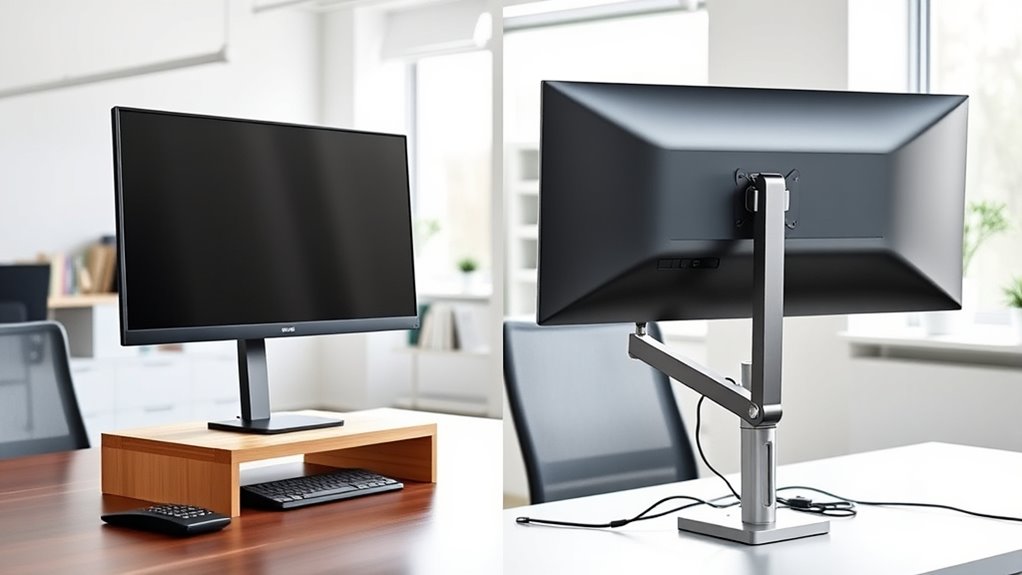
Screen risers are simple platforms that sit underneath your monitor. They are generally easy to set up—just place your monitor on top, and you’re good to go. One of their main ergonomic benefits is that they raise your monitor to a more comfortable eye level, helping reduce neck and shoulder strain. However, they are fixed in height, so once you pick a riser, you’re locked into that position. Installation considerations are minimal; no tools are usually required, making them a quick and affordable upgrade. Still, their simplicity means limited adjustability. If your workspace or posture changes frequently, a riser might feel restrictive because you can’t easily alter the height or angle. Additionally, some risers may not accommodate larger or heavier monitors effectively, which can limit their usefulness.
Screen risers are easy-to-use platforms that boost your monitor to a comfortable eye level with minimal setup.
Monitor arms, on the other hand, are more versatile. They clamp or attach to your desk, allowing you to precisely position your monitor at the ideal height, angle, and distance. The ergonomic benefits of monitor arms are significant—they promote better posture, reduce eye strain, and make it easier to switch between sitting and standing positions if you opt for an adjustable model. Installation considerations for monitor arms can be more involved; you’ll need to securely attach them to your desk, often requiring tools like screws or clamps. Ensuring your desk can support the arm is essential, and some workspaces might need extra adjustments or reinforcement. Despite the initial effort, monitor arms are incredibly flexible, letting you optimize your workspace for comfort and productivity. Moreover, choosing a monitor arm can contribute to a more organized workspace by freeing up desk space and reducing clutter.
While screen risers are a straightforward solution that works well for those on a budget or with minimal space constraints, monitor arms excel in environments where ergonomic customization is a priority. If you value adjustability and long-term comfort, a monitor arm might be worth the extra effort and investment. Conversely, if you prefer a quick, hassle-free setup without permanent modifications, a screen riser can be sufficient. Ultimately, your choice should align with your ergonomic goals, workspace constraints, and how much flexibility you need to maintain a healthy posture during long work hours.
Top picks for "screen riser monitor"
Open Amazon search results for this keyword.
As an affiliate, we earn on qualifying purchases.
Frequently Asked Questions
Can Screen Risers Improve Ergonomics Better Than Monitor Arms?
Screen risers can improve ergonomics and posture, but monitor arms often do it better. They allow you to adjust height, tilt, and distance precisely, providing better ergonomic benefits. With monitor arms, you can position your screen at eye level, reducing neck and eye strain. While risers help raise your monitor, they lack the flexibility of monitor arms for ideal posture improvement, making arms generally a smarter choice for ergonomic setup.
Are Monitor Arms Suitable for All Monitor Sizes and Weights?
You might worry that monitor arms can’t handle all monitor sizes and weights, but many are designed for versatility. If you check the weight capacity and compatibility with your monitor size, you’ll find options that fit securely. Heavy or large monitors often need sturdy, high-capacity arms. Don’t let concern hold you back—choose a monitor arm that matches your monitor’s size and weight, ensuring stability and ergonomic comfort.
How Easy Is It to Install Screen Risers Compared to Monitor Arms?
Installing a screen riser is generally much simpler and quicker than setting up a monitor arm. You just place it on your desk and make sure it’s stable, which takes only a few minutes. Monitor arms, on the other hand, often require more steps, such as attaching clamps or mounting brackets, and can take longer to set up properly. Overall, screen risers offer easier installation and faster setup time.
Do Monitor Arms Offer Better Cable Management Options?
Yes, monitor arms typically offer better cable management options than screen risers. With adjustable clamps and built-in channels, you can neatly route your wireless connectivity cables, reducing clutter and improving aesthetic appeal. This setup not only keeps your workspace tidy but also provides flexibility in positioning your monitor for ideal comfort. Overall, if cable management is a priority, monitor arms give you a cleaner, more organized look.
Which Option Is More Cost-Effective Long-Term?
Monitor arms tend to be more cost-effective in the long term because they offer better adjustability and durability, reducing the need for replacements. If you choose budget options for monitor arms, you can save money upfront and enjoy long-term savings through improved ergonomics and flexibility. Screen risers may be cheaper initially, but they often lack durability, leading to higher costs over time. So, investing in quality monitor arms is a smarter long-term choice.
Conclusion
Ultimately, whether you choose a screen riser or a monitor arm, you’re gently guiding your workspace toward harmony. Both options subtly elevate your comfort and productivity, so it’s all about finding what feels right for you. Think of it as fine-tuning your environment—small changes can make a big difference. Whichever you pick, you’re making a quiet but powerful step toward a more balanced, inviting workspace that keeps you focused and inspired.