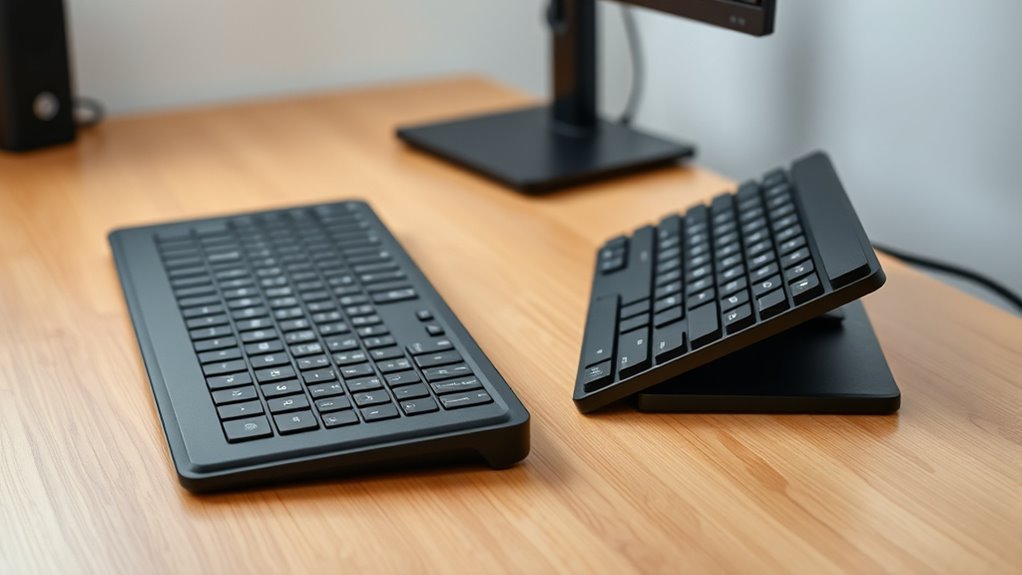

Using a flat keyboard position generally promotes better wrist alignment and reduces strain. Tilted keyboards can cause your wrists to bend upward or downward, leading to discomfort over time. For ideal ergonomic health, it’s best to keep your keyboard flat or adjust the tilt to a comfortable angle that keeps your wrists neutral. If you want to learn how to choose the most suitable setup for you, there’s more to take into account that can help protect your long-term comfort.

Get comfort and recovery gear delivered free with Prime
- Fast, free delivery on millions of items
- Prime Video, Amazon Music and more included
- Member-only deals all year
Key Takeaways
- Flat keyboards promote natural, neutral wrist alignment, reducing strain and lowering injury risk.
- Tilted keyboards can cause awkward wrist bending, increasing discomfort and potential repetitive stress injuries.
- Adjustable angles and ergonomic supports help customize setup for optimal wrist posture and comfort.
- Maintaining a flat or minimally tilted keyboard minimizes long-term wrist fatigue and health issues.
- Proper posture combined with a flat or slight tilt setup enhances overall ergonomic health during typing.

Have you ever wondered how the angle of your keyboard impacts your comfort and productivity? The way you position your keyboard can profoundly influence your typing experience, especially concerning wrist strain and your overall typing posture. When you choose between a flat or tilted keyboard, you’re making a decision that can affect not only how comfortably you work but also how prone you are to repetitive stress injuries over time.
A flat keyboard tends to promote a more natural wrist position, keeping your wrists aligned with your forearms. This alignment reduces unnecessary strain, especially if you spend hours typing each day. When your keyboard is flat, you’re less likely to bend your wrists upward or downward excessively, which helps prevent discomfort or conditions like carpal tunnel syndrome. Additionally, a flat surface encourages better typing posture because your hands stay in a neutral position, distributing effort evenly across your wrists and forearms. This setup can make your typing more efficient and less fatiguing, especially during long writing sessions.
A flat keyboard promotes natural wrist alignment, reducing strain and enhancing comfort during prolonged typing sessions.
On the other hand, tilting your keyboard can sometimes lead to increased wrist strain if not adjusted properly. When the keyboard is angled, particularly with a steep tilt, your wrists tend to bend upward or downward to reach the keys comfortably. This unnatural wrist flexion can cause discomfort and exacerbate strain over time. Some ergonomic keyboards offer adjustable tilt options, allowing you to find a balance that minimizes wrist bending. If you prefer a tilted setup, ensure that the tilt isn’t too extreme and that your wrists remain as straight as possible while typing. Using wrist supports or a padded wrist rest can also help maintain proper wrist alignment, regardless of the keyboard angle you choose. Furthermore, understanding ergonomic principles can help you optimize your keyboard setup for better health.
Ultimately, your typing posture is the most essential factor. No matter the angle, maintaining a relaxed, upright posture with your elbows close to your body and your wrists in a neutral position will help prevent fatigue and injury. If you experience discomfort, experiment with different angles and accessories until you find a setup that feels natural and comfortable. Remember, what’s healthy varies from person to person, but generally, a flat keyboard combined with good posture and wrist support is a safe bet for reducing wrist strain and promoting ergonomic efficiency.
As an affiliate, we earn on qualifying purchases.
Frequently Asked Questions
Can Adjusting Keyboard Angle Prevent Carpal Tunnel Syndrome?
Adjusting your keyboard angle can help prevent carpal tunnel syndrome by promoting better wrist flexibility and reducing arm fatigue. When you tilt your keyboard correctly, it encourages a more natural wrist position, minimizing strain. This reduces the risk of nerve compression and repetitive strain injuries. Keep your wrists straight and relaxed, and take regular breaks to maintain comfort and health during long typing sessions.
Does a Tilted Keyboard Improve Typing Speed or Accuracy?
A tilted keyboard can dramatically boost your typing speed and accuracy, turning your workspace into a powerhouse of ergonomic design and comfort. When you tilt your keyboard, it aligns your wrists naturally, reducing strain and allowing for smoother, more precise keystrokes. This improved ergonomics not only enhances your typing comfort but also minimizes fatigue, helping you work efficiently and comfortably for longer periods.
How Often Should I Change My Keyboard Angle for Health?
You should change your keyboard angle regularly, ideally every few hours, to prevent strain. Adjust the keyboard height and tilt to maintain a neutral hand posture, reducing stress on your wrists and forearms. Pay attention to discomfort or fatigue, and modify the angle accordingly. Incorporating these small changes helps avoid repetitive strain injuries and keeps your hands comfortable during long typing sessions.
Are There Specific Ergonomic Guidelines for Keyboard Tilt?
Think of your keyboard as a bridge to comfort—ergonomic guidelines suggest keeping the tilt minimal to maintain proper wrist alignment and a neutral keyboard posture. A slight negative tilt can help, but avoid extreme angles that cause strain. Adjust your keyboard to promote natural wrist positioning, ensuring your hands float comfortably above the keys. Regularly check your wrist alignment and keep your elbows close to your sides for lasting ergonomic harmony.
Does Keyboard Angle Affect Wrist Muscle Strain Over Time?
Yes, your keyboard angle can influence wrist extension and muscle fatigue over time. A tilted keyboard often causes you to extend your wrists more, increasing strain and leading to muscle fatigue. A flat keyboard promotes a more natural wrist position, reducing strain and the risk of discomfort. To minimize wrist issues, keep your wrists in a neutral position, avoid excessive extension, and take regular breaks during typing.
adjustable tilt ergonomic keyboard
As an affiliate, we earn on qualifying purchases.
As an affiliate, we earn on qualifying purchases.
Conclusion
Choosing between a flat or tilted keyboard impacts your comfort and health. Think of it like balancing a teeter-totter; the right angle keeps your wrists in a natural position, preventing strain. Remember, even in the age of dial-up modems, folks knew the importance of proper ergonomics. So, take charge of your setup—find that sweet spot, and you’ll work like a well-oiled machine, avoiding aches and pains for years to come.
As an affiliate, we earn on qualifying purchases.
ergonomic keyboard with tilt adjustment
As an affiliate, we earn on qualifying purchases.
As an affiliate, we earn on qualifying purchases.
Halloween Picks
halloween
As an affiliate, we earn on qualifying purchases.