If you work extensively with spreadsheets, you should adjust your screen and desk setup to reduce strain and stay comfortable. Position your monitor at eye level and about an arm’s length away to avoid neck and eye fatigue. Keep your keyboard and mouse close to maintain 90-degree elbows and organize your workspace for easy access. Brighten your environment properly and use anti-glare filters. For more tips tailored to long spreadsheet sessions, keep exploring.
Key Takeaways
- Use larger monitor displays or dual screens to view multiple spreadsheets simultaneously, reducing unnecessary head and eye movement.
- Position screens at eye level and at an appropriate distance to minimize strain during extended spreadsheet tasks.
- Incorporate adjustable stands or risers to optimize monitor height for prolonged data entry and analysis sessions.
- Ensure ample, uniform lighting with minimal glare to enhance readability and reduce eye fatigue during intensive spreadsheet work.
- Maintain an ergonomic workspace layout that keeps keyboard and mouse close, supporting sustained comfortable typing and navigation.
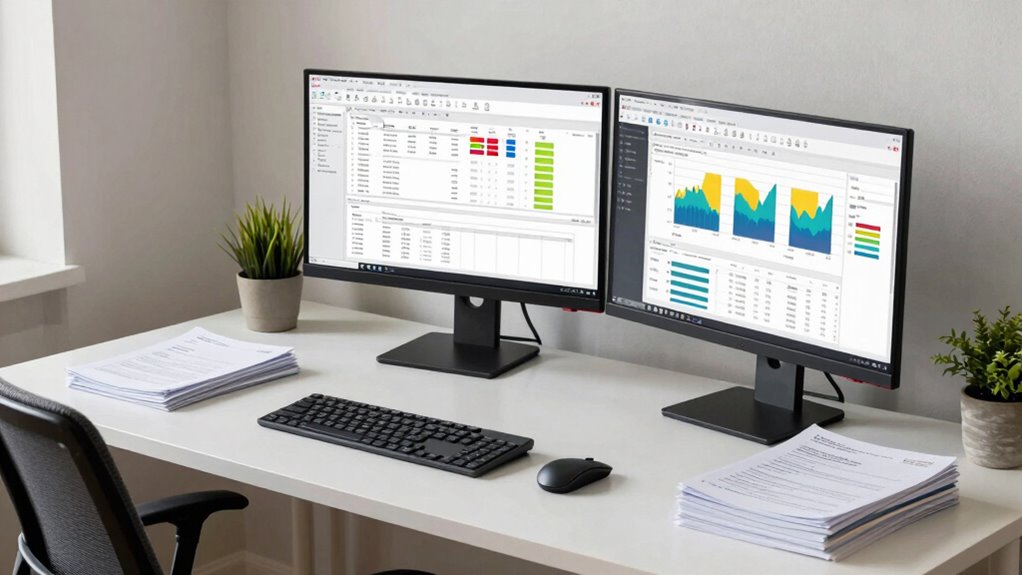
When your work revolves around extensive spreadsheets, it’s clear that your screen and desk setup needs to adapt to meet those demands. Long hours staring at data require more than just a comfortable chair; they demand intentional ergonomic adjustments designed to reduce strain and boost productivity. Proper positioning of your monitor is vital. Ideally, your screen should be at eye level, so you avoid tilting your head up or down. This minimizes neck strain and encourages better posture. If your monitor is adjustable, set it to a height where the top of the screen aligns with your eyes. If it’s not adjustable, consider using a stand or stacking books underneath to achieve the right height.
Ensure your monitor is at eye level to reduce neck strain and promote better posture during long spreadsheet sessions.
In addition to height, distance matters. Your monitor should be about an arm’s length away, allowing you to read the data comfortably without leaning forward or squinting. Keep your keyboard and mouse close enough that your elbows stay at a 90-degree angle, reducing shoulder fatigue. These ergonomic adjustments guarantee your workspace promotes natural, comfortable body positioning, which is essential during long hours of spreadsheet work. Maintaining proper ergonomic alignment can prevent discomfort and long-term musculoskeletal issues. Additionally, paying attention to workspace organization can help you maintain these optimal positions throughout the day.
Visual ergonomics plays a significant role in minimizing eye strain. Since spreadsheets often involve intense concentration on small text and detailed data, optimizing your visual environment is critical. Adjust your screen brightness and contrast to match ambient lighting, avoiding glare from windows or overhead lights. Use anti-glare filters if necessary. Taking regular breaks using the 20-20-20 rule—every 20 minutes, look at something 20 feet away for at least 20 seconds—helps relax your eye muscles and reduces fatigue. Also, consider increasing font size or adjusting display settings to improve readability without straining your eyes.
Lighting in your workspace should be diffuse and uniform. Avoid harsh lighting that causes reflections or shadows on your screen. If possible, position your monitor perpendicular to windows to prevent direct glare. Keep your workspace well-lit but not overly bright, which can cause eye discomfort. Incorporate task lighting that allows you to see your keyboard and documents clearly without shining directly into your eyes or onto your screen.

BoYata Monitor Stand, Adjustable Monitor Riser Metal Computer Stand Compatible with TV, PC, Laptop, Computer, iMac, and All Screen Display-Black
Adjustable Height: Unlike the traditional stand, our monitor stand has an adjustment twist knob that can adjust the…
As an affiliate, we earn on qualifying purchases.
As an affiliate, we earn on qualifying purchases.
Frequently Asked Questions
How Can I Reduce Eye Strain During Extensive Spreadsheet Work?
To reduce eye strain during extensive spreadsheet work, you should adjust your screen settings. Activate blue light filters to lessen eye fatigue, especially during long hours. Increase the font size for better readability without straining your eyes. Additionally, take regular breaks, follow the 20-20-20 rule (look 20 feet away for 20 seconds), and guarantee your workspace is well-lit to minimize glare and eye discomfort.
What Ergonomic Tools Are Best for Long Hours at a Spreadsheet?
If you spend long hours on spreadsheets, ergonomic tools like an adjustable chair and a keyboard with ergonomic design are essential. For example, a user who adjusted their chair to keep feet flat and maintained a neutral wrist position with an ergonomic keyboard reported less fatigue. Prioritize chair adjustments for proper back support and height, and choose a keyboard that promotes correct wrist alignment to reduce strain during extended work sessions.
How Should I Customize My Workspace for Maximum Productivity?
You should customize your workspace by organizing your workspace efficiently, keeping essential tools within reach to minimize movement. Use ambient lighting to reduce eye strain and improve focus, ensuring it’s soft yet sufficient. Adjust your monitor height for proper ergonomics, and keep your desk clutter-free. Incorporate ergonomic accessories like a supportive chair and a keyboard tray, creating a comfortable environment that boosts your productivity during long spreadsheet sessions.
Are There Specific Monitor Settings Beneficial for Spreadsheet Tasks?
Your monitor settings can make or break your spreadsheet efficiency. Guarantee your display brightness is comfortable to reduce eye strain, and calibrate your monitor for accurate colors and contrast—this way, you see data precisely as intended. Proper calibration prevents misreading numbers, while ideal brightness keeps your eyes happy during long hours. Adjust these settings to create a visual environment that boosts your focus and helps you work smarter, not harder.
What Breaks or Exercises Help Prevent Fatigue During Spreadsheet Work?
To prevent fatigue during spreadsheet work, take regular break intervals—every 20-30 minutes—to rest your eyes and stretch. Incorporate posture adjustments, like sitting upright and keeping your monitor at eye level, to reduce strain. Do simple exercises such as neck rolls or shoulder shrugs during breaks. These small actions refresh your focus, prevent discomfort, and help maintain productivity throughout long spreadsheet sessions.

Kado 2-Pack Dual 22" Flat Screen 1920×1080 75Hz FHD Computer Monitor
DUAL MONITOR SETUP – Flat monitors in a dual setup provide a seamless viewing experience with reduced peripheral…
As an affiliate, we earn on qualifying purchases.
As an affiliate, we earn on qualifying purchases.
Conclusion
Since 80% of your workday might be spent staring at spreadsheets, adopting a tailored screen and desk setup is essential. Adjusting your monitor height to reduce neck strain and choosing an ergonomic chair can boost your comfort and productivity. Remember, small changes make a big difference—so invest in your workspace. By optimizing your environment, you’ll not only work more efficiently but also protect your health during those long spreadsheet sessions.

Magicmoon 2-Pack 24 Inch Computer Privacy Screen Filter, Anti-Spy/Glare Protector Film for Widescreen Monitor with 16:9 Aspect Ratio (Width x Height: 531mm x 298mm)
Compatible Model(s): Magicmoon brand filter only for 24 inch -diagonally measured – widescreen monitor – aspect ratio 16:9…
As an affiliate, we earn on qualifying purchases.
As an affiliate, we earn on qualifying purchases.

Wireless Keyboard and Mouse Combo, 2.4G Full Size Wave Keys Ergonomic Keyboard with Wrist Rest and 3-Level DPI Adjustable Wireless Ergonomic Mouse for Windows, Mac OS Desktop/Laptop/PC(Black)
【Wave Ergonomic Wireless Keyboard and Mouse Combo】The wireless keyboard features a wave key and wrist rest design that…
As an affiliate, we earn on qualifying purchases.
As an affiliate, we earn on qualifying purchases.